OPERATING ELEMENTS 38
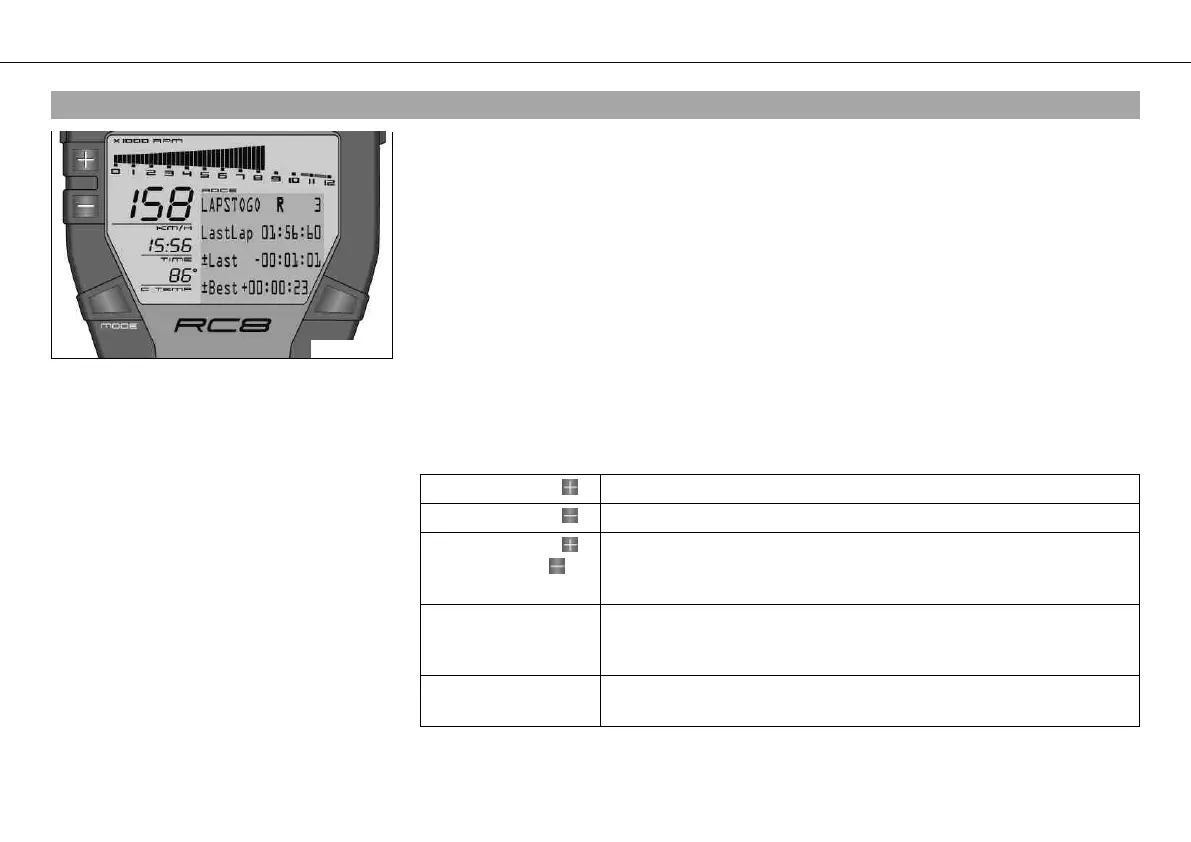
5.22LAPSTOGO menu
400444-01
Condition
• The ignition is on.
• RACE mode
– Press the MODE button briefly and repeatedly until LAPSTOGO appears at the top left of
the info display.
LAPSTOGO shows the number of remaining laps.
If an R appears after LAPSTOGO, the stopwatch is running in the background.
If a P appears after LAPSTOGO, the stopwatch in the background is active but waiting for a
speed signal. The time is not running.
This function is controlled by the button "LAP".
LastLap shows the lap time of the last round.
±Last shows the difference between the last lap and the lap before last.
±Best shows the difference between the last lap and the best lap.
If the last lap was the fastest, you see behind ±Best: the Best! symbol in the info display.
Press the button . No function
Press the button . No function
Press the button
and the button for
3 - 5 seconds.
The display changes to the SET‑UP menu
Press the MODE but-
ton for 3 - 5 sec-
onds.
All values in RACE mode are reset (except RACEODO)
Press the MODE but-
ton briefly.
Next display mode





 To Next Page