LaCie 5big network Administering Your LaCie 5big network
User Manual page 25
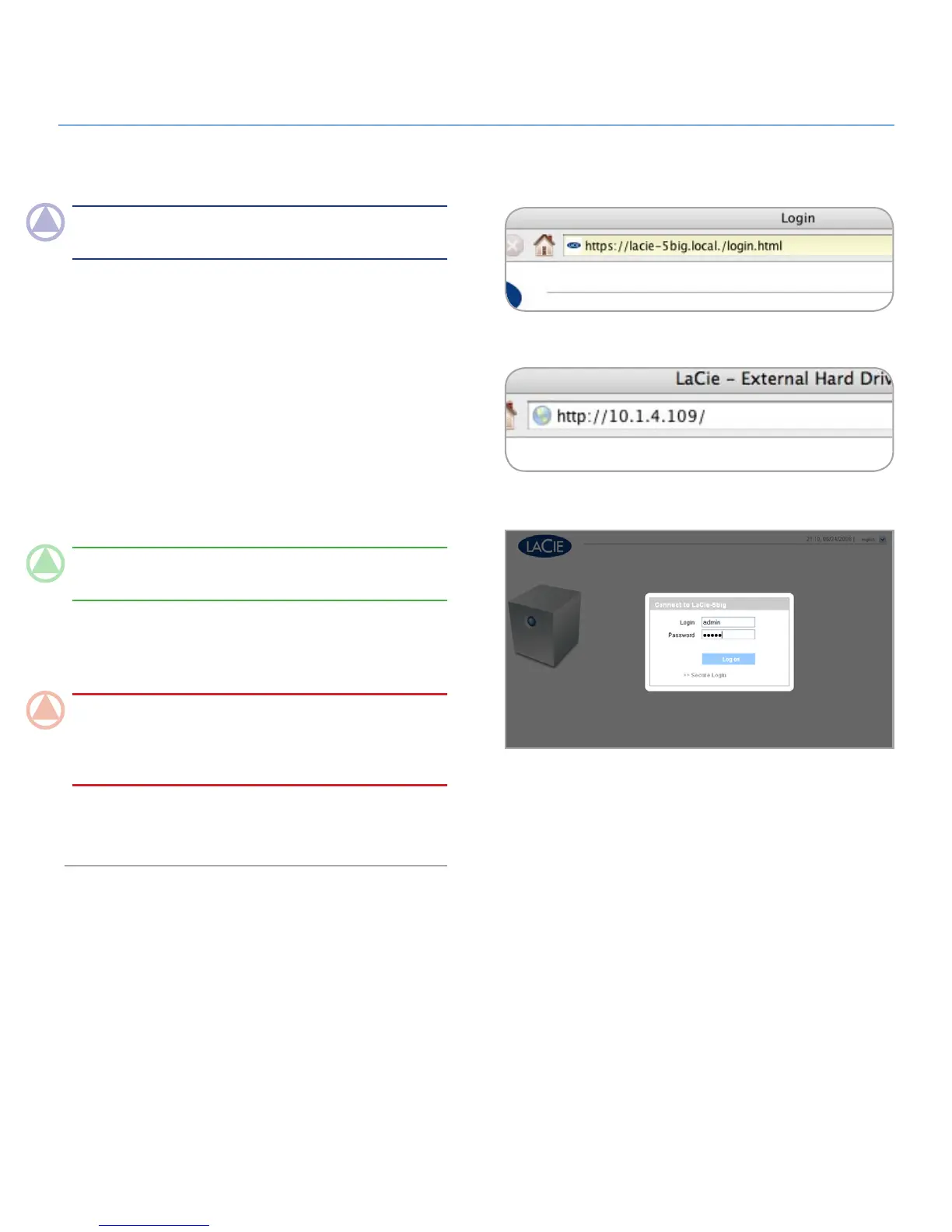
Figure 4.1-C
Figure 4.1-A
Figure 4.1-B
NOTe: The easiest way to access the Administration Page is to
use LaCie Network Assistant (see section 2.3).
To access the Administration Page with a browser:
In your browser’s URL (web address) field, type one of the fol-
lowing:
Mac users: http://lacie-5big.local. (Fig. 4.1-A)
PC users: http://lacie-5big (Fig. 4.1-A)
or
http://IP address (Fig. 4.1-B)
Find the IP address by running the LaCie Network Assistant
(section 2.3).
TeChNICAl NOTe: The IP address of your LaCie 5big may
be different than the IP address shown in Fig. 4.1-B.
On the login page (Fig. 4.1-C), type:
Login: admin
Password: admin
ImpOrTANT INfO: The login name and password are
both set to “admin” by default. The admin password can be
changed, but not the login name. See section 4.2. Users for
more information.
If you are logged in as “admin”, the Administration Page will
open. For non-admin users the file browsing page will open.
Accessing the Administration Page4.1.













 To Next Page