LaCie 5big network Administering Your LaCie 5big network
User Manual page 31
4.3. Groups
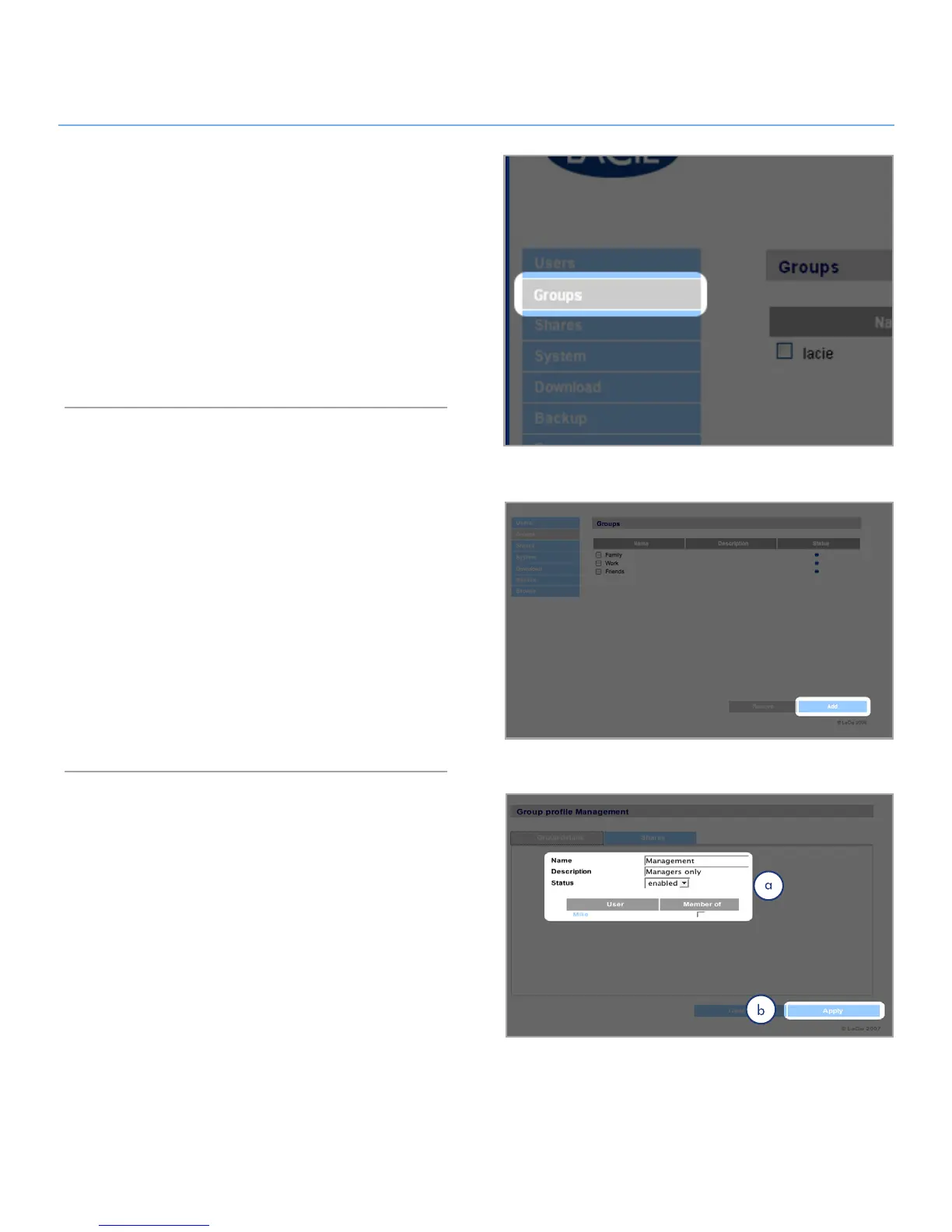
Click on the Groups link in the navigation bar to open the
Groups page (Fig. 4.3). Use this page to create, edit and delete
groups.
If you use your 5big network in an office setting where many dif-
ferent people from different departments need to have access to
the 5big network, setting up groups is a good way to organize
users and to give the most appropriate access to shares. You can
specify which shares groups can access, which users belong to
which groups and enable or disable entire groups.
Adding Groups4.3.1.
To add a group:
Click 1. Add on the Groups page (Fig. 4.3.1-A). The Group
Profile page opens (Fig. 4.3.1-B).
Enter a name and description for the group. The description
2.
only appears to the administrator as part of the Group Profile
on this page (a).
Select “enabled” to activate the group as soon as your
3.
changes are applied.
All user accounts on the 5big network are listed in the User
4.
column. Select the users you want to be in the group.
Click
5. Apply (b).
Figure 4.3
Figure 4.3.1-A
Figure 4.3.1-B













 To Next Page