LaCie 5big network Administering Your LaCie 5big network
User Manual page 48
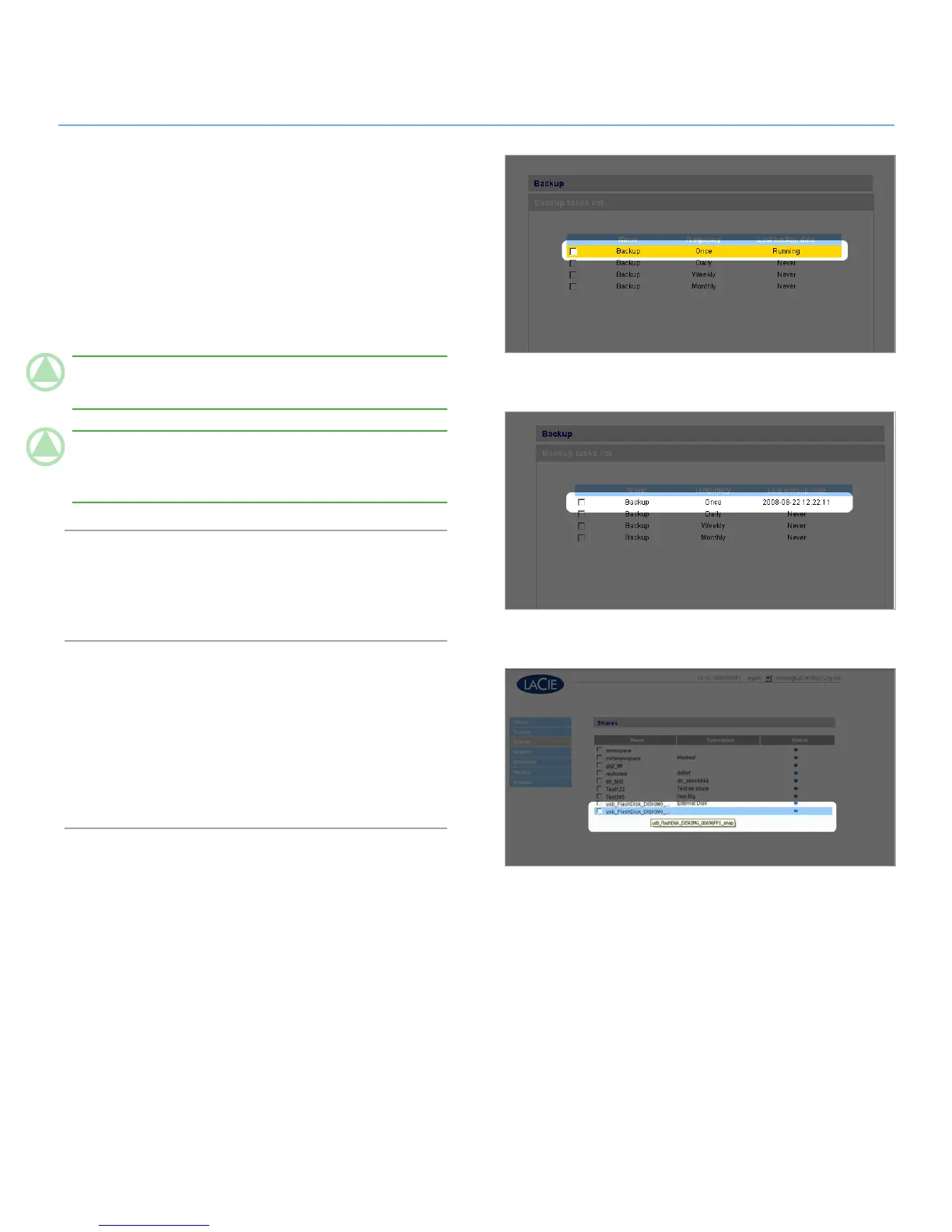
Click Start. An in-progress backup will be indicated with yel-8.
low highlighting (Fig. 4.7-C).
An action bar will appear and the Start button will change
9.
to Stop while the backup is in progress. When the backup is
complete, the button will change back to Start. Click Stop to
end the backup, if necessary.
Successful backups will no longer be highlighted and will
10.
show the date the backup was last completed (Fig. 4.7-D).
TeChNICAl NOTe: Backups are incremental, which means
that future backups will only copy new or modified files.
TeChNICAl NOTe: Backed up data is neither compressed
nor encrypted, and can be accessed from other computers or
NAS (network-attached storage).
Browse4.8.
Refer to section 3.3. Administration Page – Browse for details.
Import (Snapshot)4.9.
When you plug an external device to one of the 5big’s ports and
push the front button, the 5big will automatically import (take a
snapshot of) the data from the external device. The imported
data will be copied into an automatically created share with a
unique name (Fig. 4.9).
Figure 4.7-D
Figure 4.9
Figure 4.7-C













 To Next Page