LaCie 5big network Administering Your LaCie 5big network
User Manual page 29
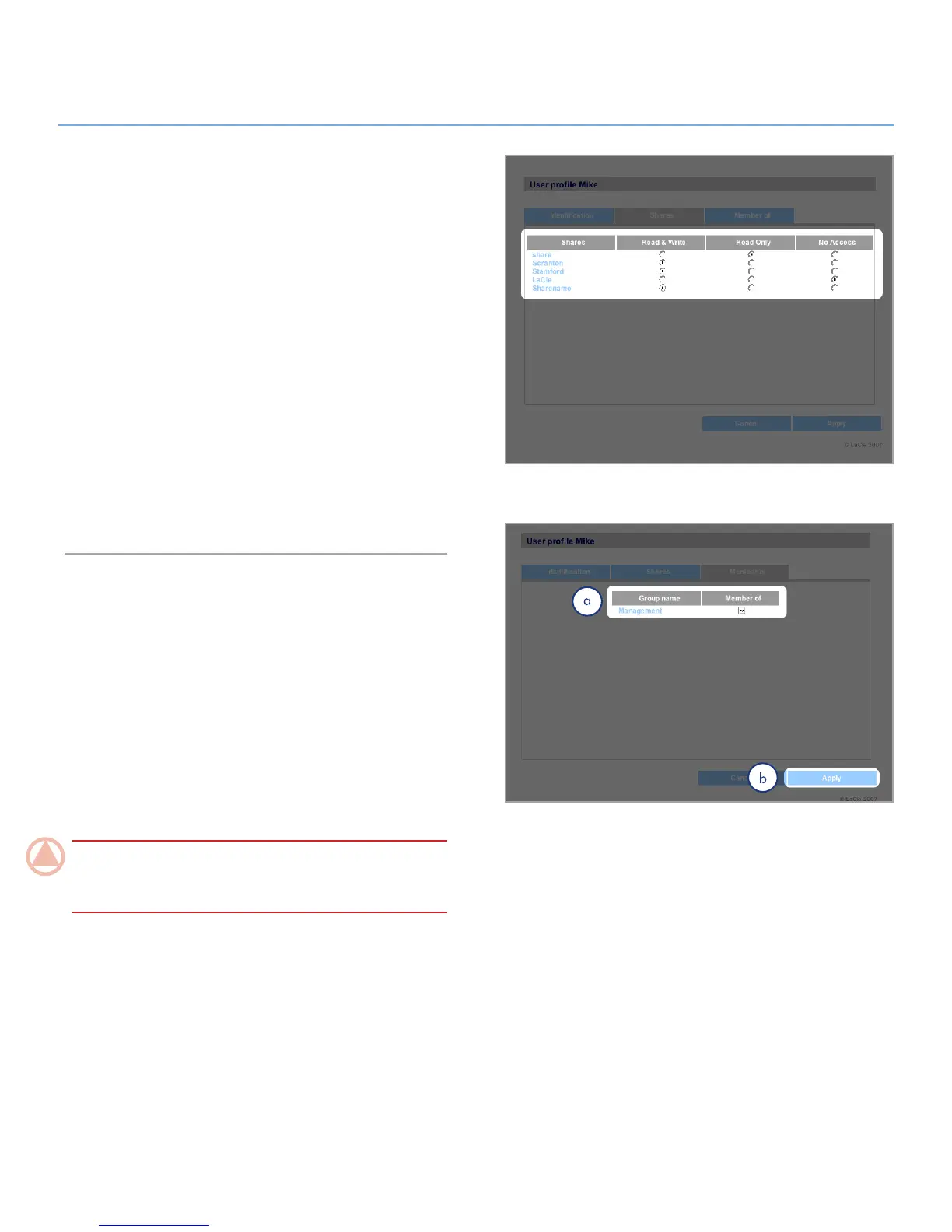
Figure 4.2.2
Setting User Access to Shares4.2.2.
All of the shares on your 5big network are listed on the Shares
tab of each user’s profile page. Shares have three access lev-
els:
Read & Write –
✦ users with Read & Write access can up-
load, download and save files
Read Only – ✦ users with Read only access can download
and open files but cannot save files
No Access ✦
See section 4.2.4. About Access Privileges for more informa-
tion.
To set user access to shares:
Click the 1. Shares tab on the user’s User Profile page.
Select
2. Read & Write, Read Only or No Access for each
share (Fig. 4.2.2). No Access is selected by default.
Setting Group Membership4.2.3.
All of the groups on your 5big network are listed on the Mem-
ber of tab of each user’s profile page. Users can belong to an
unlimited number of groups.
See section 4.2.4. About Access Privileges for more information.
To set user group membership:
Click the 1. Member of tab on the user’s User Profile page.
Check the box for each group to which you want to assign
2.
the user (a, Fig. 4.2.3).
ImpOrTANT INfO: When you are done configuring the new
user click Apply to save your settings for the new user and to
add the user to the users list (b).
Figure 4.2.3













 To Next Page