EasyManua.ls Logo

Laser 128 - The Shape Table

Laser 128
255 pages
Print Icon
To Next Page IconTo Next Page
To Previous Page IconTo Previous Page
Loading...
3.11.3
BASIC COMMANDS AND
STATEMENTS
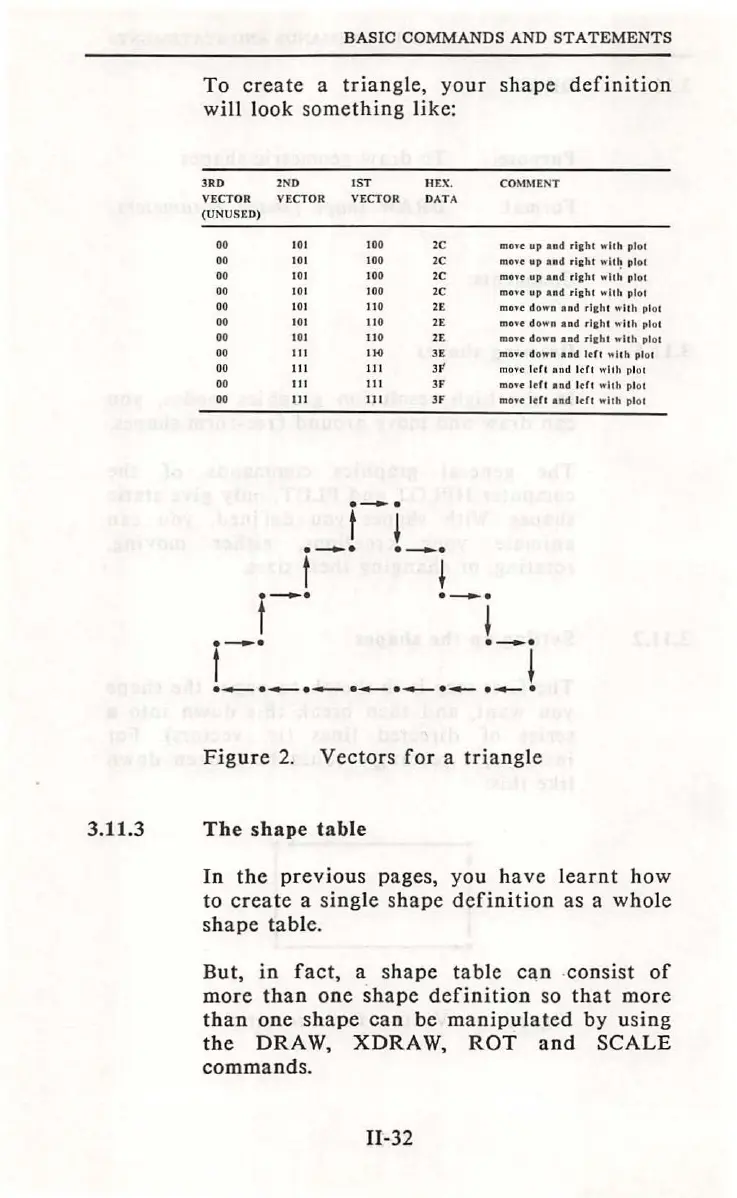
To
create
a
triangle,
your
shape
definition
will
look
s
omething
like:
JR
D 2ND
IST
HEX
.
VECTOR
VECTOR
VECTOR
D
ATA
(UNUSE
D)
00
00
00
00
00
00
00
00
00
00
00
101
1
00
2C
I
OI
1
00
2C
1
01
100
2C
101
100 2C
1
01
110
101
110
2E
101
110
2E
Ill
I
HI
Ill
11
1
JF'
111
111
JF
Ill
111
JF
f-i
f-·
·-i
f-·
·-i
COMMENT
mo..-e
up
and
r
icht
wit
h plol
m
ove
up
an
d
ri
~
hl
w
it
~
plo l
mne
up
and
rl
ah
l
wllh
plol
mo•e
up
an
d rl
ch
t
whh
plot
m
o.e
d
ow
n a
nd
rl
a
ht
w
ith
pl
ot
mo
•e
do
wn a nd r l&ht
""
'
Ith
plot
mo
we
do
wa
and
r
icht
whh
plo
t
moYe do
wn
and
ldt
"llh
plol
m
ove
l
ef
l a
nd
l
dt
w
llh
pl
ol
mou-
ld
t and J
tft
wll
h
pl
o1
mo
n
ldl
and
ldl
whh
plot
f--·
·-i
·~
. ..,__
·~
.
..._.
. ...._ . ..,_. .
...,_.
.
Figure
2.
Vectors
for
a
triangle
The
shape
table
In
the
previous
pages, you
have
learnt
how
to
create
a
single
shape
definition
as a
whole
shape
table.
But,
in
fact,
a s
hape
table
can
-
consist
of
more
than
one
shape
definition
so
that
more
than
one
shape
can
be
manipulated
by
using
the
DRAW,
XDRA
W,
ROT
and
SCALE
commands
.
11-32

Table of Contents