EasyManua.ls Logo

Laser 128 - Cursor-Control Keys; Command Keys

Laser 128
255 pages
Print Icon
To Next Page IconTo Next Page
To Previous Page IconTo Previous Page
Loading...
THE
KEYBOARD
4.2
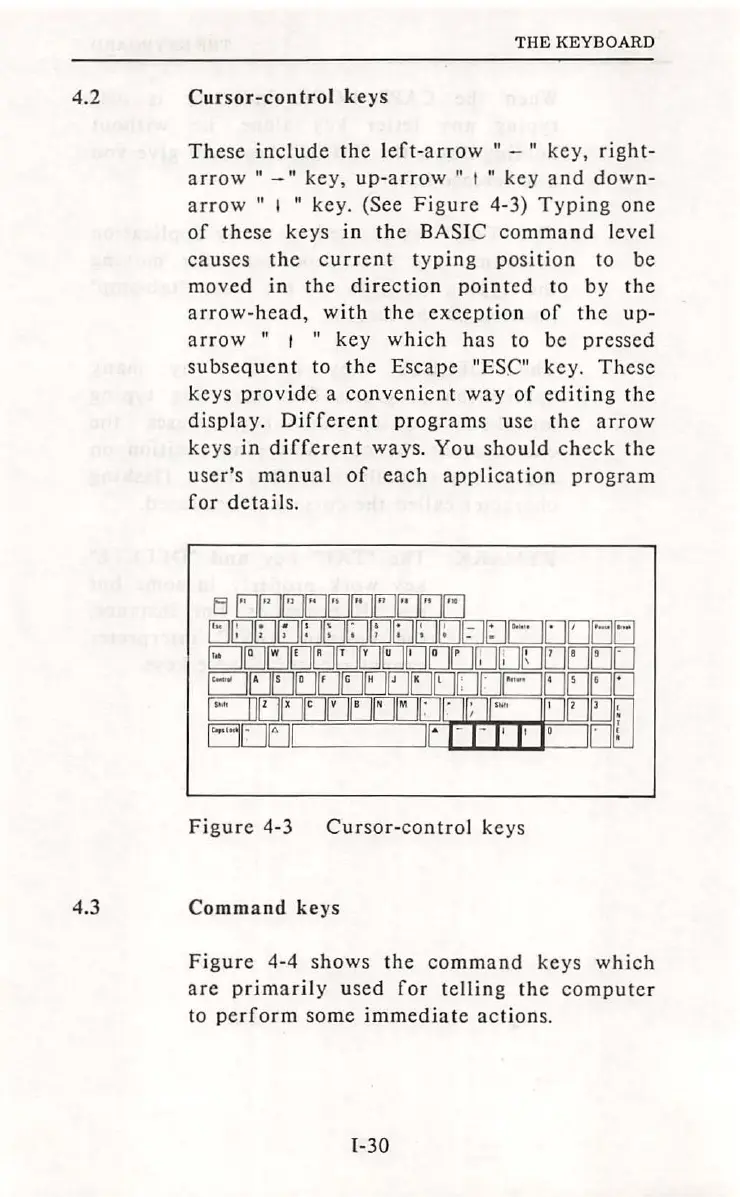
Cursor-control
keys
These
include
the
left-arrow
11
-
11
key,
right-
arrow
11
-
11
key,
up-arrow
11
t
11
key
and
down-
arrow
11
1
11
key.
(See
Figure
4-3)
Typing
one
of
these
keys
in
the
BASIC
command
level
causes
the
current
typing
position
to
be
moved
in
the
direction
pointed
to
by
the
arrow-head,
with
the
exception
of
the
up-
arrow
11
t
11
key
which
has
to
be
pressed
subsequent
to
the
Escape
"ESC"
key.
These
keys
provide
a
convenient
way
of
editing
the
display
.
Different
programs
use
the
arrow
keys
in
different
ways.
You
should
check
the
user's
manual
of
each
application
program
for
details
.
Figure
4-3
Cursor-control
keys
4.3
Command
keys
Figure
4-4
shows
the
command
keys
which
are
primarily
used
for
telling
the
computer
to
perform
some
immediate
actions.
I-30

Table of Contents