EasyManua.ls Logo

Laser 128 - 0- 40-Column Display; Parallel;Serial Printer

Laser 128
255 pages
Print Icon
To Next Page IconTo Next Page
To Previous Page IconTo Previous Page
Loading...
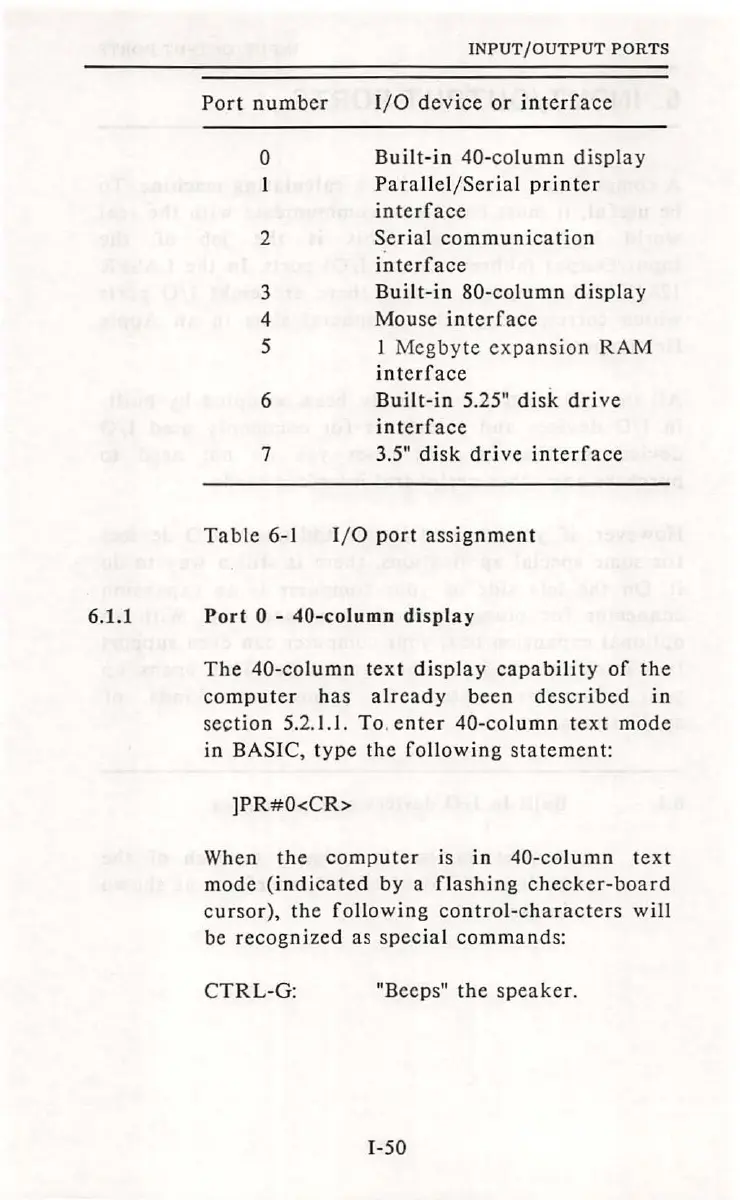
Port
number
0
2
3
4
5
6
7
INPUT/OUTPUT
PORTS
1/0
device
or
interface
Built
-
in
40-column
display
Parallel/Serial
printer
interface
Serial
communication
interface
Built-in
80-
column
display
Mouse
interface
I
Mcgbyte
expansion
RAM
interface
Built-in
5.25"
disk
drive
interface
3.5"
disk
drive
interface
Table
6-1
1/ 0
port
assignment
6.1.1
Port
0 -
40-column
display
The
40-column
text
display
capability
of
the
computer
has
already
been
described
in
section
5.2.l.l.
To
.
enter
40-column
text
mode
in BASIC,
type
the
following
s
tatement:
]PR#O<CR>
When
the
computer
is
in
40-column
text
mode
(indicated
by
a
flashing
checker-board
cursor),
the
following
control-characters
will
be
recognized
as
special
commands
:
CTRL-G:
"Beeps"
the
speaker.
1-50

Table of Contents