EasyManua.ls Logo

Laser 128 - Page 28

Laser 128
255 pages
Print Icon
To Next Page IconTo Next Page
To Previous Page IconTo Previous Page
Loading...
GETTING
FAMI
LIAR
W
ITH
THE
LASER 128/128EX
@
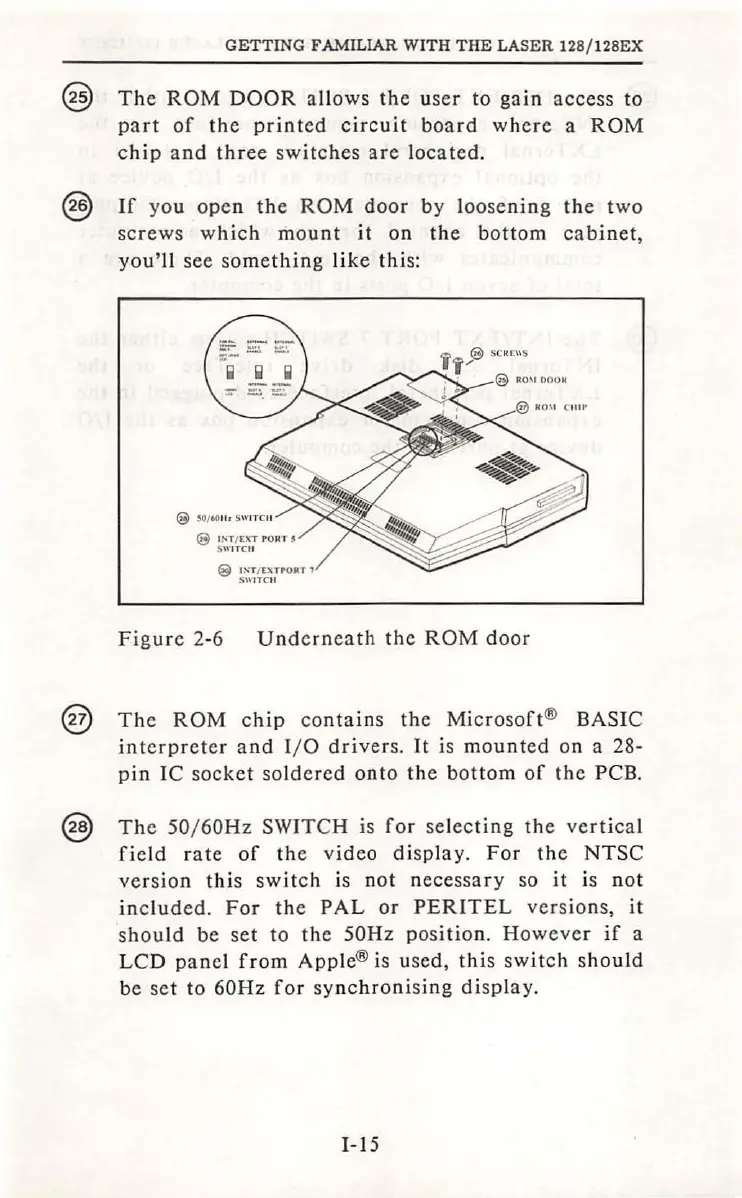
The
ROM
DOOR
allows
the
user to
gain
access
to
part
of
the
printed
circuit
board
where
a
ROM
chip
and
three
switc
hes
are
loc
ated.
@
If
you
ope
n
the
ROM
door
by
l
oosening
the
two
screws
whic
h mo
unt
it
on
the
bottom
cabinet,
you'll
see so
mething
like
thi
s:
@
l
~'T
/
C~TPORT
l
S\\l
TC
ll
Figure
2-6
Unde
rneath
the
ROM
door
@
The
ROM
chip
contains
the
Microsoft
® BASIC
interpreter
and
I/ 0
drivers.
It
is
mounted
on a 28-
pi
n
IC
socket
sol
de
red
onto
the
bottom
of
the
PCB.
@
The
50/ 60Hz SWITCH is
for
selec
tin
g
the
ve
rti
cal
fi
eld r
ate
of
the
video
display.
For
the
NTSC
versio
n
thi
s s
wit
ch is
not
n
ecessary
so
it
is
not
included.
For
the
PAL
or
PERITEL
versio
ns,
it
shou
ld be
se
t
to
the
50Hz
position.
However
if
a
LCD
panel
from
Apple
® is use
d,
thi
s sw
it
ch
sho
uld
be
se
t
to
60Hz
for
sy
nchroni
sing
di
spla
y.
I-
15

Table of Contents