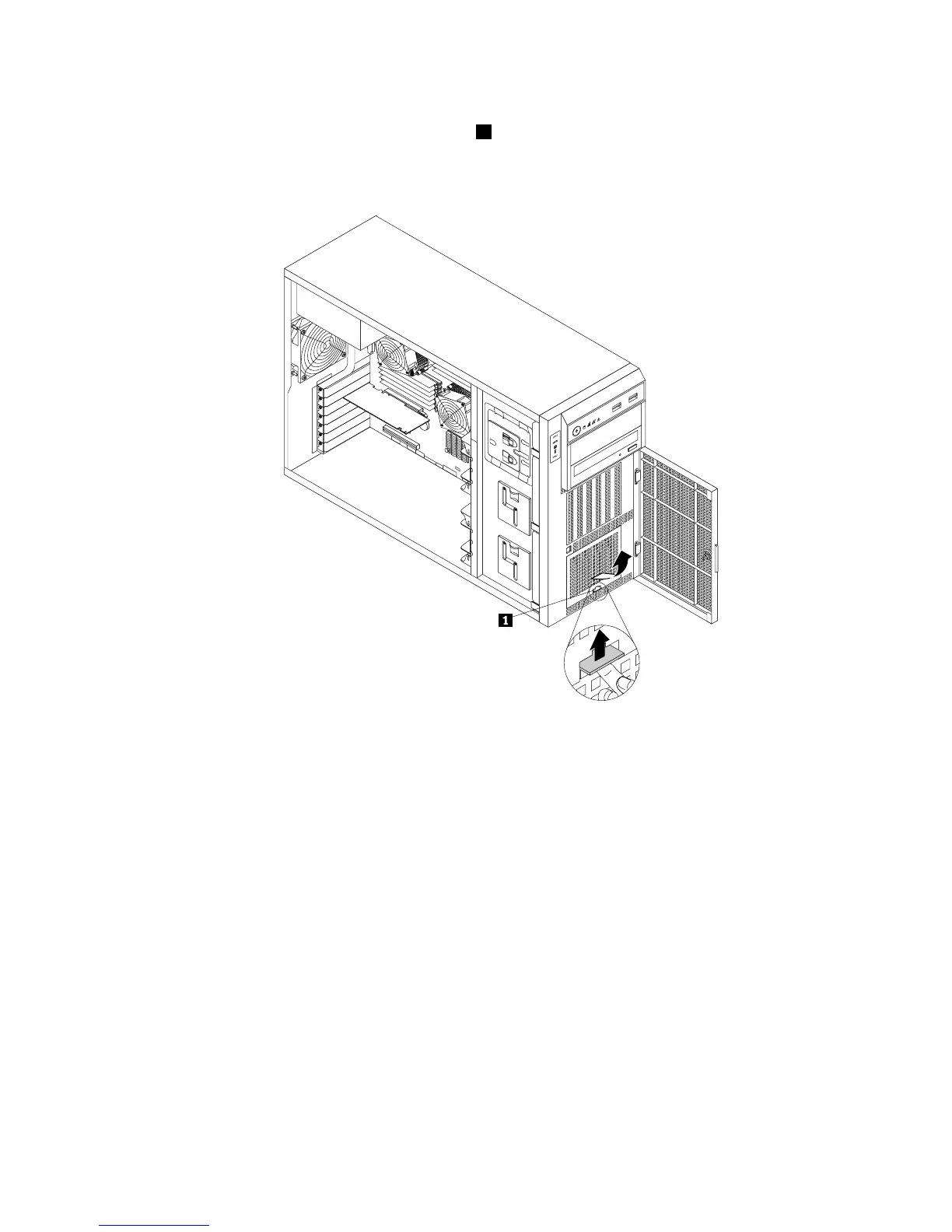
4.Thenon-hot-swapharddiskdrivesareinstalledinthelowerhard-disk-drivecageandareprotected
byanEMI-protectivepanel.Pressthesmalltab
1ontheEMI-protectivepanelfromthebottom,and
thenpivottheEMI-protectivepanelupwardtoremoveitfromthechassisandgainaccesstothe
non-hot-swapharddiskdrives.
Figure79.RemovingtheEMI-protectivepanel
5.Removethefrontsystemfan1.See“Replacingthefrontsystemfan1”onpage183.
6.Locatetheappropriatenon-hot-swapharddiskdrive.See“Servercomponents”onpage28.Then,
disconnecttheSATAsignalcableandthepowercablefromtherearofthenon-hot-swapharddiskdrive.
Chapter6.Installing,removing,orreplacinghardware141







 To Next Page