52 Information LH01
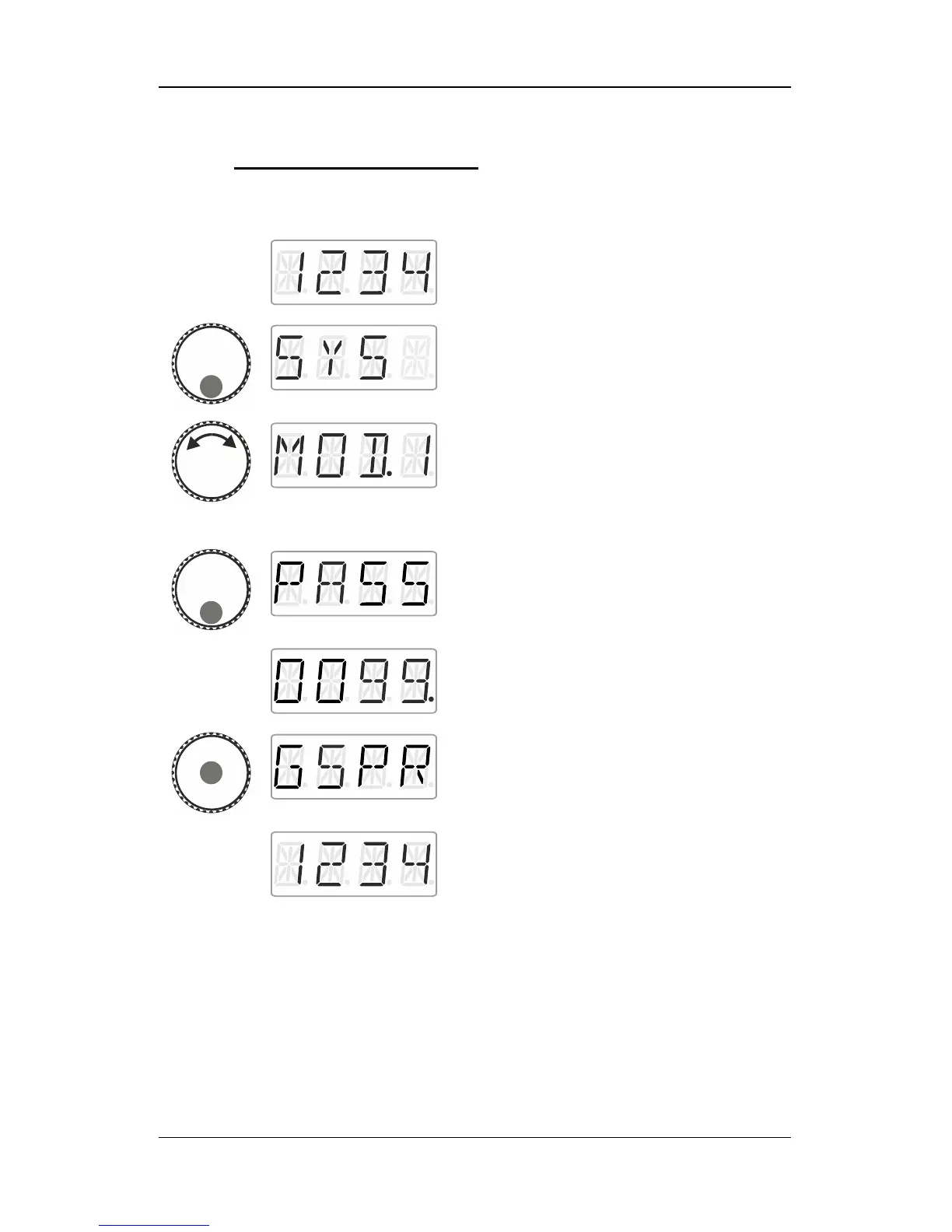
13.8.1 Setting Mode 1 or mode 2
Proceed from ‘Locomotive control’ (address
or speed step are displayed)…
… press the bottom of the rotary knob until
the LED at the bottom shines.
‘SYS’ is displayed, followed by the first sub
menu of the system settings.
Select the desired mode.
If the LH01 is set to mode 0, you can select
between ‘MOD.1’ and ‘MOD.2’.
If the LH01 is set to mode 1 or 2, you can only
select ‘MOD.0’.
Press the bottom of the rotary knob to display
‘PASS’. Release the rotary knob
… and the password ‘0099’ will be suggested
to you. Click right or left to select one of the
four digits. Turn the rotary knob to change a
digit and enter the desired password.
Complete the process by pressing the centre
of the rotary knob. ‘GSPR’ is displayed.
The LH01 will automatically return to
‘Locomotive control’. The restrictions of the
selected mode are applied.



 To Next Page