EasyManua.ls Logo

Lenz digital plus lh01 - Reading Cvs Via Pom and the Address Display LRC120

Lenz digital plus lh01
64 pages
Print Icon
To Next Page IconTo Next Page
To Previous Page IconTo Previous Page
Loading...
36 Information LH01
12.1 Reading CVs via PoM and the address display
LRC120
It is possible to read CV values via PoM during operation.
Requirements:
A RailCom-able locomotive decoder
The locomotive is located in a track section monitored by the
address display LRC120.
RailCom transmission is enabled in the decoder.
Information on how to connect the address display LRC120 as well as
the settings of RailCom-able locomotive decoders can be found in the
corresponding operating manuals.

Action
Display
Explanation
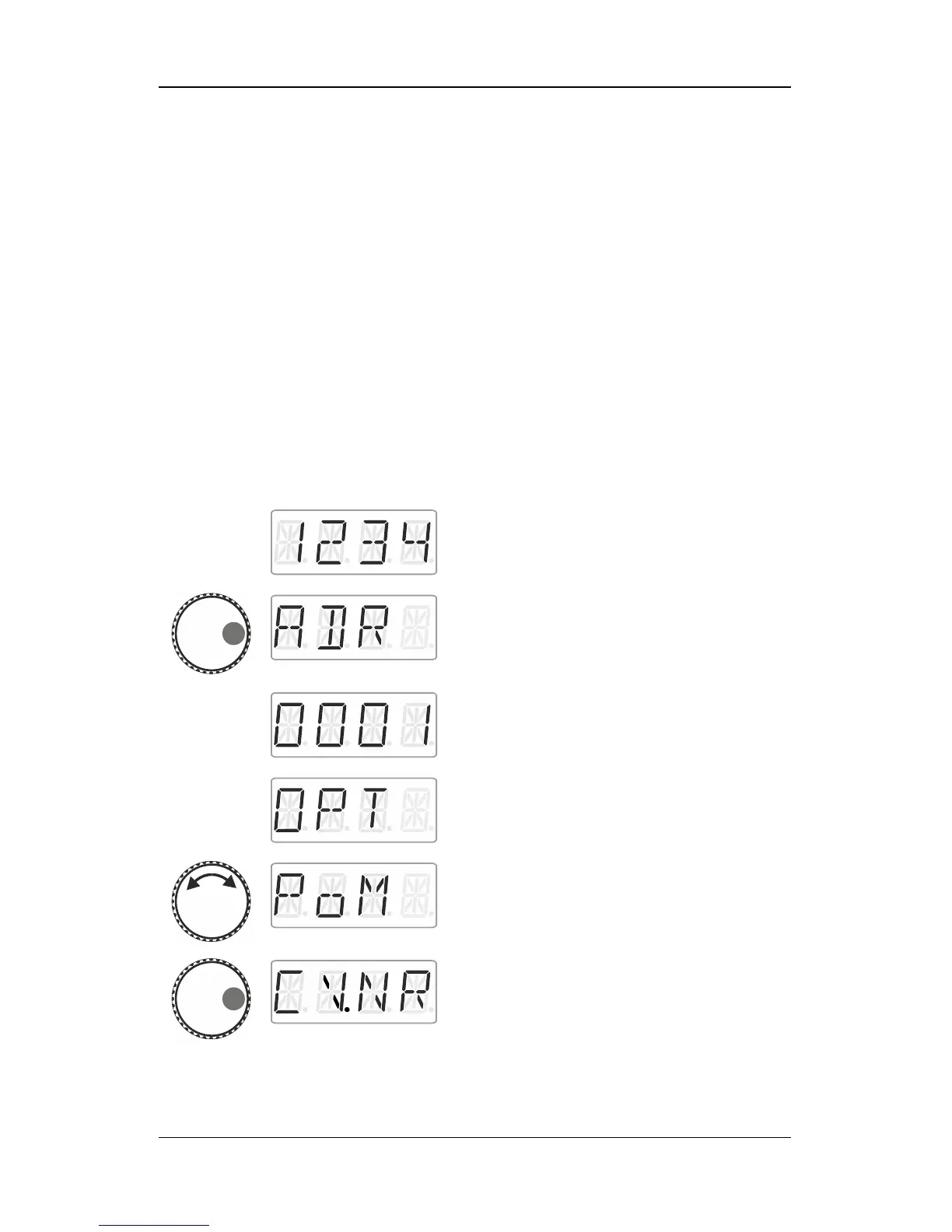
Select the address of the locomotive whose
CVs (settings) you would like to read
(p. 15).
Press the right side of the rotary knob until the
LED to the right shines.
Release the rotary knob to display the
locomotive address used last. Here:
locomotive address 1.
Click right until OPT is displayed.
Turn the rotary knob until PoM is displayed.
Press right. Now indicate which CV you would
like to read or change.

Table of Contents

Other manuals for Lenz digital plus lh01

Related product manuals