EasyManua.ls Logo

Lenz digital plus lh01 - Deleting a Function Acronym

Lenz digital plus lh01
64 pages
Print Icon
To Next Page IconTo Next Page
To Previous Page IconTo Previous Page
Loading...
26 Information LH01
Lighting driving
mechanism
Pantograph
Engine
-front
Bell
-back
Whistle
Steam generator
Coupling sound
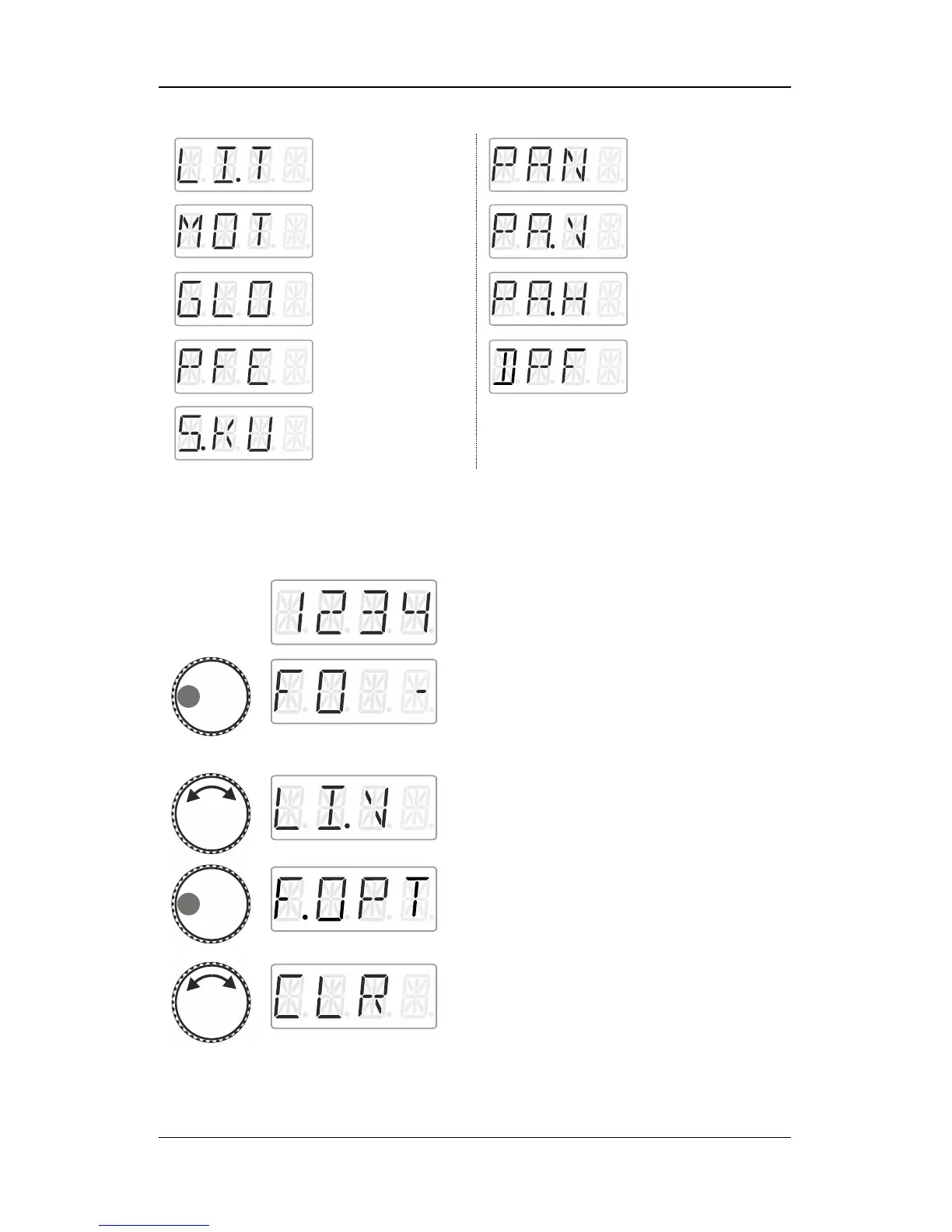
9.6 Deleting a function acronym
Action
Display
Explanation
Select the desired locomotive address for
which you would like to assign an acronym to
a function.
Press the left side of the rotary knob until the
LED to the left shines.
The locomotive function selected last is
displayed. A dash on the right indicates that
the function is enabled.
Turn the rotary knob to display the function
whose acronym you would like to delete.
Click left. F.OPT is displayed.
Turn the rotary knob to select CLR.

Table of Contents

Other manuals for Lenz digital plus lh01

Related product manuals