Page 28
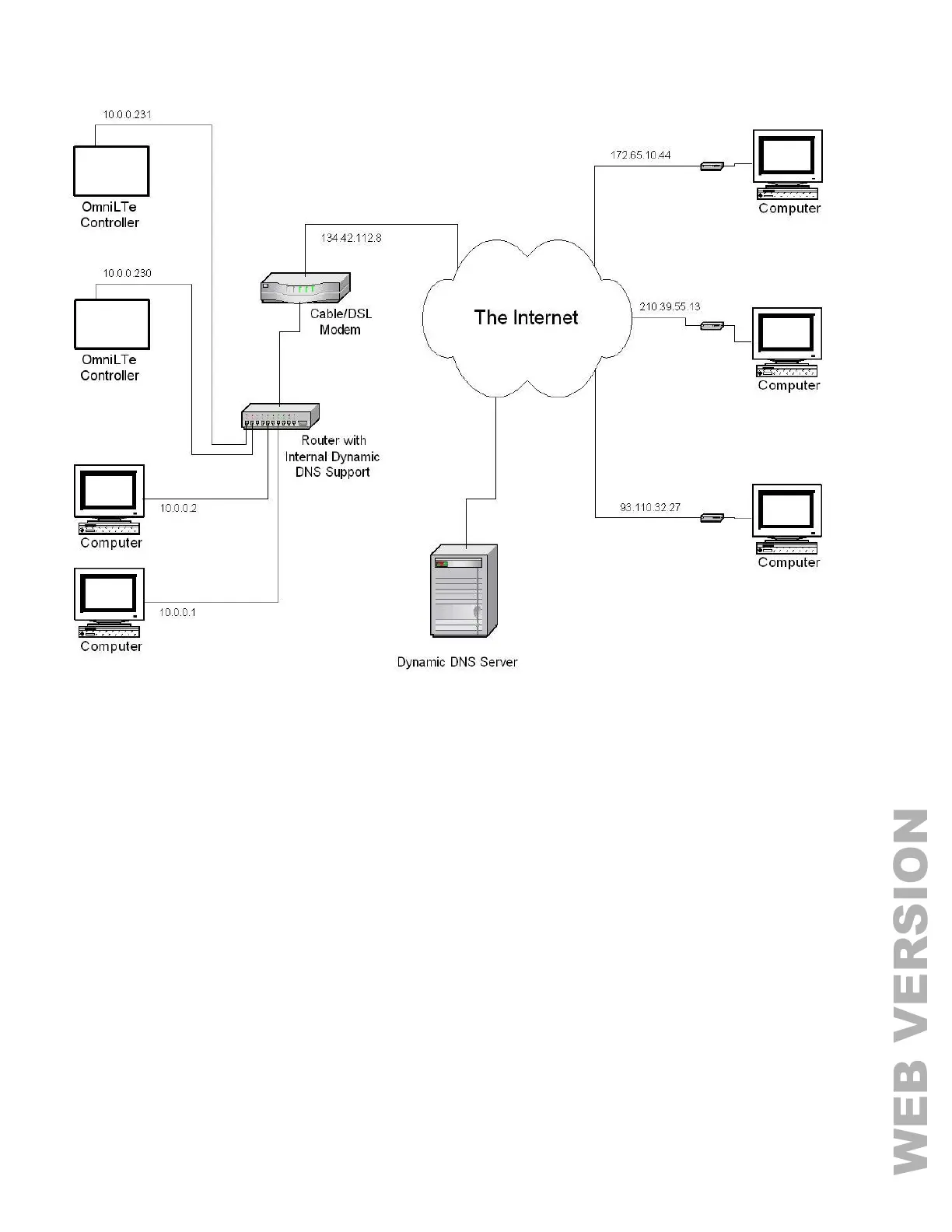
FIGURE 17 - LOCAL / WIDE AREA NETWORK
If the controller is connected to the Internet via a dynamic IP address, to locate and communicate with the controller
from remote locations over the Internet using LEVITON PC Access, you must subscribe to a Dynamic DNS (Domain
Name Service). Dynamic DNS is a service that maps your dynamic (changing) IP address to a static (permanent)
hostname, allowing you to access your Omni LTe controller over the Internet using your static hostname instead of an
IP address.
A “client” program (typically provided by the Dynamic DNS provider) runs on a PC on your local network and is used
to automatically update your Dynamic DNS provider with your current IP address. Several router/switch
manufacturers have embedded a Dynamic DNS client into their router firmware. These devices work with several of
the Dynamic DNS providers, including both free and commercial services. These devices are especially beneficial
because the router can be powered up all the time, so the dynamic update is always current and is handled by a
single device (the router/switch) in the local network. This allows you to locate and connect to the Omni LTe controller
without having a computer on the local network powered up and running.
To connect to an Omni LTe controller
on a local network using HAI PC
Access, under Configure >> Network
enter the controller’s IP address:
(i.e. 10.0.0.230)
To connect to an Omni LTe controller
from the Internet using HAI PC
Access, under Configure >> Network
enter the public IP address:
(i.e. 134.42.112.8)



 To Next Page