4-50 Service Manual
4025-XXX
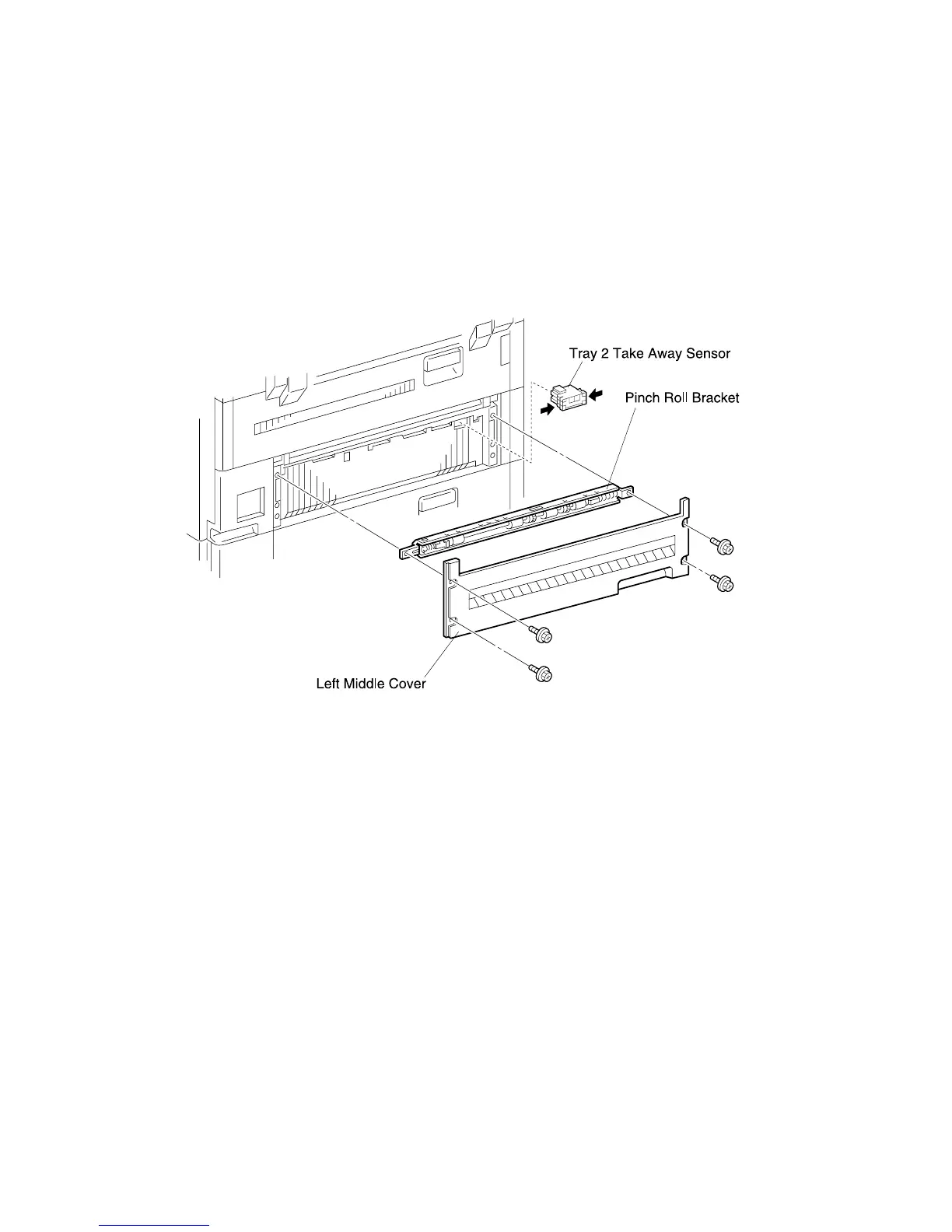
Tray 2 Take Away Sensor
Removal
1. Remove the Duplex Option and MP Feeder if equipped. See MP Feeder Assembly
removal on page 4-40.
2. Remove the MP Feeder Support Assembly. See MP Feeder Support Assembly
removal on page 4-43.
3. Remove the four screws securing the Left Middle Cover and Pinch Roll Bracket.
4. Squeeze in all four sensor latches while you pull the sensor out of the frame.
5. Disconnect J101 from the sensor.
Replacement
1. Reconnect J101 to the Sensor.
2. Insert the Sensor into the cutout in the frame.
3. Replace the Left Middle Cover and Pinch Roll Bracket and secure with four screws.
4. Replace the MP Feeder Support Assembly.
5. Replace the Duplex Option and MP Feeder if equipped.



 To Next Page