4. Operating AC Smart
Installation/Owner's Manual
4-15
Managing schedule group
Schedule group is a collection of units (indoor unit and ventilator) applied with the same schedule
pattern. This describes how to set the schedule group.
Creating new schedule group
To create a new schedule group, proceed in the following order.
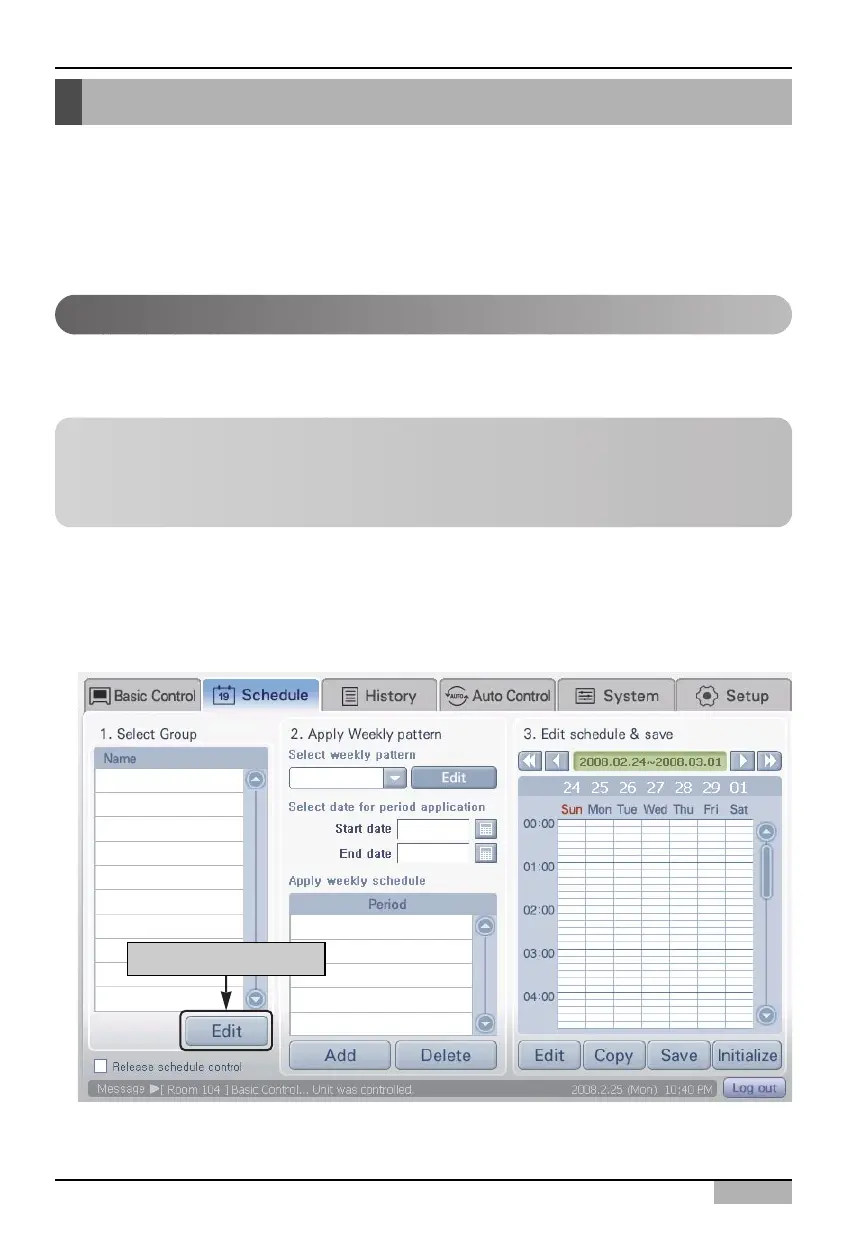
1. Select the 'Schedule' menu from the menu of AC Smart. When you select the 'Schedule' menu, the
following schedule screen is displayed. To create a new schedule group, click on the [Edit] button.
Reference: Schedule group
Schedule group is a group executing a different function from control group, Auto change over
operation group and temperature limit group. Schedule group is only used for apply the schedule
and units included in the group may not be duplicated with other groups.
Click on [Edit] button
Schedule
‘Schedule’ is the function to run the reserved operation at the specific time by previously specifying the
operation of air conditioner, ventilator and On/Off device.
In AC Smart, you can set the group to commonly apply the schedule. Also by introducing the pattern
concept, you can easily apply the repeated schedule in week or day unit.
This chapter describes how to operate the AC Smart function by using the schedule.












 To Next Page