4. Operating AC Smart
Installation/Owner's Manual
4-163
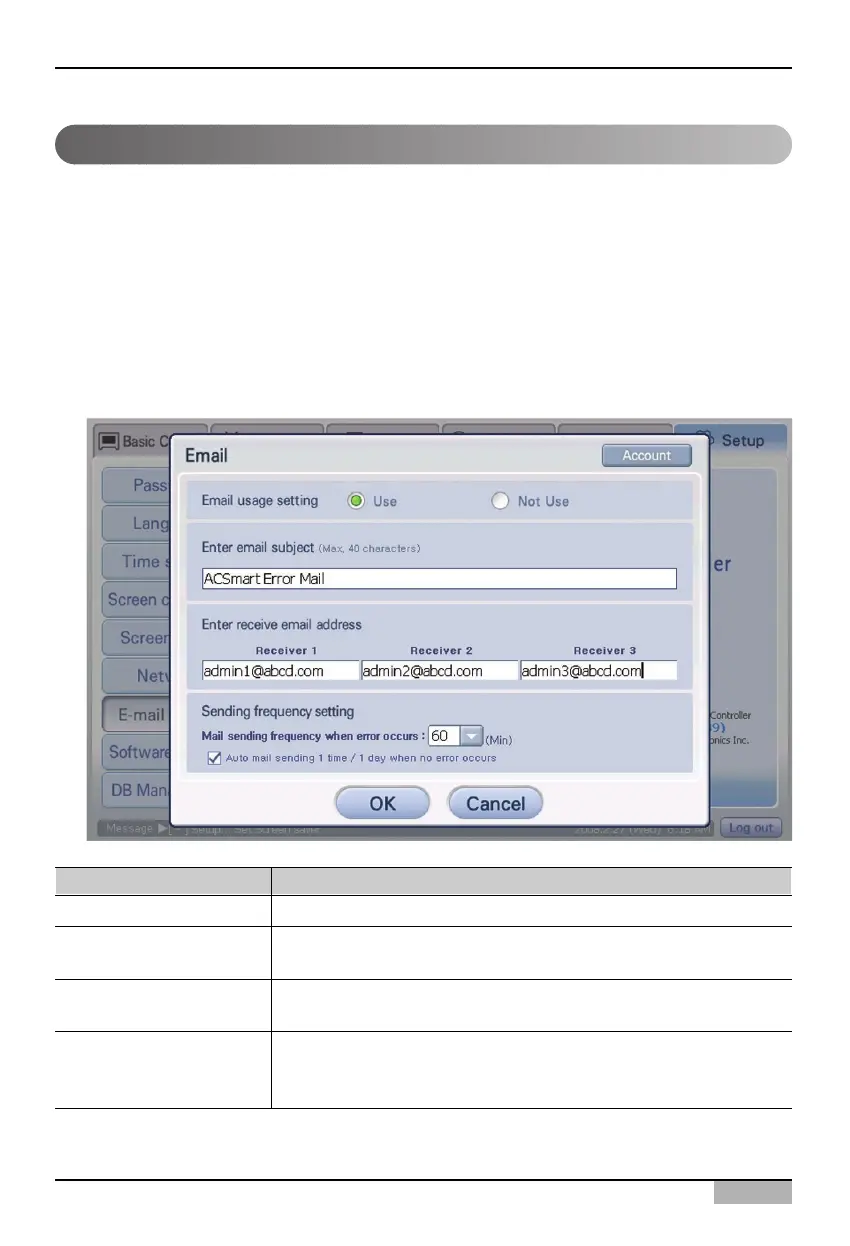
Setting the E-mail
The E-mail notifies the administrator of the critical error information of the AC Smart by the e-mail
when the administrator is absent. The information about the e-mail to be sent to the user can be set
and the account of the e-mail can be set at the ‘E-mail’ menu.
Keep the following steps to set the e-mail.
1
. Select ‘Environment setting’ from the AC Smart menu. Press ‘E-mail setting’ menu from the sub-
menus at the left side. ‘E-mail setting’ screen is displayed.
Enter the information to send the e-mail. Refer to the following table for the description about the
information to set.
Item Description
Set to use the e-mail
Enter the e-mail subject
Enter the recipient’s
e-mail address
Set the period to send
Set whether to use ‘Send the e-mail’ function or not.
Enter the subject of the e-mail to be sent to the receiver. You can enter
it up to 40 characters.
Enter the e-mail address of the recipient to receive the e-mail. Up to
three recipients can be set.
When any error is occurred, the period to send the e-mail can be set
within 1 hour by 10 minutes. Also, even when no error is occurred, it
can be set to be automatically sent once a day.












 To Next Page