4. Operating AC Smart
AC Smart
4-164
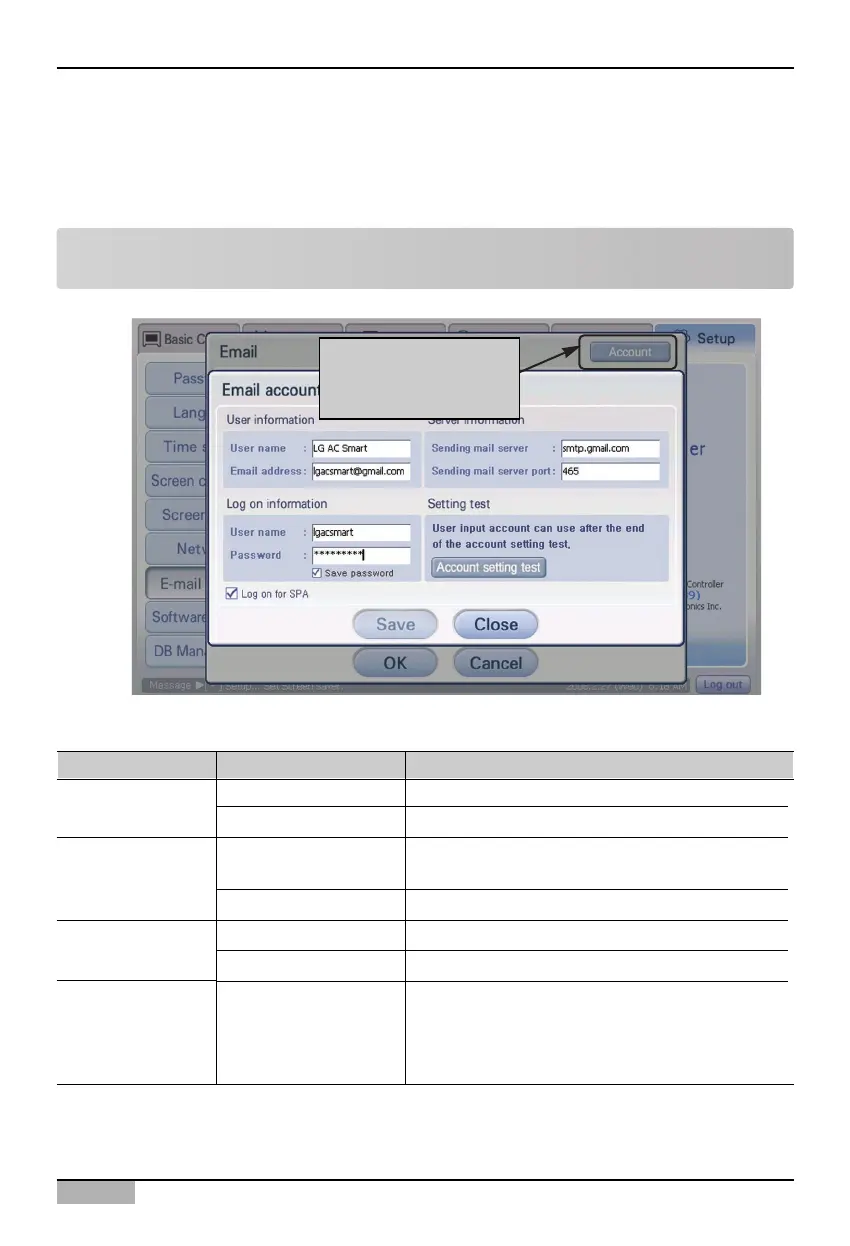
2. And then, set the account to send the e-mail. When you press [Account management] button, ‘E-
mail account setting’ screen is displayed.
Enter the e-mail account information. Refer to the following table for the description about each
item to set.
Note: Activating the [Account management] button
When it is not set as ‘Use’ at the ‘E-mail setting’ screen, [Account management] button is inactivated.
Click [Account
management] button
Classification Item Description
User name Enter the user’s name.
E-mail address Enter the user’s e-mail address.
Enter the mail server address.
Sending mail server port Enter the mail server port.
User name Enter the user name for logging into the mail server.
Password Enter the password to log into the mail server.
When you log in by using the security password
authentication, check the said check box.
User information
Sending mail server
(SMTP)
Server information
Log-on information
-
Log-on by using the
SPA (Security
Password
Authentication)












 To Next Page