4. Operating AC Smart
AC Smart
4-10
Controlling the unit in detail
The unit has three types as follows:
• Indoor unit (air conditioner): Unit to control the indoor temperature by cooling/heating
• Ventilator: Unit to keep the fresh air by the air circulation
• On/Off device: General device operated by turning on/off the power (ex: lamp)
The detailed control function can be set to air conditioner, ventilator and On/Off device. Follow the
instruction to set the detailed function of air conditioner, ventilator and On/Off device.
1. Select 'Control/Monitoring' menu from the menu of AC Smart. When you select the
'Control/Monitoring' menu, the following Control/Monitoring screen is displayed.
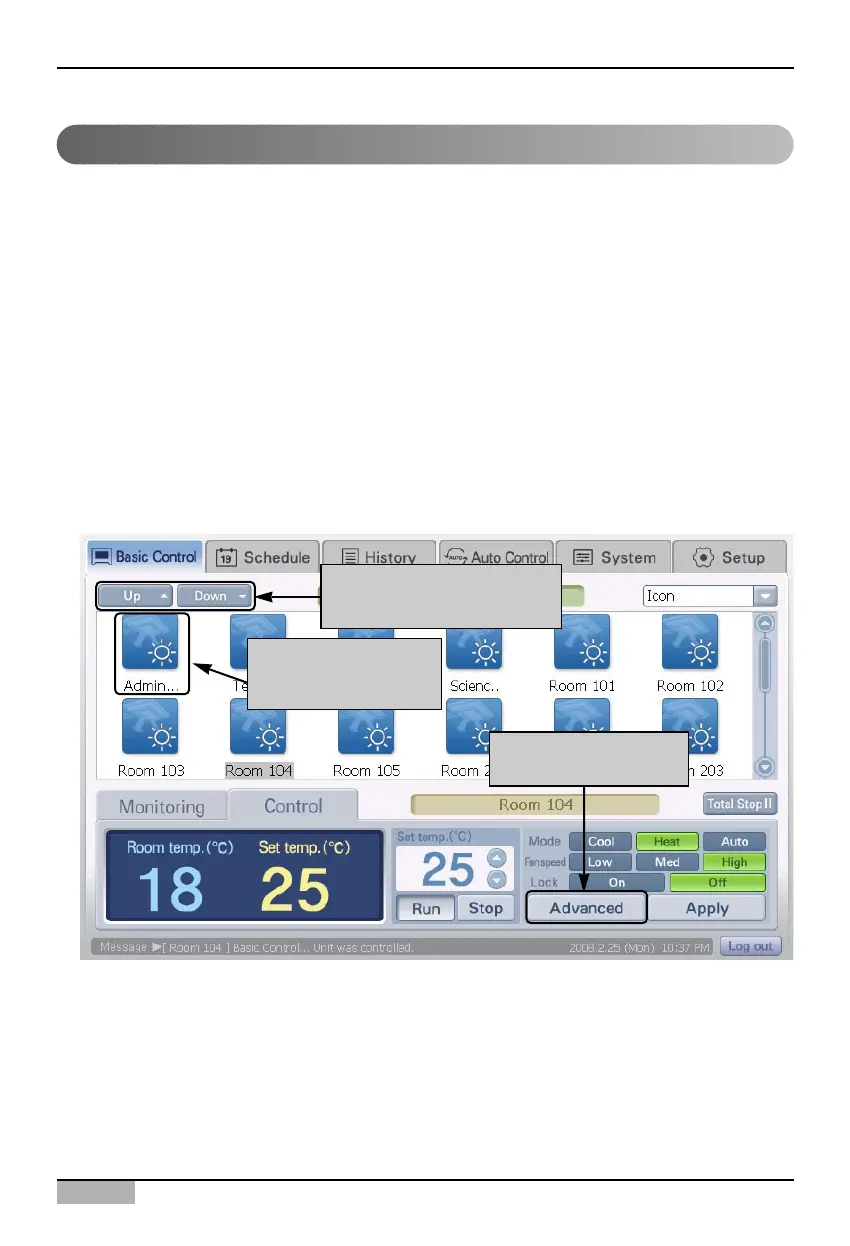
From the screen with zone, group or unit displayed, designate the target to execute various
functions of the unit. When you press the [Move up] or [Move down] button, or double click on the
applicable icon, you can change the screen displaying the zone, group or unit.
Press the [Advanced] button.
Use when moving zone,
group or unit
Double click to move
to lower level
Click on advanced
button












 To Next Page