4. Operating AC Smart
Installation/Owner's Manual
4-153
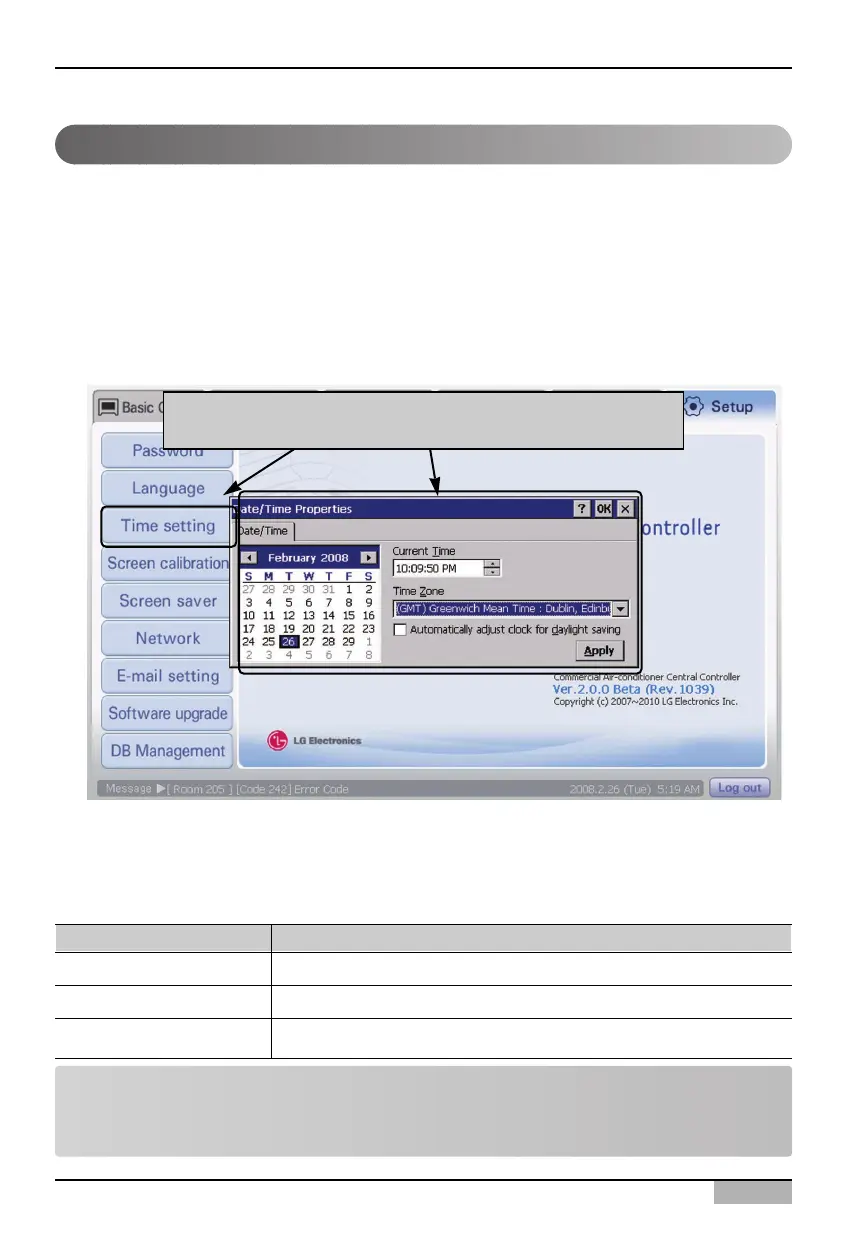
2. When you enter the information for each item and press [Apply] button, the set time information is
applied to the AC Smart. When you press [OK] button, ‘Date/Time attribute’ screen is closed and it
returns to the initial screen of ‘Environment setting’ menu.
Refer to the following table for the detailed description about each item.
Item Description
Date
Current time
Standard time zone
Set the date (year, month, day).
Select the time (a.m./p.m., hour, minute, second).
Select the time zone according to the reference area.
Note: [Apply] button
[Apply] button is deactivated before the time information is changed at ‘Date/Time attribute’ screen.
When the time information is changed, [Apply] button is activated.
The AC Smart needs the correct time setting to drive the air conditioner and the ventilator according to
the schedule set by the user or to record the history information about the occurred event. You can set
the date and the time for setting and controlling the air conditioner and the ventilator at the time setting.
Keep the following steps to set the time of the AC Smart system.
1. Select ‘Environment setting’ from the AC Smart menu. Press ‘Set the time’ menu from the sub-
menus at the left side.
Setting the time
When 'Set the time' menu is clicked, 'Date;/Time attribute'
screen is displayed












 To Next Page