4. Operating AC Smart
Installation/Owner's Manual
4-65
Time-limited running
The time-limited running automatically stops the operation of the unit after the specified time. The
time-limited running can reduce the waste of energy by limiting the individually used time of the unit
within a specific time when the administrator is absent.
In order to set the time-limited running, specify the time and the weekday to operate. The operation
time can be set to 1~4 hours (4 as default) and can be set to any weekday. Set whether to operate
the time-limited running based on 0 o’clock.
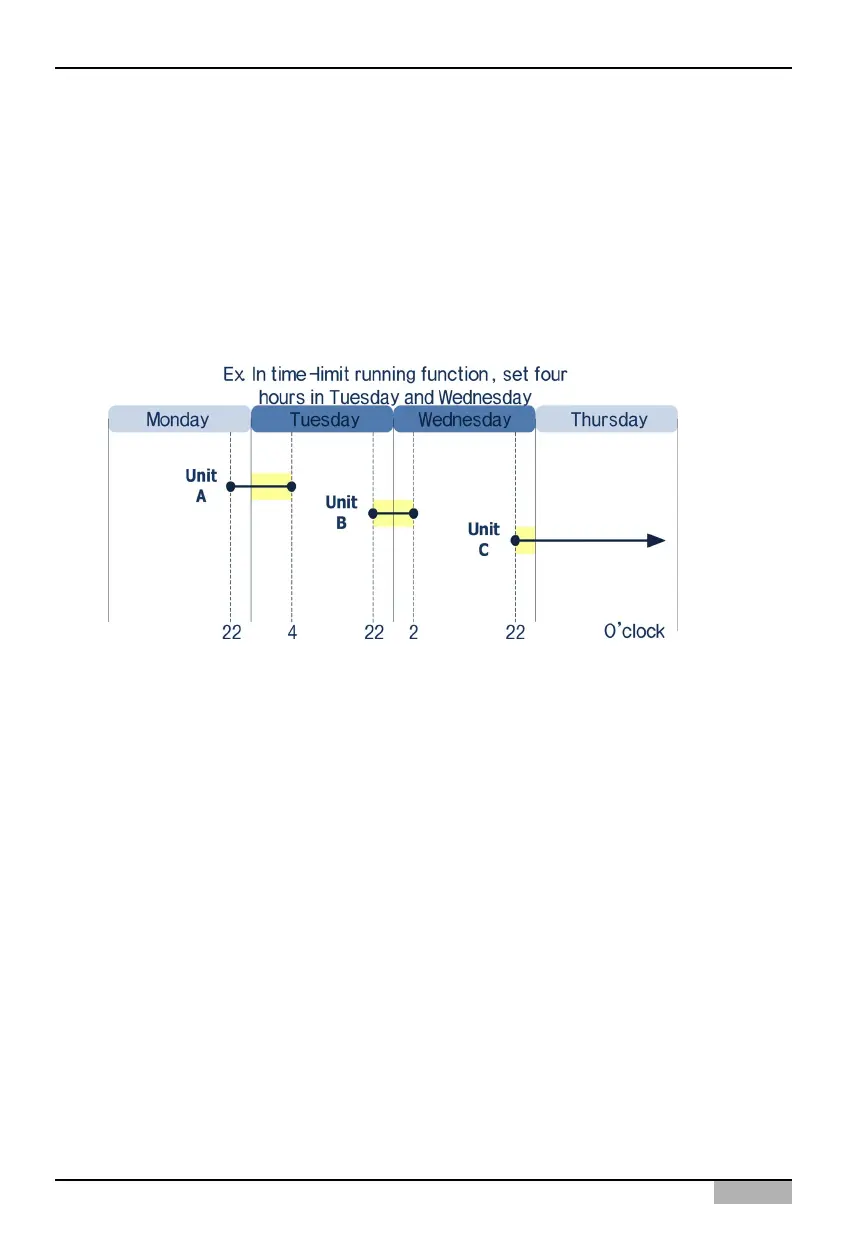
The following figure shows the example for the operation of the time-limited running. The time-limited
running is set to stop the unit by 4 hours on Tuesday and Wednesday from Monday to Thursday.
• The Unit A operates from 22:00 on Monday before applying the time-limited running. The time-
limited operation is applied to run the Unit A on Tuesday and to stop at 4:00 after 4 hours.
• The Unit B operates from 22:00 on Tuesday while the time-limited running is applied. Because the
time-limited running is also set to Wednesday, the Unit B stops at 2:00 on Wednesday.
• The Unit C operates from 22:00 on Wednesday while the time-limited running is applied. But, the
Unit C continues to operate with no time limit because the time-limited running is not applied on
Thursday.












 To Next Page