4. Operating AC Smart
AC Smart
4-80
Item Description
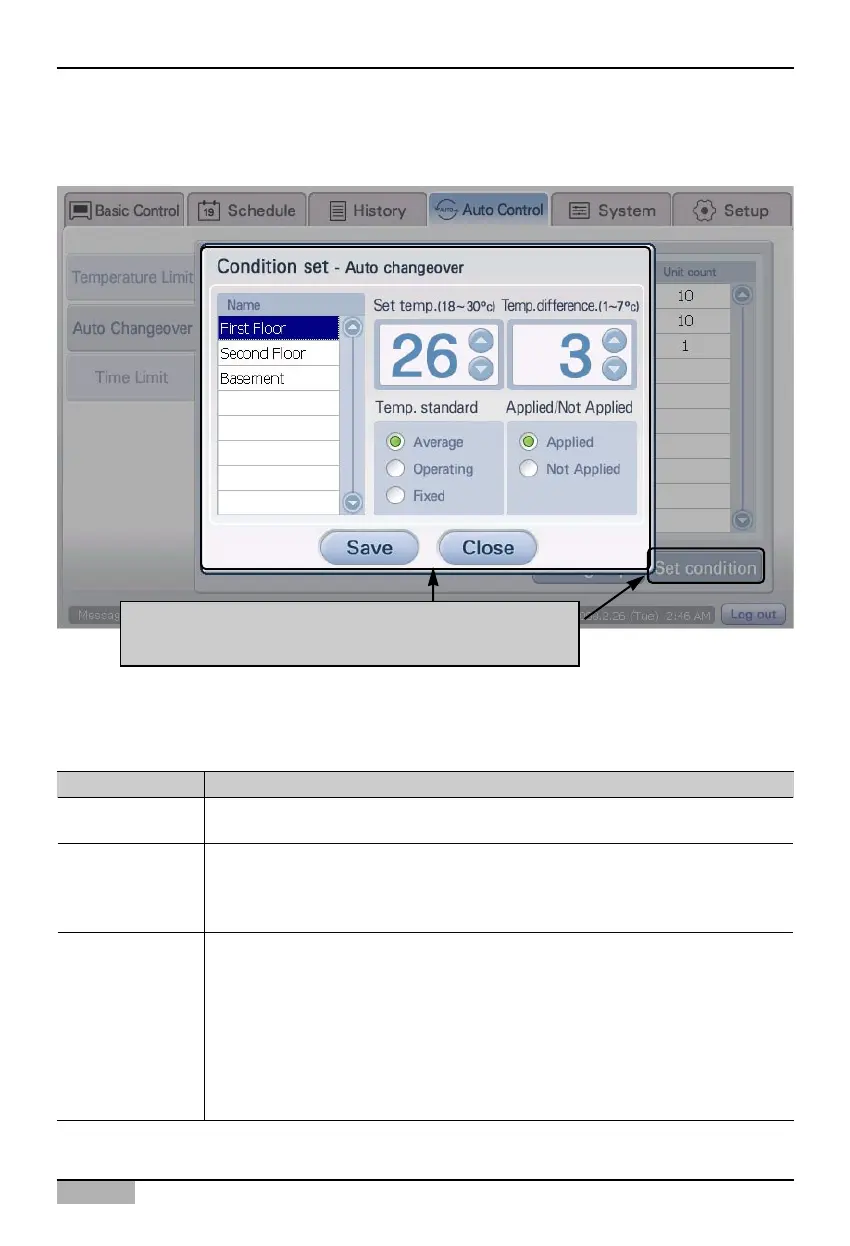
This sets the reference temperature to execute auto change over operation. The
temperature range that can be set is 18°c ~30°c.
Set the temperature difference so that the auto change over function can operate. When
the difference between the reference and indoor temperature exceeds this temperature, it
automatically changes over to the indoor unit operation. The temperature range that can
be set is 1°C~7°C.
Select the method to measure the indoor temperature. Indoor temperature can be
measured in one of the three methods below.
- All unit average: This is the method of operating the auto change over function based on
the average temperature detected for the indoor units within the group.
- Operating unit average: This is the method of operating the auto change over function
based on the average temperature of the operating indoor units within the group.
- Fixed: This is the method of operating the auto change over function based on the
temperature detected from the first registered indoor unit within the group.
Temperature setting
Temperature
reference
Temperature
difference
2. When the 'Auto change over operation' screen appears, click on [Condition setting] button to set
auto change over operation.
3. Set each item of the ‘Condition setting’ screen. For detailed description on the setting item, refer to
the following table.
When you click on [Set condition] button, 'Condition
setting' screen will be displayed












 To Next Page