2. AC Smart Installation
Installation/Owner's Manual
2-10
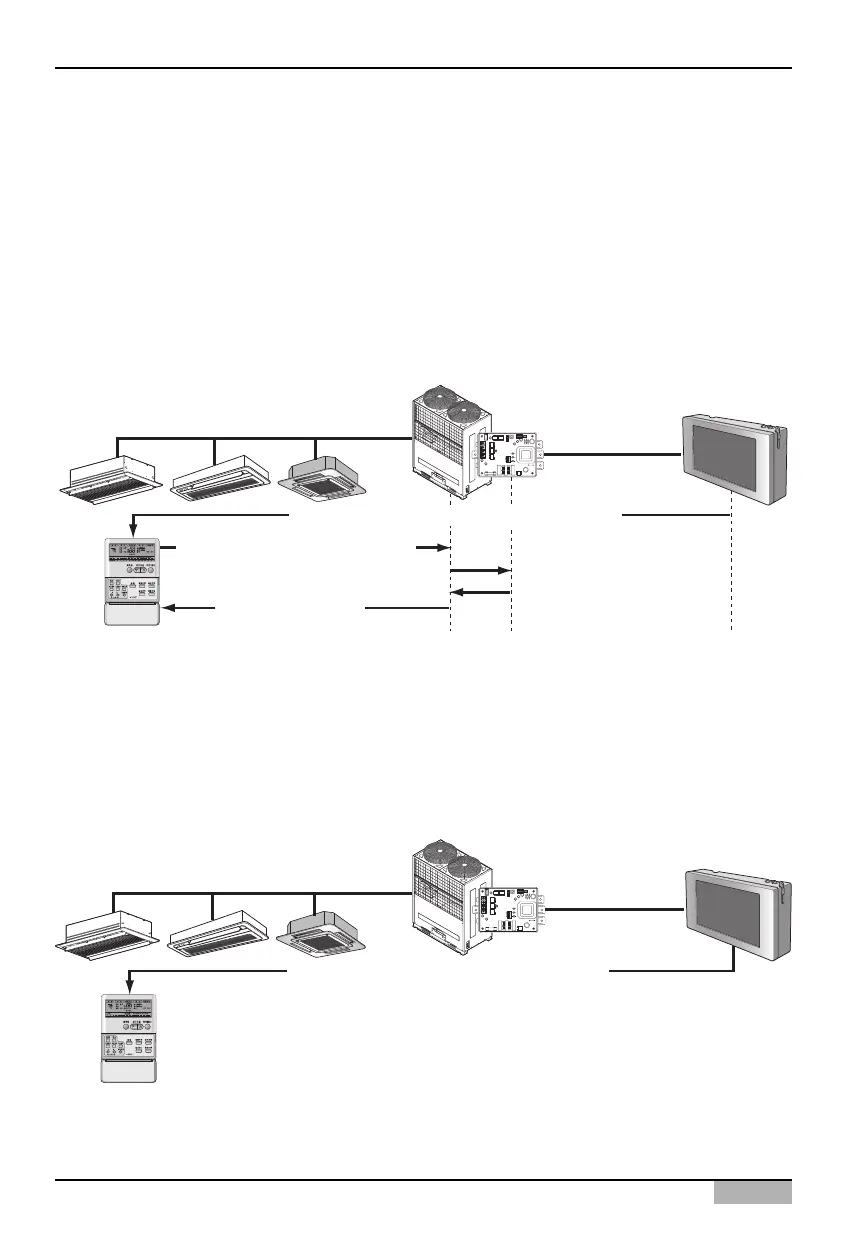
The next pictures is an example that shows central control method when the 2PIN connector is
connected to the CN_DRY terminal.
1) Through the central controller, such as AC Smart, you can command the 'Cool operation, 20°C
setting, high fan level, temperature lock' function. This command can be provided by the remote
controller.
2) But if the user changes the temperature to 25°C with the remote controller, the applicable command
is sent tot eh outdoor unit and the 25°C setting is displayed on the remote controller.
3) The outdoor unit receives the applicable command and sends it to PI485.
4) PI485 cancels this command and resends the prior central control command. And the remote
controller redisplays the temperature of 20°C sent through the central control command.
On the other hand, let’s look at the example where the 2PIN connector is connected to CN_DRY
terminal. When you command the “Cool operation, 20°C setting, high fan level, temperature lock”
function through central control, the applicable command is transmitted to the remote controller. “HL
(Hard Lock)” message displaying the central control status is displayed on the remote controller. If the
user sets the temperature to 25°C, the remote controller blocks the user’s command.












 To Next Page