3. AC Smart Menu
Installation/Owner's Manual
3-13
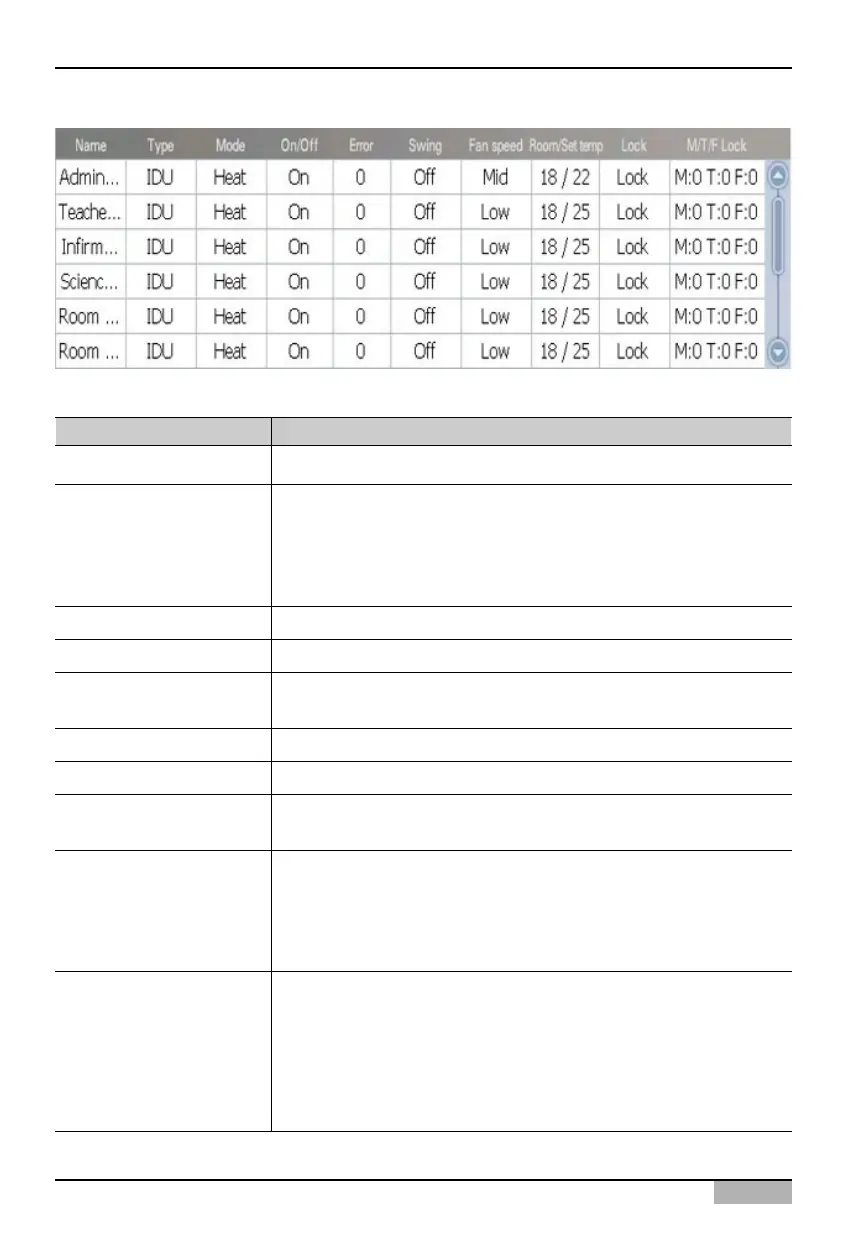
The following information is displayed at the detailed list.
Control item Description
Name
Product type
Mode
Operation
Error
Wind direction
Fan level
Indoor-Set temperature
All lock
Individual lock
Name of unit is displayed.
Type of unit is displayed.
- Indoor unit: Unit that controls the indoor temperature through
cool/heat
- Ventilator: Unit that maintains clear air through air circulation
- On/Off device: Device to be operated by turning on/off the power.
Operating mode of the unit is displayed.
Whether the unit is operating is displayed.
When there is an error in the unit, the applicable error code is
displayed.
The setting of wind direction of the unit is displayed.
The fan level set in the unit is displayed.
The indoor temperature where the unit is installed and the desired
temperature set by the user is displayed.
The setting of all lock function of the unit is displayed. All lock
function is the function disabling all function of the unit so that the
user cannot control the unit individually that is installed indoors.
- Lock: Condition lock function is enabled
- Unlock: Condition lock function is disabled
The setting of individual lock function of the unit is displayed.
Individual lock function is the function disabling specification
functions of the unit so that the user cannot control the unit
individually that is installed indoors.
- M: Mode lock function condition
- T: Temperature lock function condition
- F: Fan lock function condition












 To Next Page