3. AC Smart Menu
AC Smart
3-16
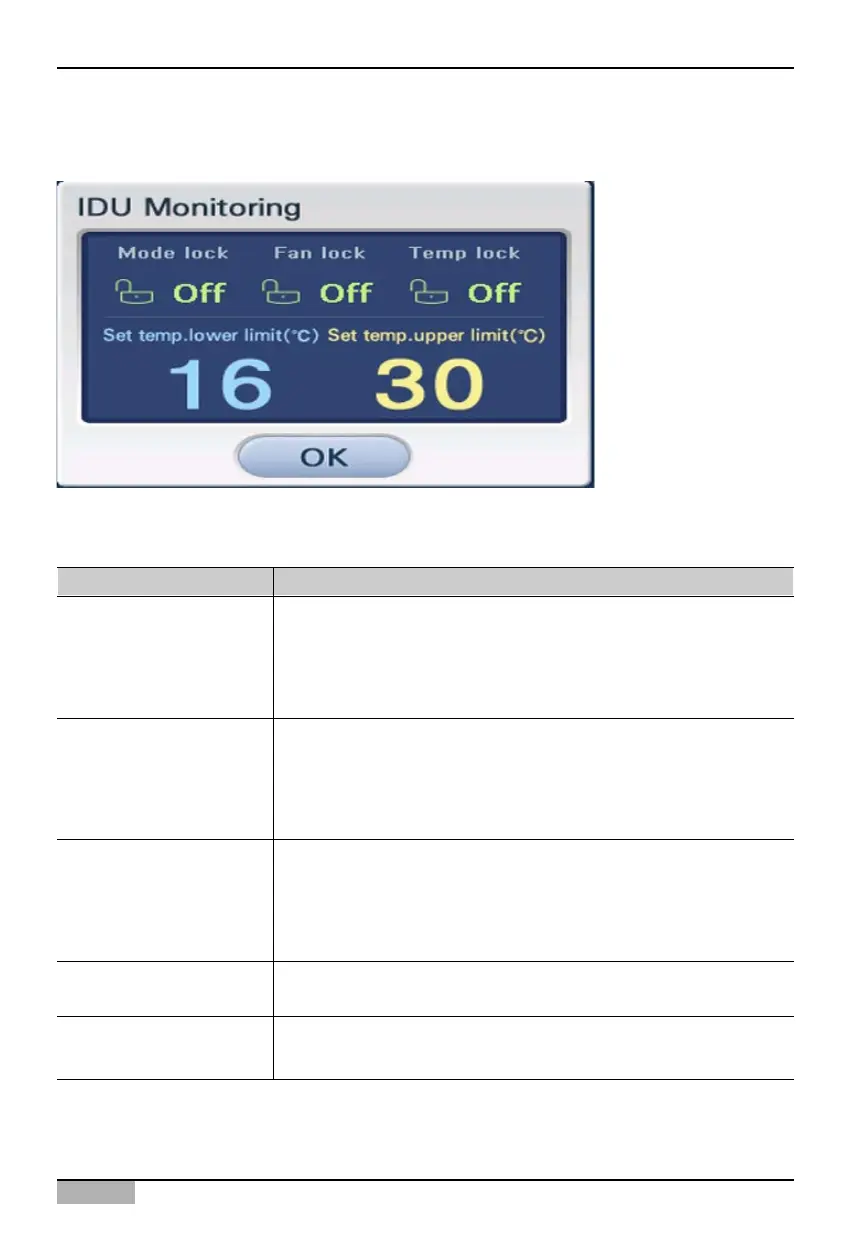
When you click on the [Detail] button, detailed unit status information is displayed in the 'Monitoring'
window.
The details shown in the 'Monitoring' window are as follows.
Displayed item Description
Mode lock
Fan level lock
Set temperature lock
Minimum set temperature
Maximum set temperature
This displays whether the mode lock function to disable the user
from changing the operating mode of each unit through the remote
controller is set or not.
- Enable: Condition lock function is enabled
- Disable: Condition lock function is disabled
This displays whether the fan lock function to disable the user from
changing the fan operation of each unit through the remote controller
is set or not.
- Enable: Condition lock function is enabled
- Disable: Condition lock function is disabled
This displays whether the temperature lock function to disable the
user from changing the desired temperature of each unit through the
remote controller is set or not.
- Enable: Condition lock function is enabled
- Disable: Condition lock function is disabled
When the indoor temperature limit function is set, this displays the
minimum temperature.
When the indoor temperature limit function is set, this displays the
maximum temperature.












 To Next Page