Chapter 4 – Quick start procedures
55
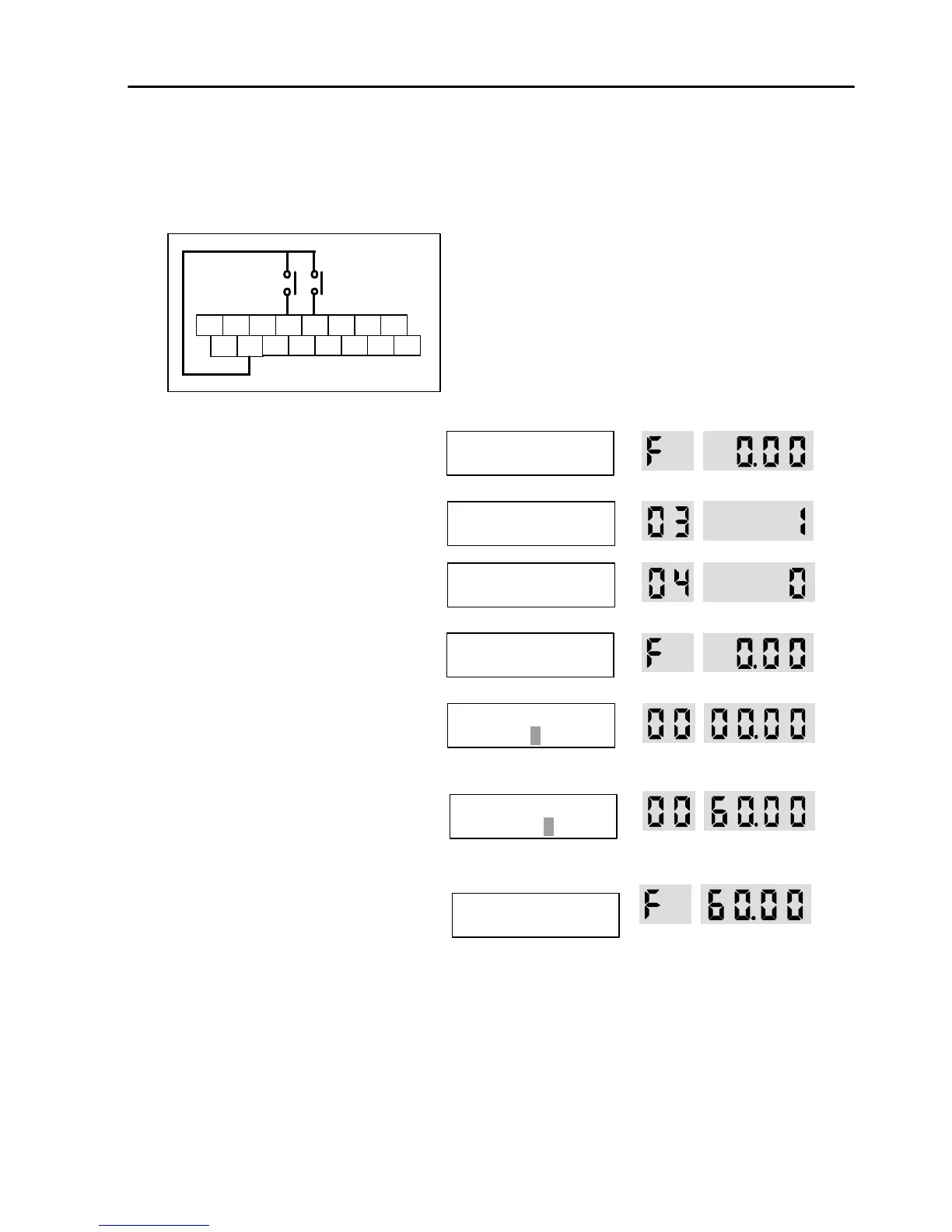
4.3.2 Frequency set by Keypad and Run/Stop by External Source.
1. Connect wiring as shown below.
2. Apply AC power.
3. Confirm that the DRV 03 is set at ‘Fx/Rx-1’.
4. Confirm that the DRV 04 is set at
‘Keypad-1’.
5. Press [SHIFT/ESC] key.
6. LCD: Press [PROG] key.
7-Seg: Press [PROG/ENT] key.
7. LCD: Set the frequency using [SHIFT/ESC]
and [? ] key.
7-Seg: Set the frequency by rotating the
encoder knob.
8. LCD: Press [ENT] key to save the data.
7-Seg: Press [PROG/ENT] key to save the
data.
9. Close the FX or RX contact to run the motor.
10. Open the FX or RX contact to stop the
motor.
LCD Display
7-Segment Display
P1
The RUN LED starts blinking.
Morek IT OÜ, Rauna 24, 76506 Saue Harjumaa, Estonia. www.morek.eu Tel. +372 604 1423 Fax +372 604 1447 morek@morek.eu


 To Next Page
 Loading...