Trackit Mk3 User Manual
34
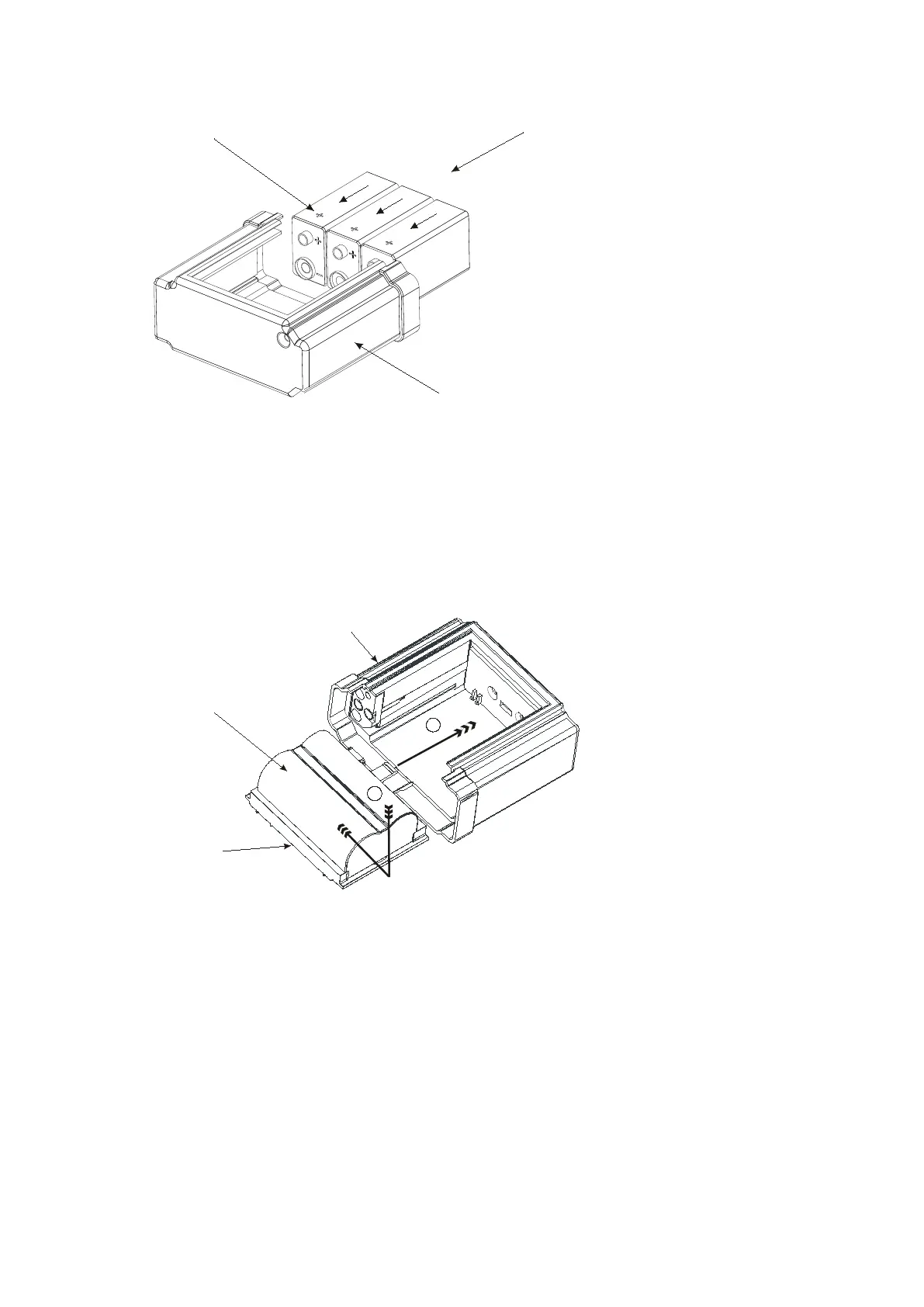
Figur e 2 4 Rem oving a nd re placing PP3 bat t e r ie s
Lithium Rechargeable Bat tery
For the Lit hium rechargeable option, first ly slide out t he t ray t hat holds the bat t ery inside the
box. Not e t hat t he Trackit Mk3 will continue recording for a couple of m inutes, depending on the
num ber of channels, before shut t ing dow n. To slide out the Tray, push the bat t ery gently t o-
wards the open end of the Bat t ery Box. This will slide out t he bat t ery and t he Tr ay sim ult ane-
ously. Now separat e the bat t ery from t he Tray by pushing it sideways along the Tray t o disen-
gage t he bayonet t abs.
Figur e 2 5 Rem oving a nd re placing Lithium re cha r ge a ble ba t t e r y
To fit a fresh batt ery, eit her charge t he original bat tery first or replace with another previously
charged batt ery. Fit t ing is a reverse of t he rem oval process. First ly slide t he Bat t ery onto t he
Tray to engage the bayonet fitt ings. Then slide t he ent ire Tray plus bat t ery assem bly back int o
the Bat tery Box by engaging the Tray slides int o t he slots in the Bat t ery Box. Not e t hat there is
a t ab on t he Tray which engages int o a slot in the back of t he Bat t ery Box.
Special Lithium Battery Instructions for Use
• The batt ery pack is a Canon Type BP511 and uses rechargeable lithium ion bat teries. Always
refer to the docum entation t hat accom panies the bat t ery for m ore inform at ion.
• The batt ery can only be charged out side the Trackit Mk3. Only t he specific Canon charger for
the BP511 m ust be used. Lifelines do not supply the charger; this is available from your lo-
cal cam era or video stockist. Always refer t o t he docum entat ion t hat accom panies the
charger for charging inst ructions.
Battery box PP3
PP3 Batteries
Polarity
+ve up
Battery Box Li
Battery Tray
Lithium battery
1
2



 To Next Page