EasyManua.ls Logo

Lifelines trackit Mk3 - Recorder Configuration; Activating Control and Checking Status

Lifelines trackit Mk3
93 pages
Print Icon
To Next Page IconTo Next Page
To Previous Page IconTo Previous Page
Loading...
Trackit Mk3 User Manual
25
An exam ple of a recording m ont age is shown in Figure 13 below.
Figur e 1 3 Recordin g Ch a n ne l edit ing
4. 2 Configuring the recorder
When you have finished sett ing up t he recording protocol, connect t he Trackit Mk3 recorder to the
host com put er. St eps 5 t o 9 describe configurat ion and set- up of an am bulat ory EEG.
Step 5 Activate the recording control
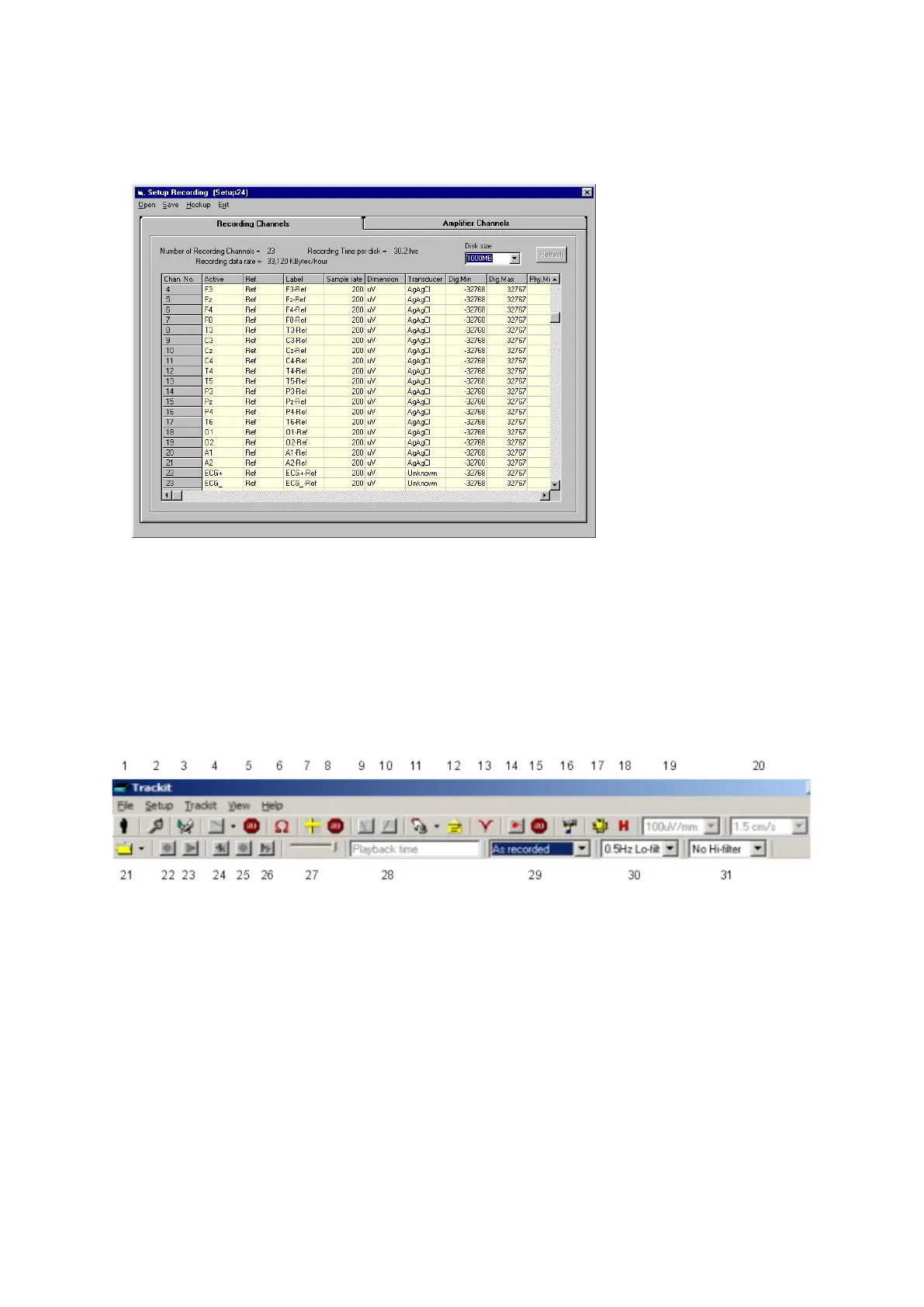
From the Trackit toolbar ( Figure 14) select t he Trackit Cont rol Panel (handshake) icon.
Figur e 1 4 Tra ck it soft w a r e t oolba r
Key:
1 New Patient
2 Set up Recording
3 Trackit Control Panel
4 Ongoings On
5 Ongoings Off
6 I m pedance Check On
7 Calibrat ion On
8 Calibrat ion Off
9 Page Down
10 Page Up
11 Get Trackit Events
12 Email Event s List
13 Not ch Filt er On/ Off
14 PC Record On
15 PC Record Off
16 Videom et ry ( optional)
17 Phot ic St im ulation
18 Hypervent ilation
19 Vertical sensitivit y
20 Chart speed
21 Open files for playback
22 Stop playback
23 St art playback
24 Page back
25 Stop paging
26 Page forw ar d
27 Paging speed
28 Playback t im e
29 Montage selection
30 Lo- filter select ion
31 Hi- filt er selection

Table of Contents

Other manuals for Lifelines trackit Mk3