Page 20 / 107 Section 4. Electrical connections
4.5. RS-232 port
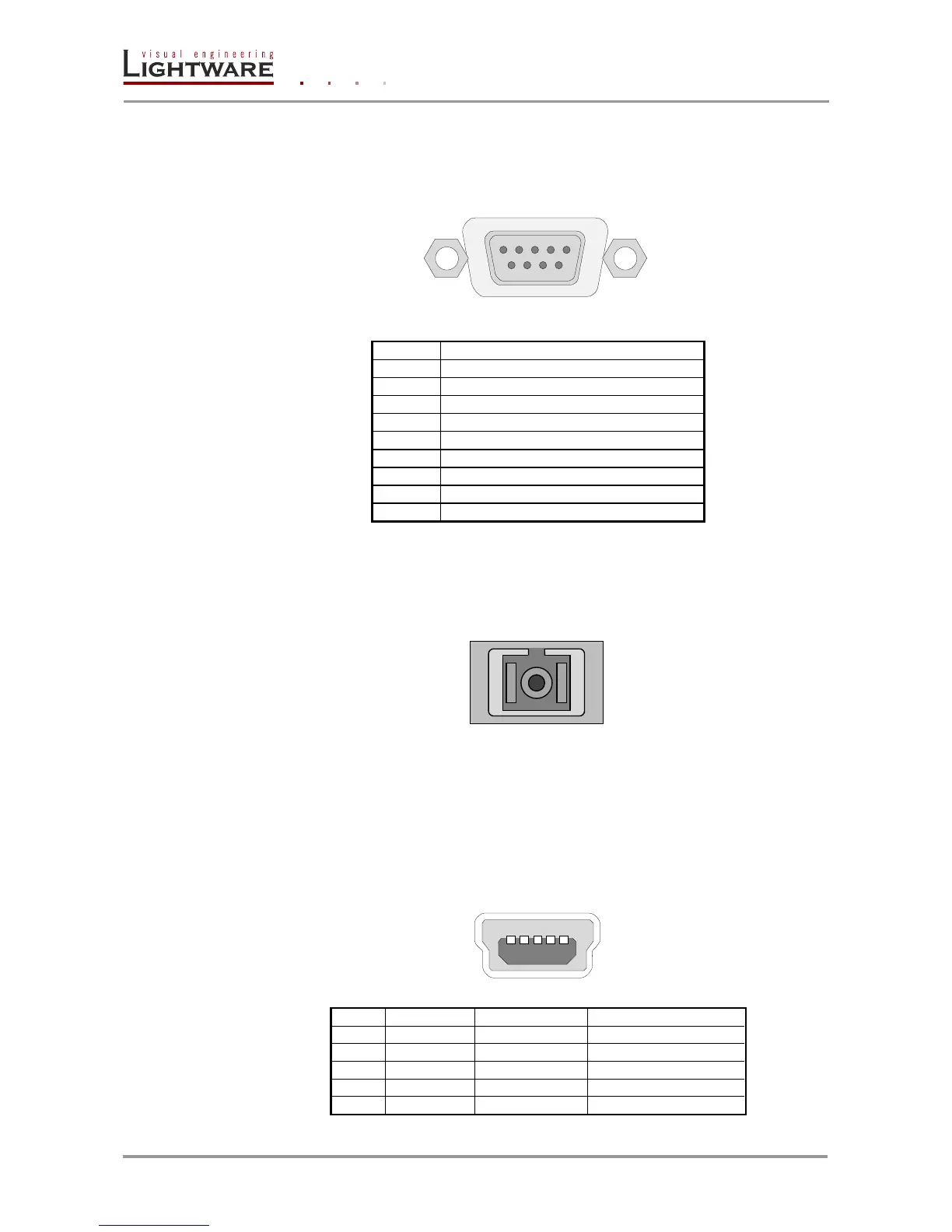
UMX-OPT-TX150R has RS-232 pass-through function or can be remote controlled
through industry standard 9 pole D-SUB female connector. The extender uses RS-232
port.
D-SUB 9 pole female connector (DE9F)
TX data transmit (output)
DTR (Internally connected to Pin 6)
GND signal ground (shield)
DSR (Internally connected to Pin 4)
RTS (Internally connected to Pin 8)
CTS (Internally connected to Pin 7)
Table 4-5. D-sub connector pin assignment for standard RS-232
4.6. Fiber optical output
UMX-OPT-TX150R has SC fiber connector. Always use high quality fiber cable for
connecting transmitters and receivers.
SC fiber receptacle
Info: Fiber optic cables can be easily damaged if they are improperly handled or installed.
Handle the optical cables with care to avoid damage and/or limiting their usefulness.
Warning! Avoid exposure to beam! Direct intrabeam viewing normally hazardous.
4.7. USB connector
UMX-OPT-TX150R has standard Mini USB Type B receptacle.
Mini USB B connector
Table 4-6. Mini USB B connector pin assignments













 To Next Page