Page 4-6
MPS Motor Protection System Rev. 6-F-022117
Operation and Setup
4.3.3 STARTER CONTROL
OPI Menu: Setup | Starter | Starter Type
OPI Menu: Setup | Hardware | OPI Display |
OPI Ctrl Select
A starter type other than Protection Only must be
selected for starter functions to become operational.
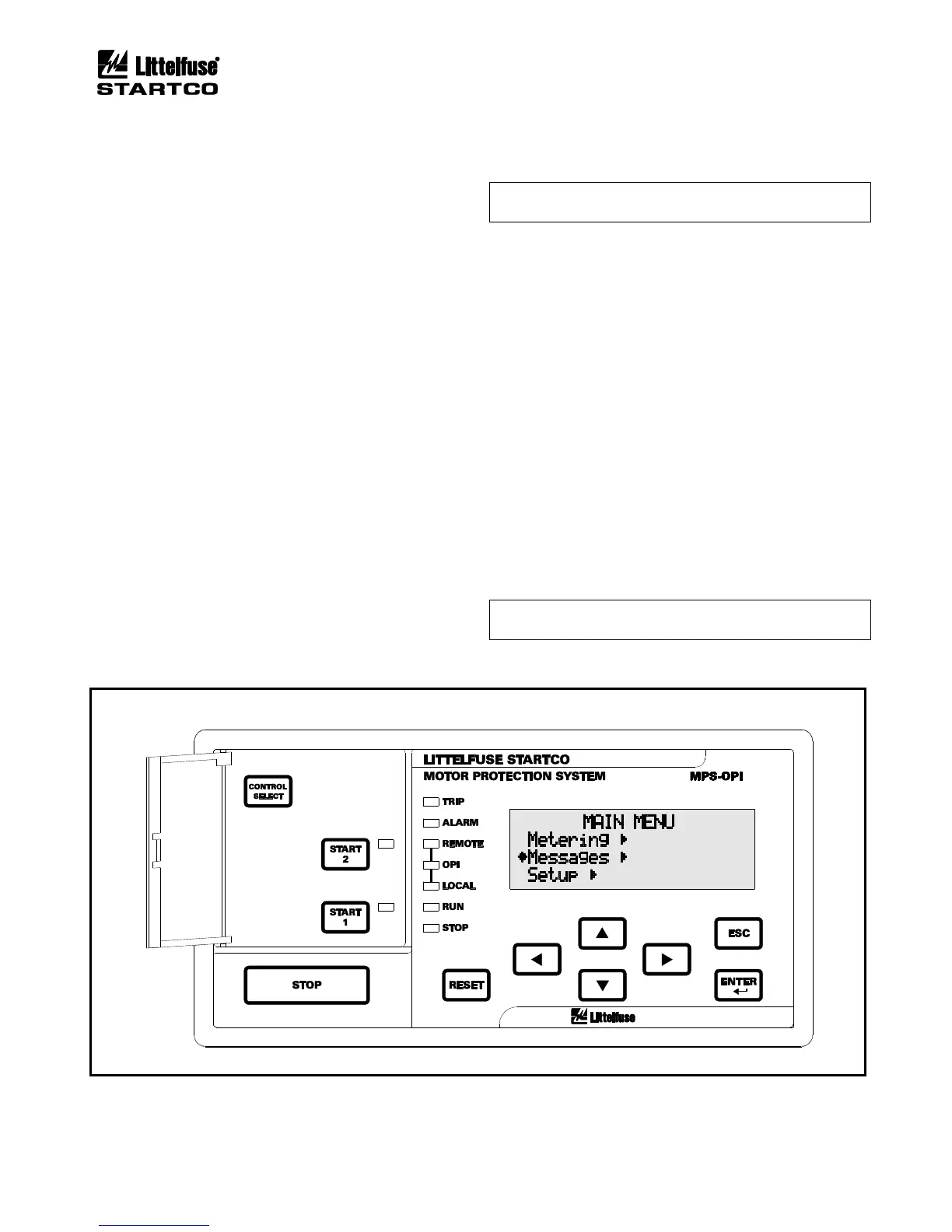
The OPI has a CONTROL SELECT key and three
yellow LED’s (labeled REMOTE, OPI, and LOCAL) to
select and indicate the start sources that the MPS will
respond to. Each of the start sources can be enabled or
disabled in the OPI Ctrl Select menu, and the CONTROL
SELECT key allows the operator to choose from among
the enabled start sources. The factory default has all
sources enabled and REMOTE selected. Regardless of
the control setting, all stop sources are always enabled.
4.3.3.1 OPI CONTROL
If only the OPI LED is on, the MPS is under OPI
control and start keys on the OPI are the only start source
the MPS will respond to. If the OPI has been enabled as a
start source for remote control, the OPI LED will also be
on when remote control is selected. In this case, the MPS
will also respond to the other sources enabled in remote
control (Remote Group).
4.3.3.2 LOCAL CONTROL
OPI Menu: Setup | Digital Inputs | Digital Input x |
Input x Function
When the LOCAL LED is on, the MPS is under local
control and digital inputs programmed as Local Start 1 or
Local Start 2 are the only start sources the MPS will
respond to.
NOTE: The I
2
t Start Inhibit function and digital inputs
programmed as Interlock are bypassed in local control.
Local control can also be selected with a network
command or by a digital input programmed for Local
Select—both have priority over the CONTROL SELECT
key. If either or both methods force the MPS into local
control and then release local control, the MPS will return
to the previous control setting. Each local-control source
must release local control to allow the MPS to return to
the previous control setting.
4.3.3.3 REMOTE CONTROL
OPI Menu: Setup | Starter | Remote Group
When the REMOTE LED is on, MPS start control is
from the start sources enabled in the Remote Group menu.
Start source selections are Digital Inputs, OPI, and
Network. If Digital Inputs is enabled, digital inputs
programmed for Start1, Start2, 2-Wire Start1, and 2-Wire
Start2 are enabled. If OPI is enabled, the start keys on the
OPI are enabled and if Network is enabled, start
commands from the network are enabled.
NOTE: The OPI STOP key and digital STOP inputs
always cause a stop.
FIGURE 4.3 MPS-OPI Interface.


 To Next Page