Page 4-9
MPS Motor Protection System Rev. 6-F-022117
Operation and Setup
4.3.5.3 DATA LOGGING
OPI Menu: Messages | Event Records
Trip-record data, start-record data, and Emergency
Thermal Resets (ETR) are logged. Trip-record data
includes the time of trip, cause of trip, and pre-trip
(1)
data. ETR records contain a snapshot of the data prior to
an ETR.
Trip or ETR records include:
• Time Stamp YY/MM/DD HH:MM:SS
• V
ab
, V
bc
, V
ca
, I
a,
I
b
, I
c
, and 3I
0
at time of trip or ETR
• Unbalance (I
2
/I
1
, V
2
/V
1
) at time of trip or ETR
• P, Q, S, and PF at time of trip or ETR
(1)
• Used I
2
t at time of trip or ETR
• PTC/RTD temperature data if applicable
• Differential module data if applicable
Start records
(2)
are triggered by motor current and
include:
• Time Stamp YY/MM/DD HH:MM:SS
• Maximum values of I
a
, I
b
, I
c
, and 3I
0
during the start
• Maximum value of I
2
/I
1
(4)
, V
2
/V
1
during the start
• Minimum values of V
ab
, V
bc
, V
ca
during the start
• Maximum differential currents during the start if
applicable
• I
2
t used during the start
(3)
• Start duration
• PTC/RTD temperature data if applicable
Record Type .............................. Trip/Start/ETR
Number of Records .................... 64 (First In First Out)
(1)
Recorded values for power quantities (P, Q, S, PF)
are averages of measurements over the previous 16
cycles.
(2)
Values updated at 0.5-s intervals during a start.
Record logged when the Run mode is entered.
(3)
Starting I
2
t can be used to determine the I
2
t Lockout
Level. See Section 5.2.
(4)
Measurements enabled 0.5 s after start current is
detected.
4.3.5.4 STATISTICAL DATA
OPI Menu: Messages | Statistics
OPI Menu: Setup | System Config | Maintenance
The MPS records the following statistical data:
• Running hours.
• Counters for all trips.
Statistical data can be cleared in the Maintenance
menu.
4.3.5.5 EMERGENCY THERMAL RESET
OPI Menu: Messages | Emerg I2t Reset
The Emerg I
2
t Reset menu is used to reset the thermal
memory. See Section 5.2.3.
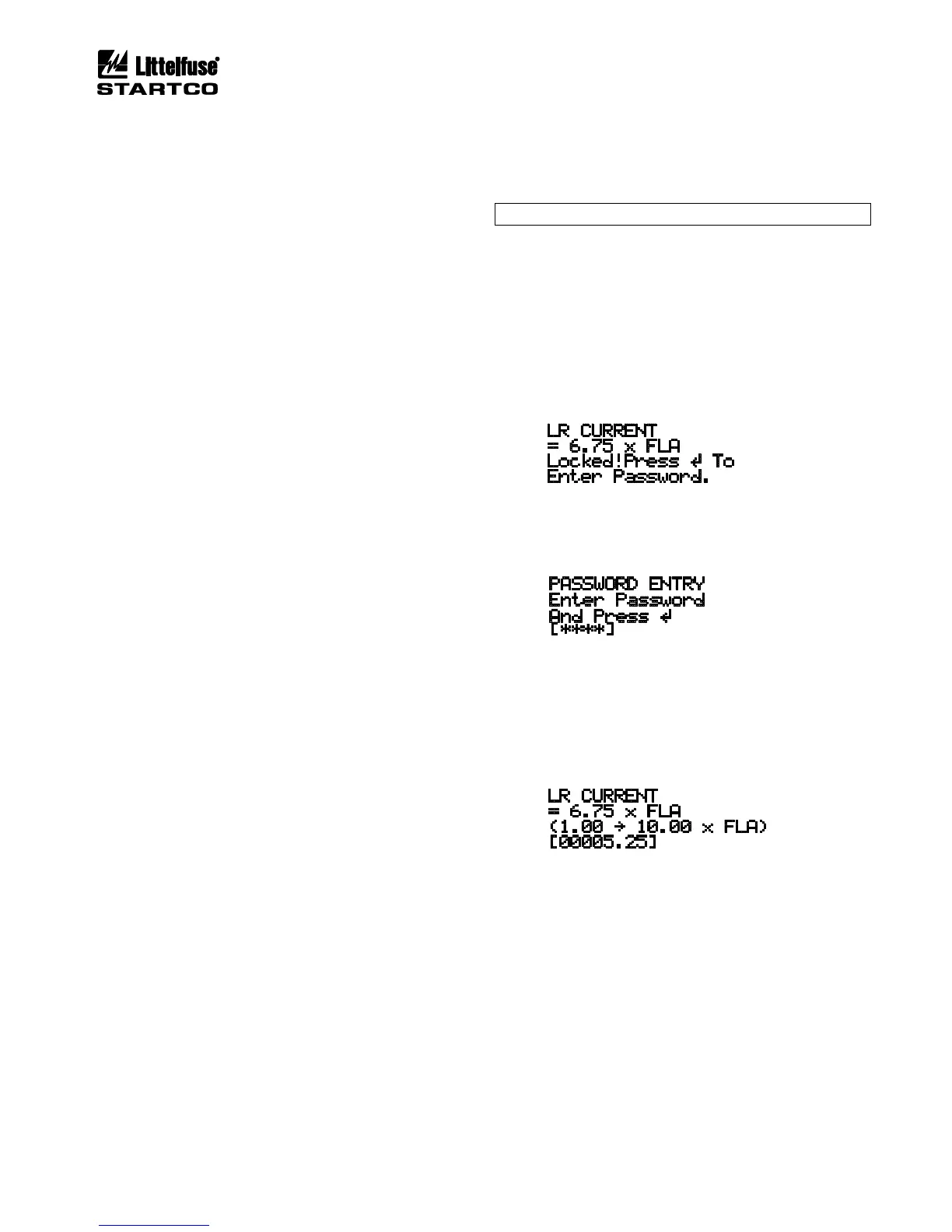
4.3.6 PASSWORD ENTRY AND PROGRAMMING
OPI Menu: Setup | System Config | Password Timeout
NOTE: Factory default password is 1111.
All set points are locked from changes until the four-
character password is entered. If set-point access is
locked, the user is prompted to enter the password. Once
entered, set-point access is allowed and remains enabled
until a key has not been pressed for the time defined by
the Password Timeout set point.
EXAMPLE:
Prior to password entry:
When ENTER is pressed, the Password Entry display
is shown:
Use the left- and right-arrow keys to select the position
of the flashing cursor. Use the up- and down-arrow keys
to select password characters. Press ENTER.
When the correct password is entered, a flashing
cursor is displayed, the set-point range and units are
shown, and set points can be changed.
Use the up- and down-arrow keys to change a set-
point update-field character, and use the left- and right-
arrow keys to move between characters. Press ENTER
to update the set point, or press ESC to exit the display
without changing the set point. A set point is set to the
minimum or maximum value of its range if an out-of-
range value is entered. Press ESC to exit the set-point-
update screen.


 To Next Page