OPERATION
REEL POSITION (continued)
NOTE: The
reel
must
be
adjust
ed
equally
on
bo
th
sides
,
both
horizontally
and
vertically.
To
adjust
reel
horizontal
(fore-aft)
position:
a,
Lo
osen
nuts (A) and (8) until
reel
drive chain
a
nd
belt
are
loose.
b. L
oosen
nu
ts
(e)
. three
on
left
side,
fou
r
on
right
si
de
.
c. l oosen jam nut
on
bolt (0
),
both
sides, and tum
adjus
ter
nu
ts
to move
ree
l
fore
or aft to desired
position.
Ti
g
ht
en jam
nul
d, Tighten
nuts
(e
),
the
n
tighten
chain
and
be
lt
to
recommended t
ension.
See
Maintenance
/S
ervi
ce
section
.
To
adjust
reel vertical position:
a. Loosen nuts (A) and (8) until reel drive chain
and
be
lt
are
loose.
b.
Loosen
nuts
(e)
,
three
on
left
side
, four
on
right
side
.
c. L
oosen
nuts
(E) (left
side
o
nly
).
and use
push
b
ol
ts
(F
),
two
per si
de
,
to
move
reel
up
or
down
to desired position. Tighten nuts (E
).
d. T
ig
hten nuts
(e)
, then tighten chain and belt to
recommended tension.
See Maintenanc
e}
Service section.
To
adjust
tine aggressiveness:
a. At right side of reel (cam end) only,
lo
osen
fou
r
nuls (C).
b. Use push bolts (F) to rotale cam to desired
position. Viewed from right side, rotate cam
clockwise to obtain more
agg
ressive
tin
e
action.
c. Tighten nuts
(e
),
then check that chain
an
d/or
be
lt have not become over tig
ht.
Adjust to
recommended tens
io
n
if
required. See
Ma
intenancel Service section.
After
adjusting reel
position
:
a, Check that the reel rotates freely.
nnes
must
not
co
ntact auger, guards or ground.
b, Check that the reel
is
adjusted to the same
po
si
tion
on
both sides, Reel tube should
appear
parallel to header beam from both side
and front.
c. Check header
Hoat
and adjust if required. See
"Header
Fl
otation"
in
th
is section.
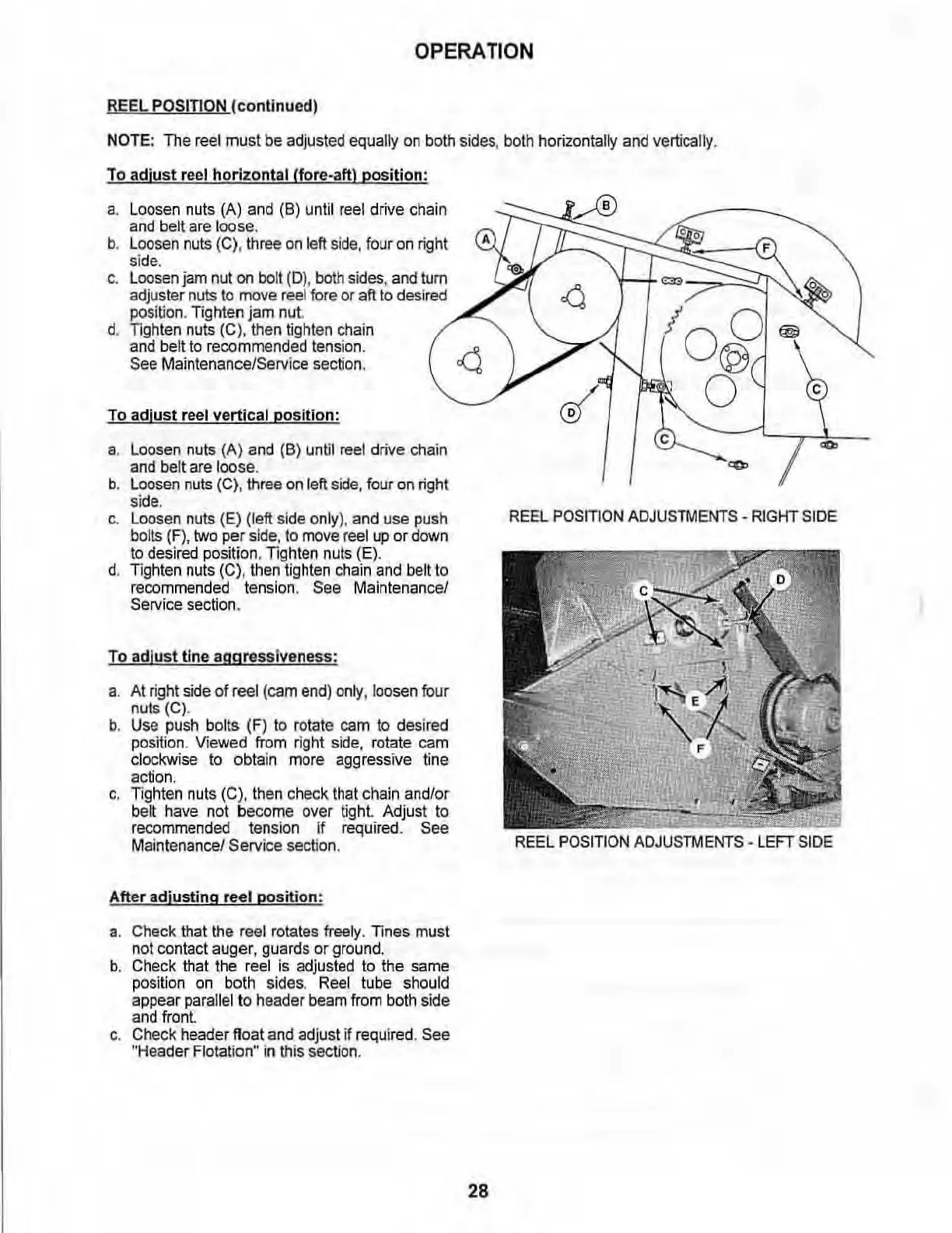
REEL
PO
S
IT
ION
ADJU
STMENTS
-
RIGHT
SIDE
REEL
POSITI
ON
AD
J
US
TMENTS
-
LEFT
SIDE
28


 To Next Page