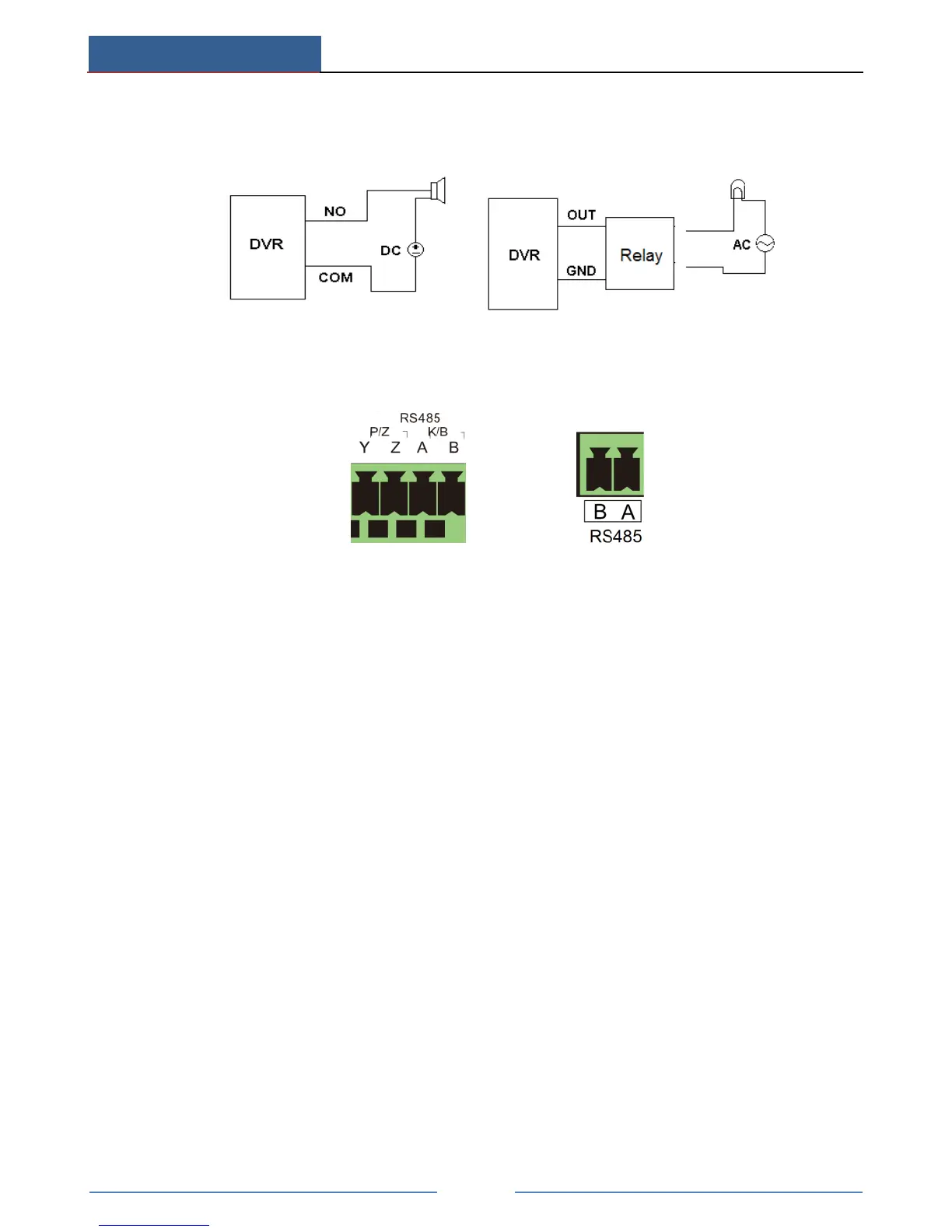
tighten the screws. Provided that the external alarm output devices need power supply, you
can connect the power supply as per the following figures.
PTZ Connection
There are two types of RS485 interfaces:
(Type 1) (Type 2)
Type 1: The P/Z interfaces are used to connect speed dome. K/B interfaces are used to connect
keyboard.
Type 2: The RS485 interfaces are not only used to connect speed dome but also to connect
keyboard.
The way to connect speed dome to the AHD Hybrid DVR:
Type 1: Disconnect pluggable block from the RS-485 terminal block and then loosen the fixed
screws from the pluggable block, insert signal cables into Y and Z port separately (Y is TX+;
Z is TX-) and tighten the fixed screws. Next, connect pluggable block back into terminal block.
Finally, connect the video cable of the speed dome to the video input interface of the AHD
Hybrid DVR.
Type 2: Disconnect pluggable block from the RS-485 terminal block and then loosen the fixed
screws from the pluggable block, insert signal cables into A and B port separately (A is TX+;
B is TX-) and tighten the fixed screws. Next, connect pluggable block back into terminal
block. Finally, connect the video cable of the speed dome to the video input interface of the
AHD Hybrid DVR.



 To Next Page