② Select date and channels on the right hand side. A data with highlighted borderline
indicates presence of data.
③ Checkmark Motion, Sensor or All accordingly.
④ Click Search button to display the searched event information in the event list box.
Double check a certain record file to playback.
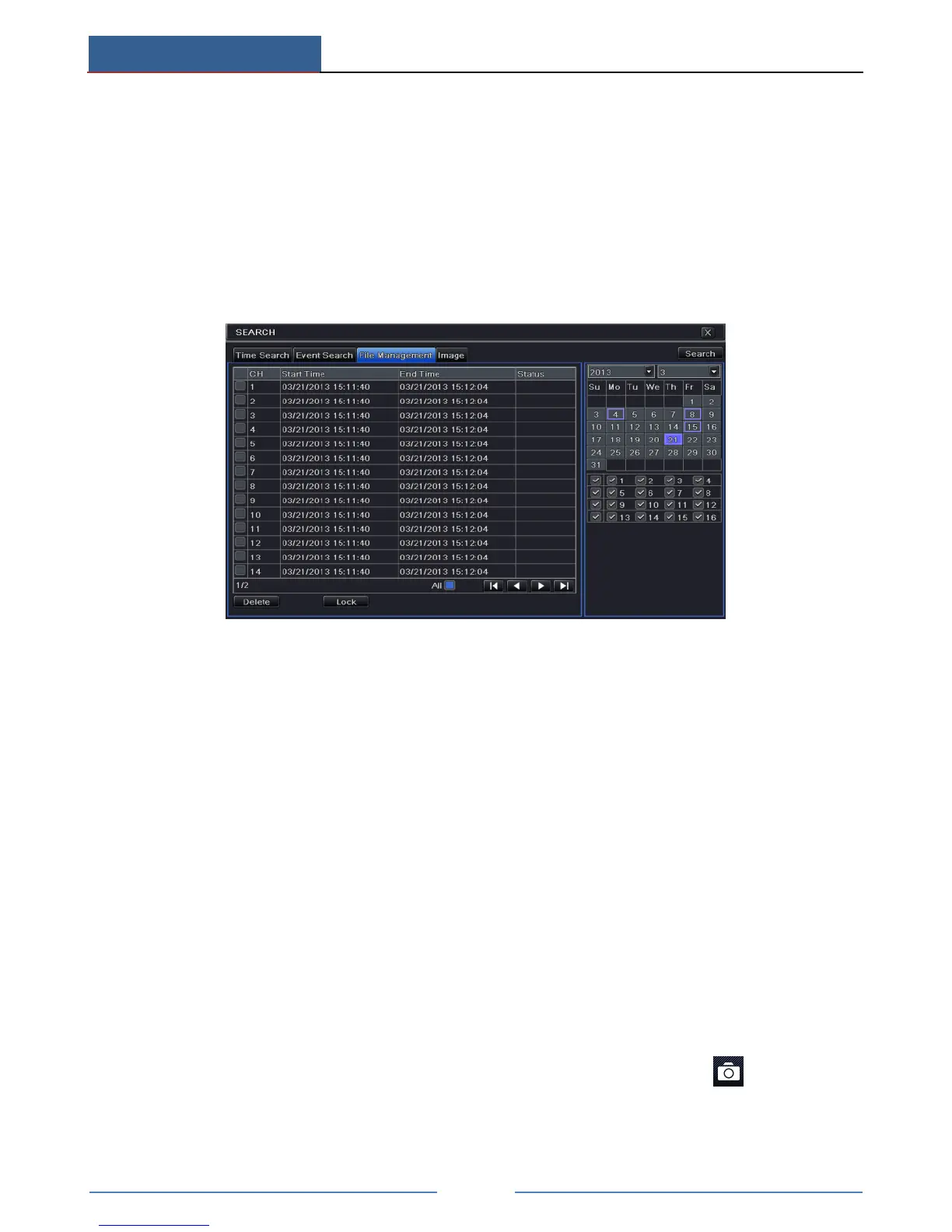
7.4 Playback by File Search
① Go to Main MenuSearchFile Management interface.
② Select date and channels. The date with highlighted borderline indicates presence of
data.
③ Click “Search” button to display the searched files in the file list box.
④ Use “All” button to lock/unlock or delete all files in the file management column.
⑤ Double click an unlocked item to play.
Lock: Select a file and click “Lock” button to lock this file, after that, that file will not be
deleted or covered.
Unlock: Select a locked file and click “Lock” button to unlock this file.
Delete: Select an unlocked file and click “Delete” button to delete this file.
7.5 Snap Setting and Playback by Picture Search
You need to capture pictures first and then play back by picture search.
7.5.1 Snap Settings
Manual Snap
In the live view mode, right click to dispaly the menu toolbar. Then click on this menu
toolbar to capture the picture.
Auto Snap



 To Next Page