DVR will connect to the server and would give a confirmation message.
② When accessing the remote interface of the AHD Hybrid DVR, user can input WAN IP
to access directly (user can go to Main MenuInformationNetwork interface to check
IP address). The browser will download Active X control.
③ The following setting steps are as the same as ④ and ⑤ in Point 1.
14.3 Remote Surveillance through Apple PC
Note: Because the current plug-in version of client end just only supports 32-bit mode,
so the safari browser shall start 32-bit mode. If the browser is the earlier MACOS
version, the default setting is 32-bit mode and the setting can be skipped.
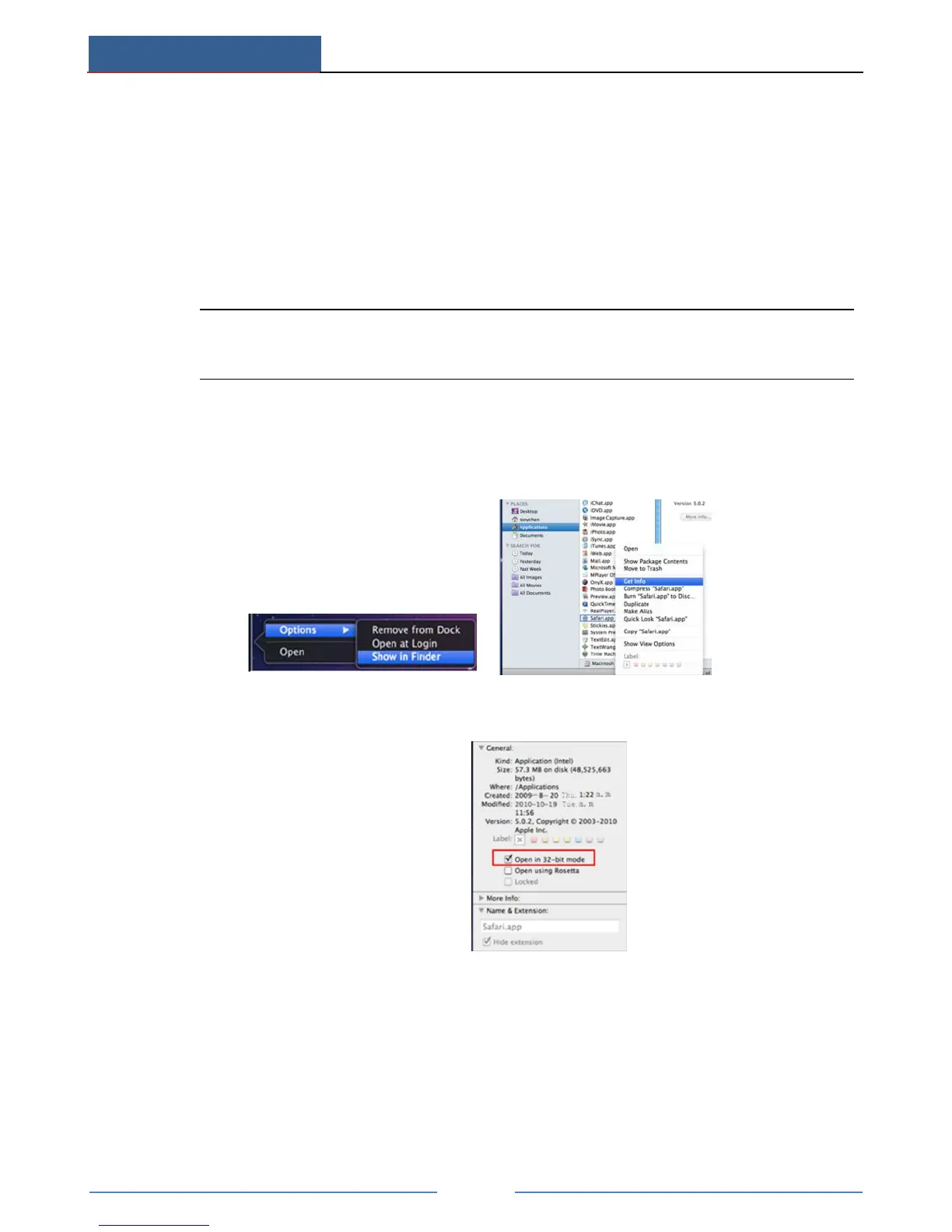
The setting steps are as follows:
① Right click safari icon and select “Show in Finder”.
② Select ApplicationsRight click “Safari. App”Select “Get Info”.
③ Select “Open in 32- bit mode”.
14.3.1 LAN
① After starting Apple computer, click Apple icon. The following window will pop up.
Please select “System Preferences” “Internet &Wireless” “Network”.



 To Next Page