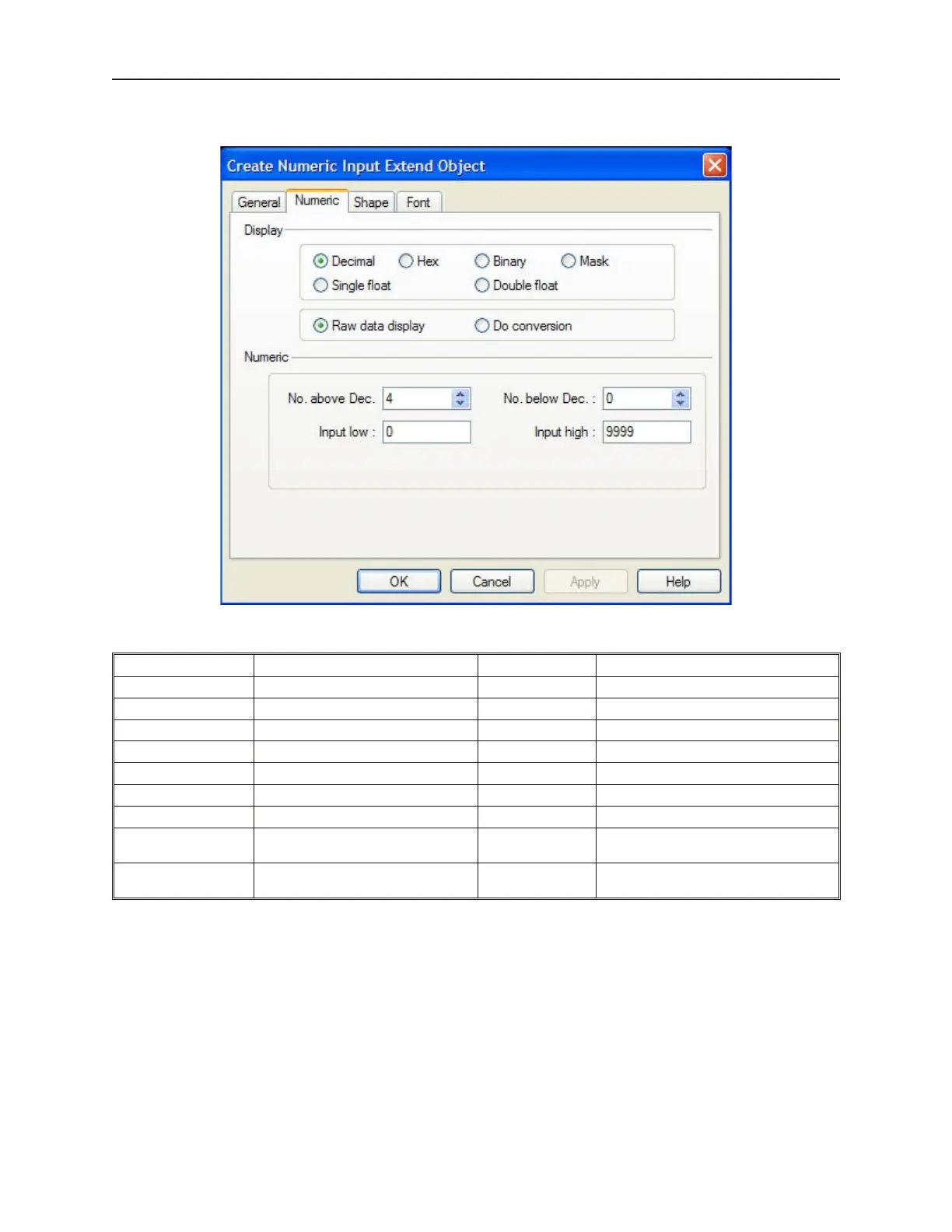
5. Click the Numeric tab to display the Numeric form.
6. In the Display attribute box, select the format type you wish to use. The options are:
Format Range No. of Words Description
Decimal -32768 to +32767 1 signed 16 bit format
-999999999 to +2147483647 2 signed 32 bit format
Hex 0000 to FFFF 1 hexadecimal 16 bit format
00000000 to FFFFFFFF 2 hexadecimal 32 bit format
Binary 00… to 11… (16 bits) 1 binary 16 bit format
00… to 11… (32 bits) 2 binary 32 bit format
Mask ***** 1,2 masks the value with asterisks
Single Float
-999999999.9999999999 to
9999999999.9999999999
2 IEEE 754 format; single precision
Double Float
-999999999.9999999999 to
9999999999.9999999999
4 IEEE 754format; double precision
7. If Decimal format is selected, then you have the option of selecting Raw data display or Do
conversion. Use Raw data display when you wish to display the true numeric value of the
register. Select Do conversion when you wish to scale the value.
8 In the Display attribute box, select the format type you wish to use. The options are:
1010-1001a, Rev 02
188 Sil ver Se ries In stal la tion & Op er a tion Man ual



 To Next Page