18
PLAY for confirming that the test is correct. PREV when the
test is not ok. NEXT is pressed in order to abort to the
nucleus at any time; the nucleus is not tested successfully.
The confirmation can also be send through the serial port for
automated verification. Character ‘o’ means 'ok'; character ‘n'
means that this nucleus must be aborted; the nucleus is not
tested successfully. Any other key will fail the test.
Basic Engine Tests [06]
Furore Tests [12]
DAC Board Tests [13]
Miscellaneous Tests [14]
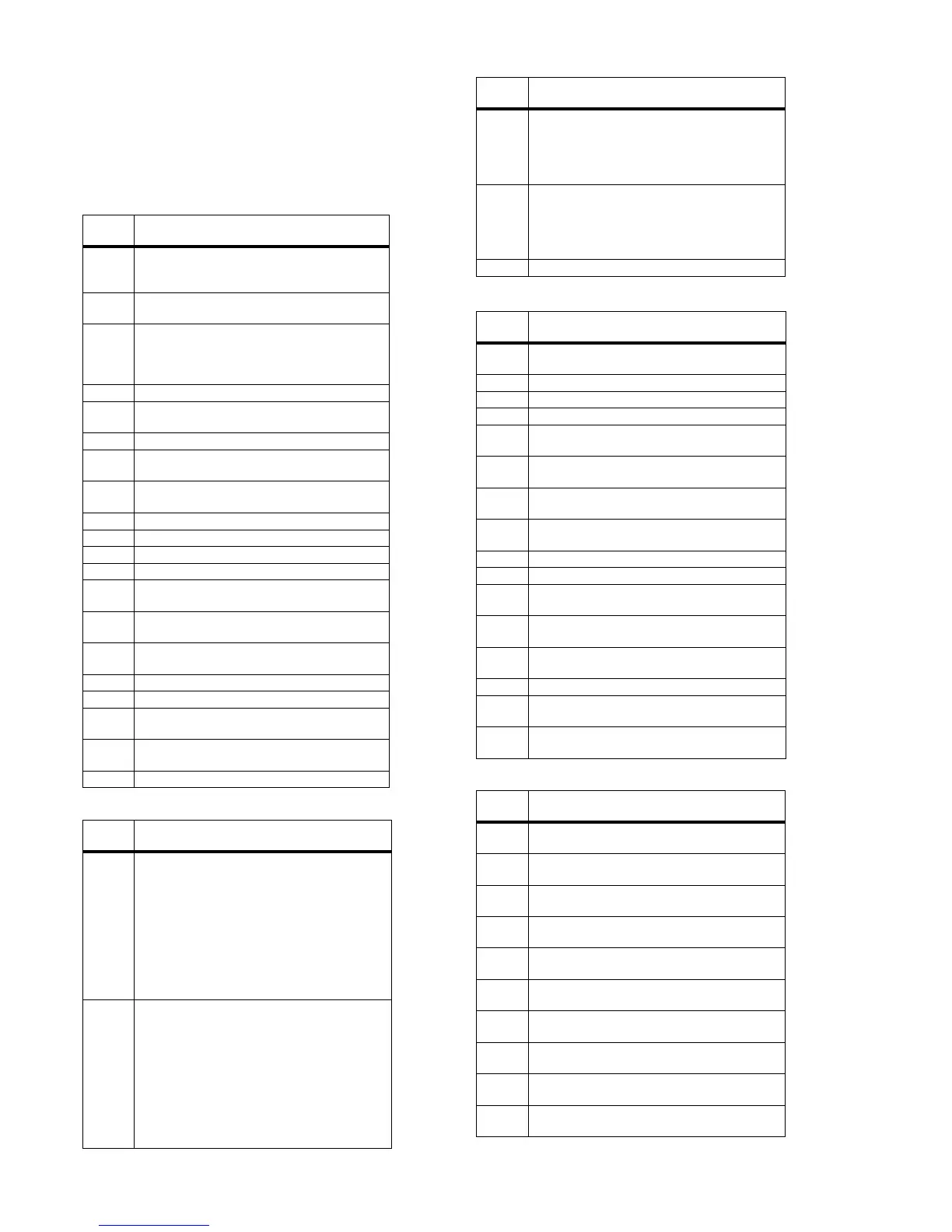
[xx yy]
Number
Nuclei
600 S2B Pass Switch the RS232 port and the S2B
port in pass-through mode. The only way to exit
this nucleus is via a power off of the player.
601 S2Bengine Checks the S2B interface with the
Basic Engine by sending an 'echo' command.
602 Version Returns the version number of the Basic
Engine. The version number will also be dis-
played on the local display. The PLAY key is
used to exit this nucleus.
603 Reset Resets the Basic Engine.
604 Focus On Puts the laser of the BE into focus (fo-
cus loop).
605 Focus Off Switches the focus loop off.
606 Disc Motor On Switches the disk motor (= spin-
dle motor) on.
607 Disc Motor Off Switches the disk motor (= spin-
dle motor) off.
608 Radial On Closes the radial loop.
609 Radial Off Opens the radial loop.
610 Sledge In Moves the sledge fully inwards.
611 Sledge Out Moves the sledge fully outwards.
612 Grooves In Lets the laser spot jump to the inside
limit the disc.
613 Grooves Mid Lets the laser spot jump to the mid-
dle of the disc.
614 Grooves Out Let's the laser spot jump to the out-
side of the disc.
615 Tray In Closes the disc tray.
616 Tray Out Opens the disc tray.
635 DVD Laser On Switches the DVD laser of the BE
on.
636 CD Laser On Switches the CD laser of the BE
on.
637 Lasers Off Switches the lasers off.
[xx yy]
Number
Nuclei
1200 Write Read SDRam Low The following three indi-
vidual memory tests will be executed at the lower
FURORE SDRAM: a data bus test, an address
bus test, and a device test. The first two test for
electrical wiring problems and improperly insert-
ed chips, while the third is intended to detect
missing chips and catastrophic failures. As an
unintended consequence, the device test will
also uncover problems with the control bus wir-
ing.
1201 Write Read SDRam High The following three in-
dividual memory tests will be executed at the
higher FURORE SDRAM: a data bus test, an ad-
dress bus test, and a device test. The first two
test for electrical wiring problems and improperly
inserted chips, while the third is intended to de-
tect missing chips and catastrophic failures. As
an unintended consequence, the device test will
also uncover problems with the control bus wir-
ing.
1202 Write Read Fast SDRam Low The following two
individual memory tests will be executed at the
lower FURORE SDRAM: a data bus test, and an
address bus test. The two test for electrical wiring
problems and improperly inserted chips.
1203 Write Read Fast SDRam High The following two
individual memory tests will be executed at the
higher FURORE SDRAM: a data bus test, and an
address bus test. The two test for electrical wiring
problems and improperly inserted chips.
1204 Id Gets the revision ID of the FURORE chip.
[xx yy]
Number
Nuclei
1300 I2C Checks the interface between the I2C con-
troller on the Hostdecoder and the DAC board.
1301 I2C Enable Enables the I2C interface.
1302 I2C Disable Disables the I2C interface.
1303 Reset Resets the DAC board.
1304 Filter SACD Selects the SACD output filters for
the DACs.
1305 Filter Non-SACD Selects the non-SACD output
filters for the DACs.
1306 Clock Internal Selects the internal clock of 384 *
Fs. (in 44.1kHz mode)
1307 Clock External Selects the external clock. (in non
44.1 kHz mode)
1308 Mute On Switches the mute of the DAC board on.
1309 Mute Off Switches the mute of the DAC board off.
1310 Mode CDDA Switches the DACs into CDDA
mode.
1311 Mode DVD48 Switches the DACs into DVD 48
kHz mode.
1312 Mode DVD96 Switches the DACs into DVD96
kHz mode.
1313 Mode DSD Switches the DACs into DSD mode.
1314 Clock Frequency SACD Selects the DAC master
clock MCLK for SACD = 384Fs
1315 Clock Frequency CDDA Selects the DAC master
clock MCLK for CDDA = 192Fs
[xx yy]
Number
Nuclei
1400 Clock 11.289 MHz Switches clock A_CLK from
the microclock to 11.2896 MHz.
1401 Clock 12.288 MHz Switches clock A_CLK from
the microclock to 12.288 MHz.
1402 Clock 24.576 MHz Switches clock A_CLK from
the microclock to 24.576 MHz.
1403 Colour Setup I2C Checks the I2C interface with
the RGB video processor on the Audio/Video.
1404 Colour Setup High Sets the RGB setting to a high
value, changing the intensity.
1405 Colour Setup Low Sets the RGB setting to a low
value, changing the intensity.
1406 Colour Setup Normal Sets the RGB setting to a
normal value, changing the intensity.
1407 Scart Switch I2C Checks the I2C interface with
the scart switch on the Audio/Video board.
1408 Scart Switch Dvd Sets the switch IC on the Audio/
Video board to give DVD signal.
1409 Scart Switch Pass Sets the scart IC on the Audio/
Video board to pass-through the aux. scart input.
[xx yy]
Number
Nuclei



 To Next Page