38
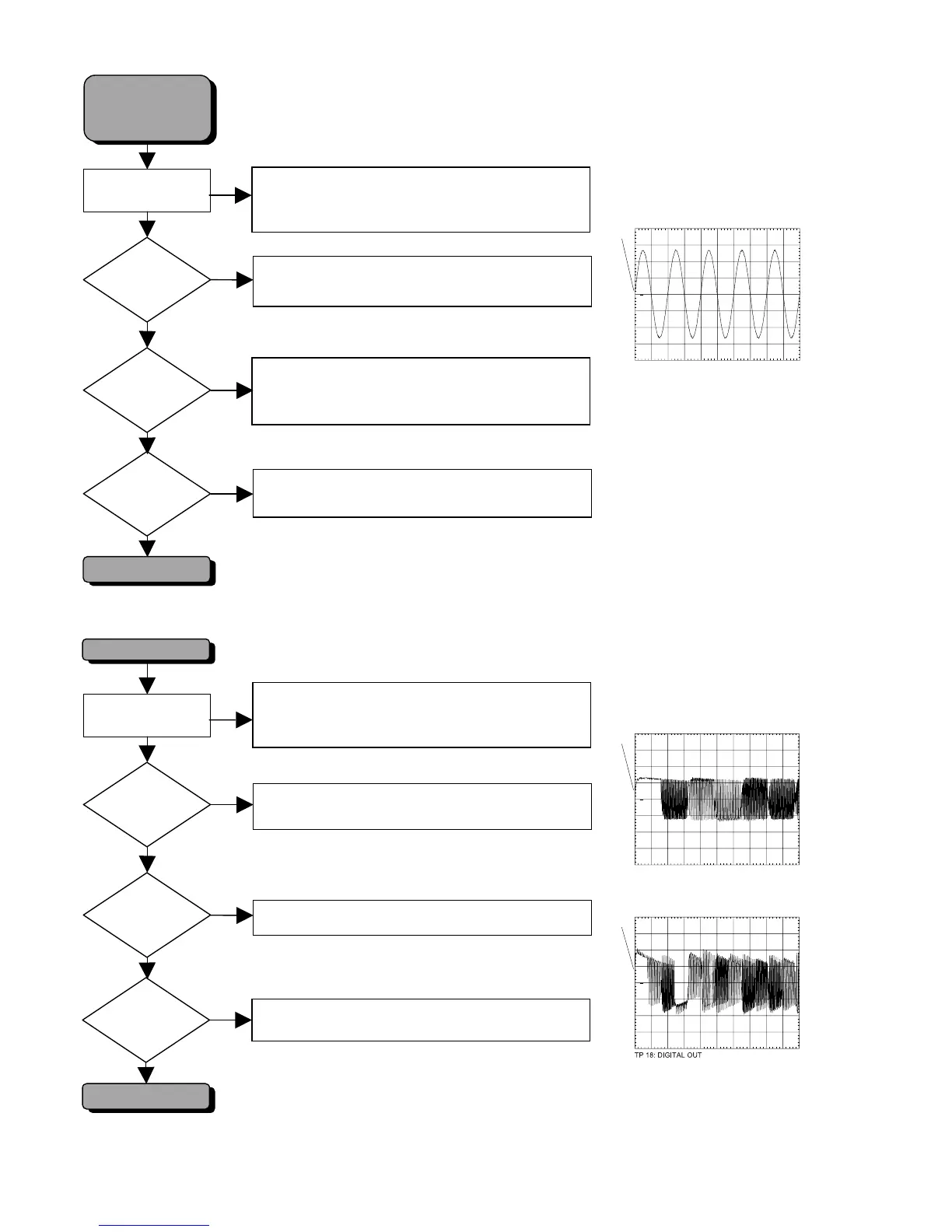
SOUND OK
Diagnostic Software
NO SOUND ON
AUDIO CINCH 1402
TV- & AUX SCART
HPR?
HPL?
Check SWITCH 7413
Check OPAMP 7414
Check KILL transistors 7415, 7416, 7419, 7420
Check HPR and HPL at conn.1410-1,3 (testpoint 16)
Check OPAMP 7403-C,D
NO
YES
AUDIO
CINCH 1402
?
NO
YES
To put set in “Player script”, press keys
STOP+OPEN/CLOSE simultaneously and switch on.
Proceed until display shows “
Press PLAY to execute test.
”.
DIGITAL OUT OK
Diagnostic Software
NO DIGITAL OUTPUT
DIG_OUT
Testpoint 11?
Check digital trafo L5400
Check flex connection to mono board
Check mono board
NO
YES
DIGITAL OUT
Testpoint 18?
NO
YES
OPTICAL OUT?
Check optical transmitter 6400
AUDIO
TV- & AUX-SCART
?
YES
NO
Check SCART SWITCH IC 7305
Check KILL transistors 7336, 7337
PM3392A
ch1
CH1 1 V~ MTB 500us ch1+
1
TP 16 : ANALOG OUTPUT AUDIO HP_R & HP_L
PM3392A
ch1
CH1 2 V~ MTB 100ns ch1+
1
TP 11: DIG_OUT
PM3392A
ch1
CH1 200mV~ MTB 200ns ch1+
1
SINE ON
Display shows "
BUSY
".
To put set in “Player script”, press keys
STOP+OPEN/CLOSE simultaneously and switch on.
Proceed until display shows “
Press PLAY to execute test.
”.
SINE ON
Display shows "
BUSY
".



 To Next Page