42
5.8 Trouble shooting DAC Board
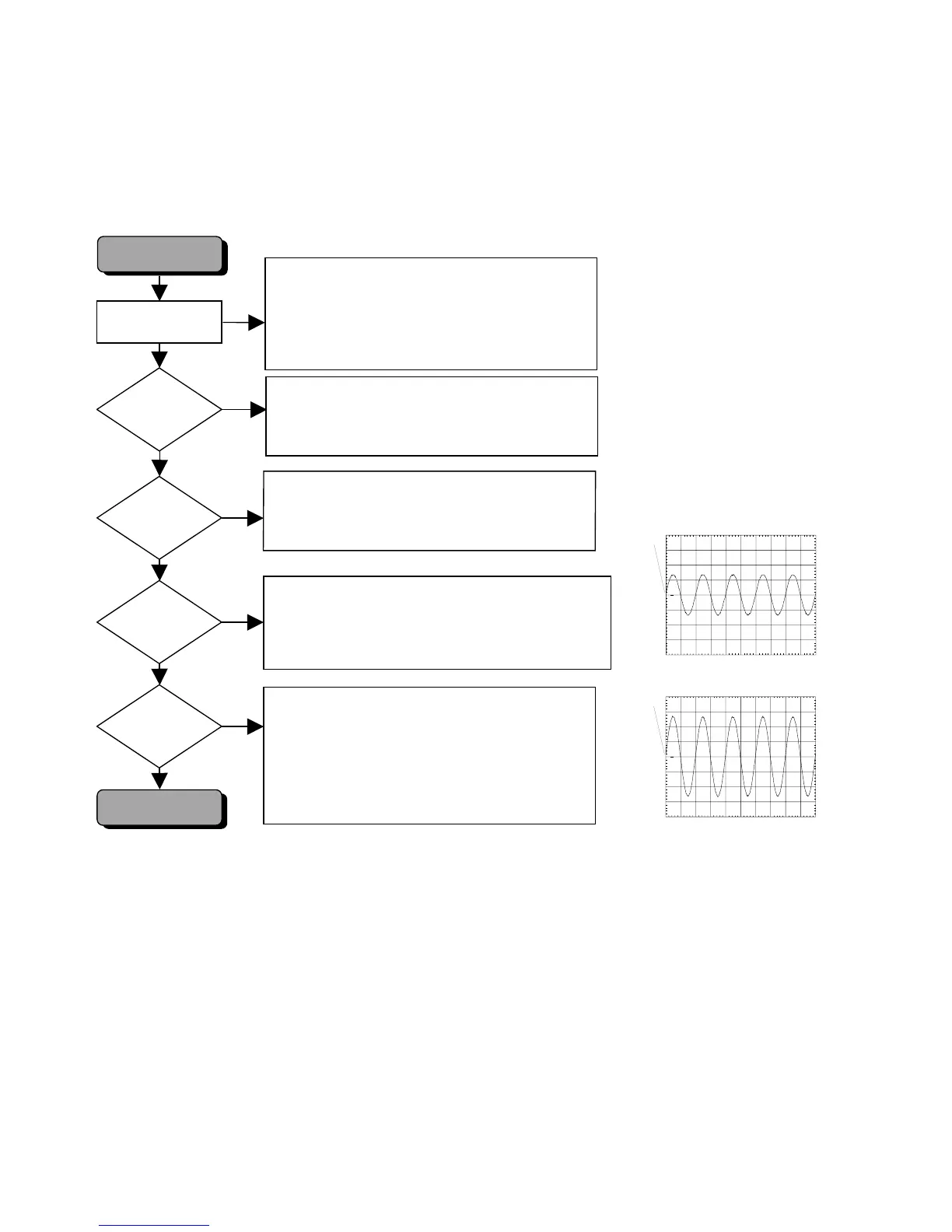
TROUBLESHOOTING DAC BOARD
Testing of DAC board can be done using diagnostic software “Player script”.
Mono board is used to generate a sound with the sound test SINE ON.
Diagnostic Software
DAC''s
& Filters
POWER SUPPLY?
Check filters.
Check mute circuits
Check relays
Check for analog signal at outputs of DAC's: see oscillogram
Check for analog signal at cinch outputs: see oscillogram
Check power supply voltages +12VA, -12VA
Check voltage on TP01 (pin 25 of DAC): 2.26V?
BCK = 3, 072MHz, LRCK = 48 kHz
SDT[3:1] = DATA, SEL[3:1] = High
See test instructions mono board.
Check supply voltages 12VA, -12VA, +5VA, +3.3VD,
+12VR, +3.3VOSC (QD23)
Check connection to Linear power supply
Check flex connection to mono board.
Master Clock at pin2 of conn. JD01(16.9344 MHz)
Check flex connection to mono board.
NO
YES
BCK, LRCK
SDT[3:1]
SEL[3:1]
?
NO
YES
NO
YES
AUDIO
CINCH OUTPUTS
NO
YES
AUDIO
AT OUTPUTS
OF DAC's
?
?
To put set in “Player script”, press keys
STOP+OPEN/CLOSE simultaneously and switch player on.
Press NEXT until display shows "
SINE ON
"
Press
PLAY
to execute.
During this test, an audio sine signal will be
sent to the audio cinches.
DAC & FILTERING
OK
PM3392A
ch1
CH1 1 V~ MTB 500us ch1+
1
ANALOG OUTPUT DAC
PM3392A
ch1
CH1 1 V~ MTB 500us ch1+
1
ANALOG OUTPUT AUDIO CINCH



 To Next Page