4.7 Changing Settings on the Quick Start Menu
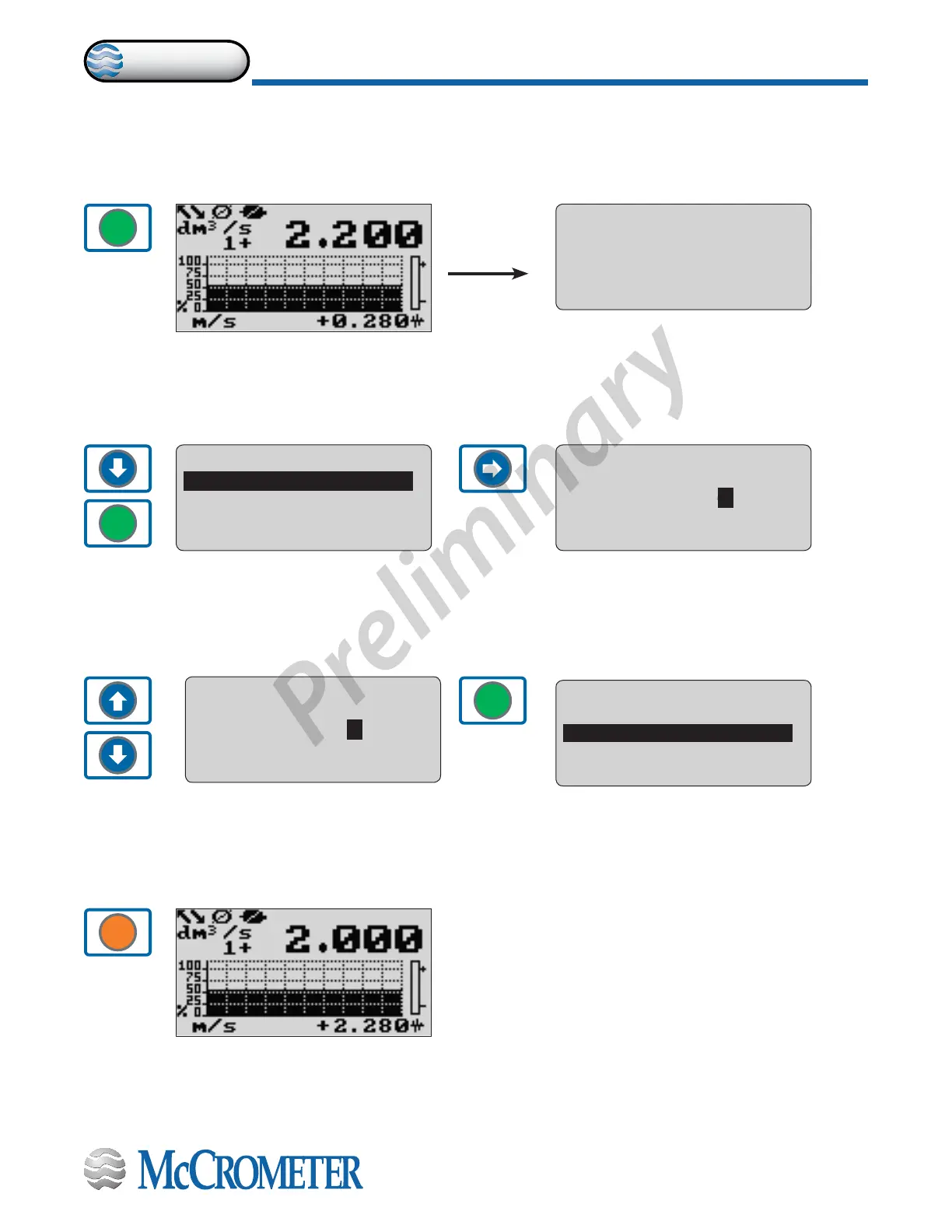
The steps below demonstrate how to modify the Full Scale value from the Quick Start Menu.
1. Beginning at one of the visualization screens, press the ENTER button to go to the Quick Start Menu.
2. Press the DOWN button to select the function
FS1 and press the ENTER button.
6. Press ESC to exit to the main page.
4. Press the up or down buttons to change the value.
ENTER
ENTER
ENTER
ESC
3. Press the RIGHT button to select the value.
5. Press ENTER to conrm the new value.
QUICK START
S.model= 000
FS1=dm3/s 04.000
FS2=dm3/s 04.000
Main menu
QUICK START
S.model= 000
FS1=dm3/s 04.000
FS2=dm3/s 04.000
Main menu
S.model= 000
QUICK START
S.model= 000
FS1=dm3/s 04.000
FS2=dm3/s 04.000
Main menu
4
QUICK START
S.model= 000
FS1=dm3/s 04.000
FS2=dm3/s 04.000
Main menu
5
QUICK START
S.model= 000
FS1=dm3/s 04.000
FS2=dm3/s 05.000
Main menu
FS1=dm3/s 05.000
30124-60 Rev. 1.0 | unreleased
Page 17
CONVERTER OPERATION
ProComm


 To Next Page