McHale Fusion 3 Baler & Wrapper
60
7.2 Control box features
7.2.1 Working Display
When the control box is first switched on it displays “McHale Fusion” followed by the
software version number, followed by the selected language. The language can be
changed at this point by pressing the arrow up (Softkey A) or arrow down (Softkey B)
button to scroll until the required language is selected.
After a short delay, the working display appears. The working display features an
image of the Fusion 3, which is surrounded by general working information.
7.2.2 Manual/Automatic Modes
There are two working screen modes:
1. Manual
2. Automatic
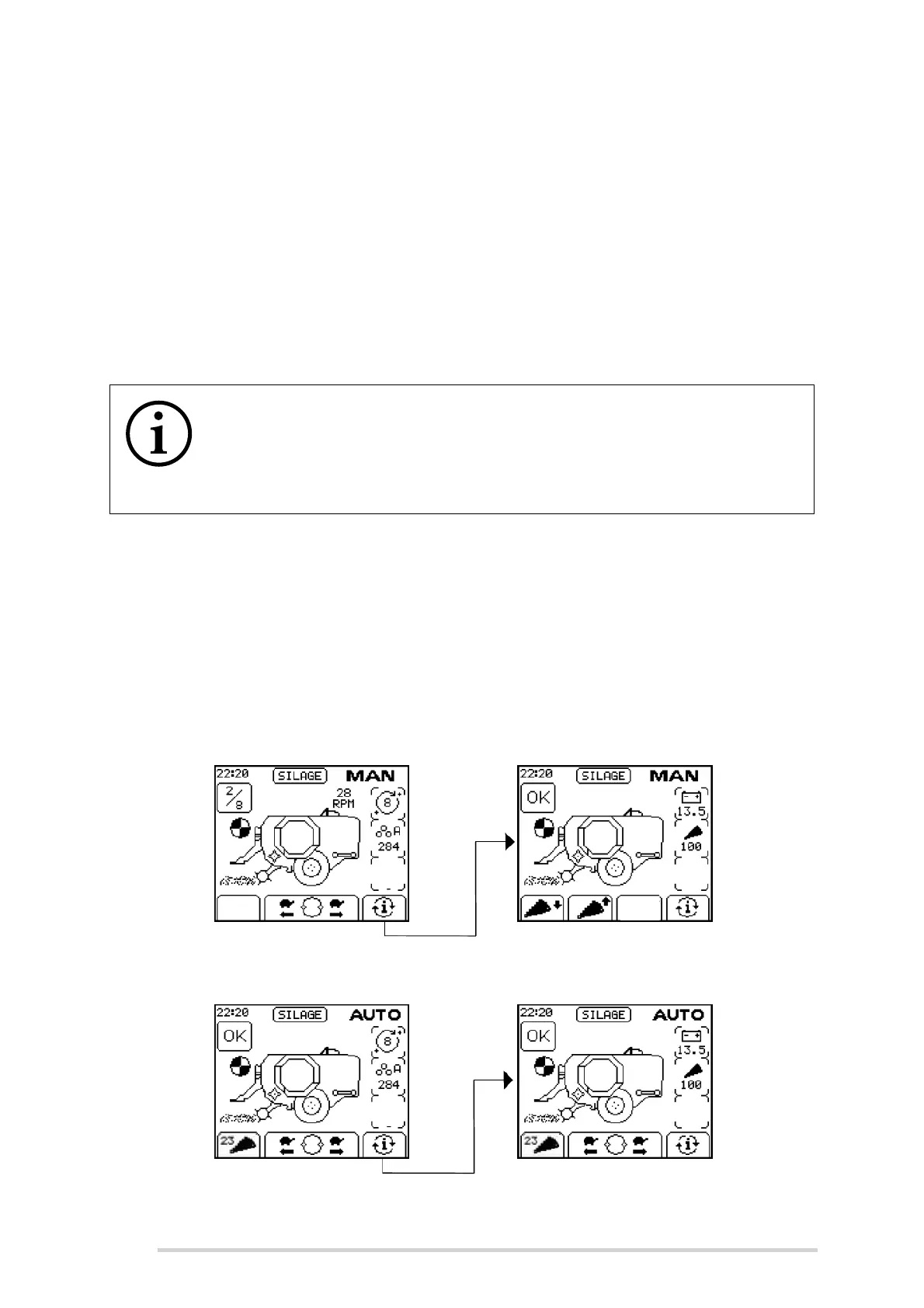
To switch between the Manual and Automatic modes, press “Auto/Man” (Button 3). The
selected control mode is displayed in the top right corner of the screen.
Figure 7.a - Manual Screen Display (Screen 1 on LHS & Screen 2 on RHS)
Figure 7.b - Automatic Screen Displays (Screen 1 on LHS & Screen 2 on RHS)
NOTE: The four soft key buttons are used for multiple functions
The four soft key buttons are used for multiple machine functions and
menu navigations. Their function changes depending on the current
screen and relates to the corresponding symbol directly above each soft
key, across the bottom of the screen.



 To Next Page