21
Chapter 4
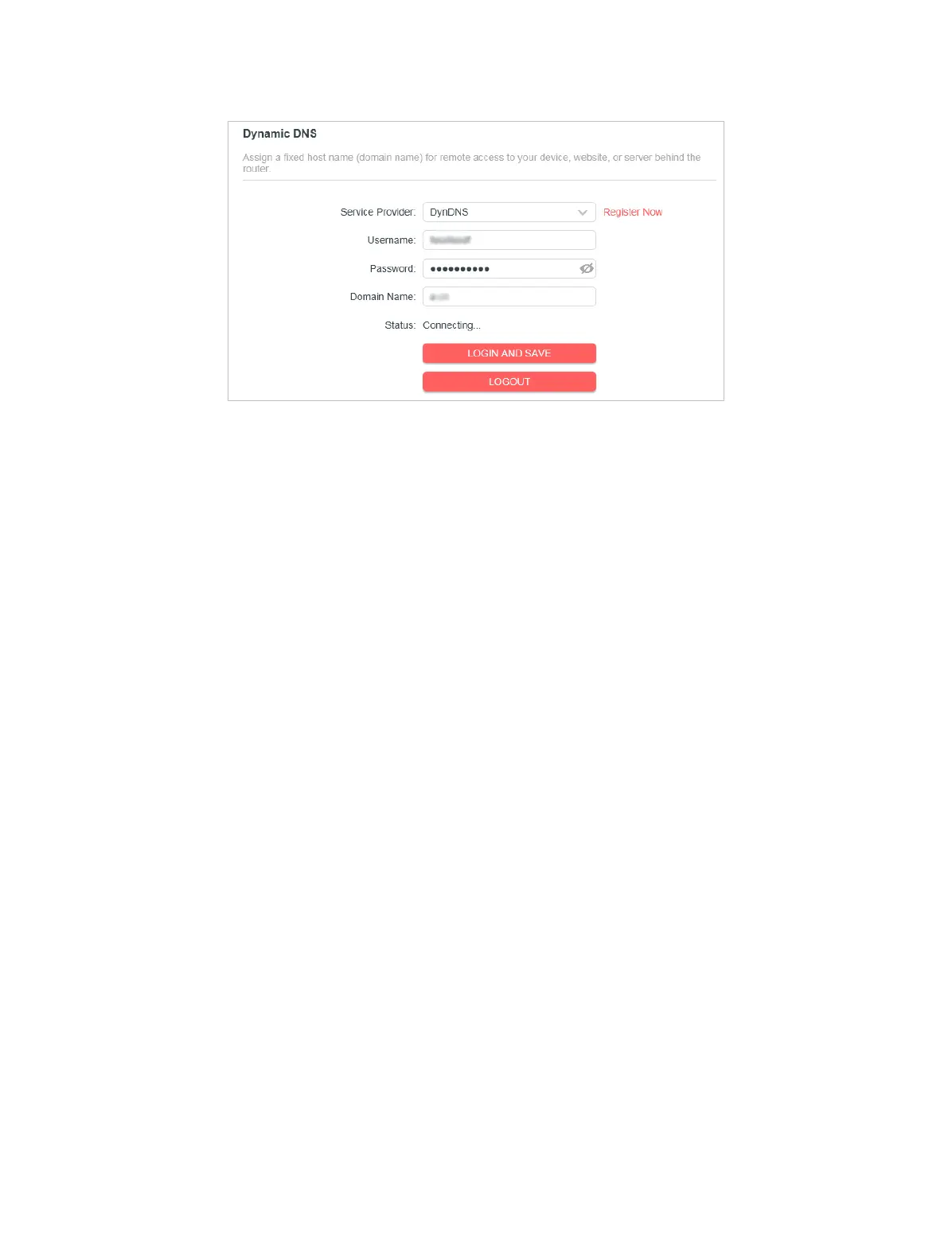
4. Enter the Username for your DDNS account.
5. Enter the Password for your DDNS account.
6. Enter the Domain Name you received from dynamic DNS service provider here.
7. If your service provider is NO-IP, select WAN IP binding to ensure that the domain
name is bound to the WAN IP of this router.
8. Click LOGIN AND SAVE.
4. 2. 9 Static Routing
Static Routing is a form of routing that is congured manually by a network
administrator or a user by adding entries into a routing table. The manually-
congured routing information guides the router in forwarding data packets to the
specic destination.
I want to:
Visit multiple networks and servers at the same time.
For example, in a small oce, my PC can surf the internet through Router A, but I
also want to visit my company’s network. Now I have a switch and Router B. Connect
the devices as shown in the following gure so that the physical connection
between my PC and my company’s server is established. To surf the internet and
visit my company’s network at the same time, I need to congure the static routing.


 To Next Page