16
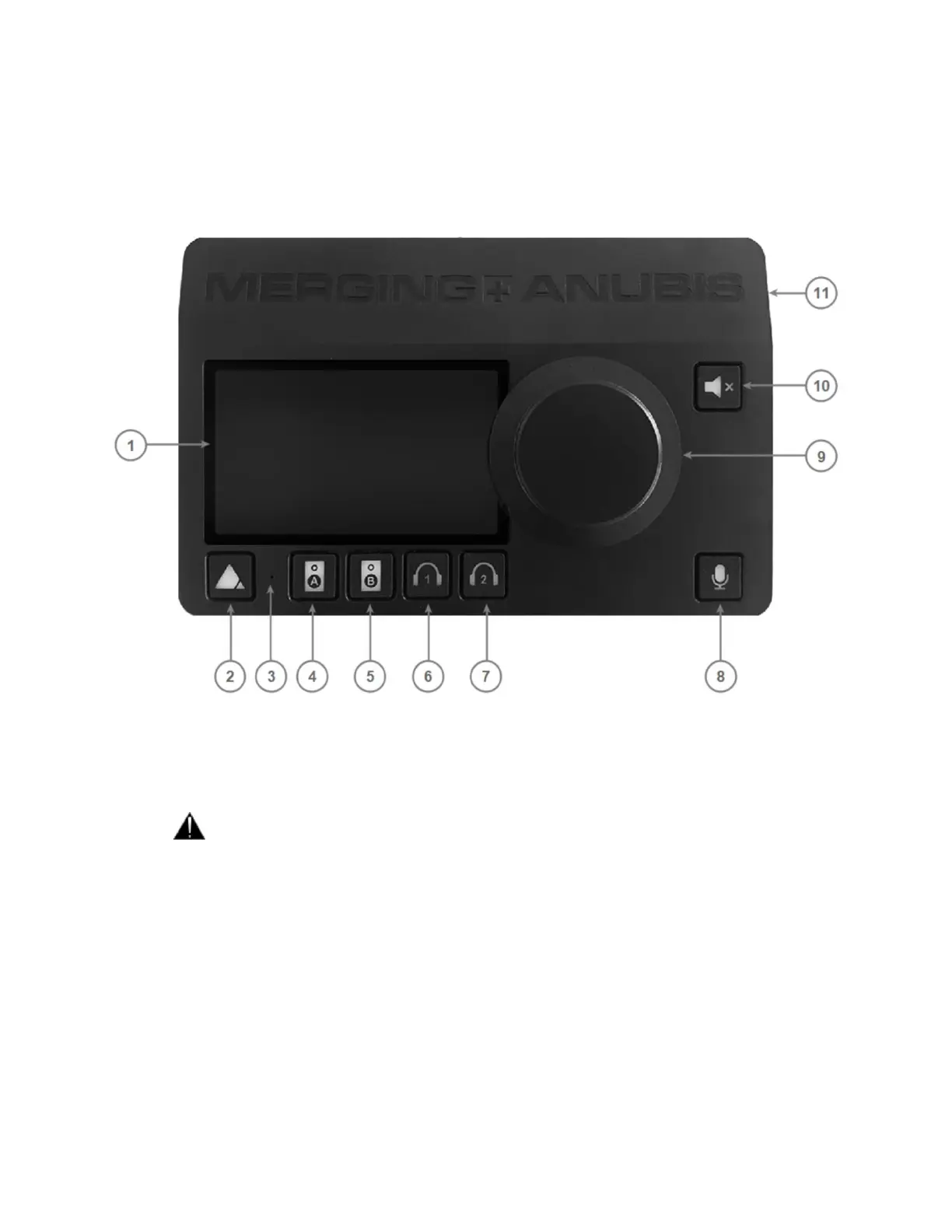
MERGING+ANUBIS panels description
TOP PANEL
1. TFT LCD: High resolution capacitive multi-touch display
2. Home button: Access to Anubis display Main menu cycling and Home page / Settings access
3. Built-in talkback microphone: Mono omnidirectional condenser capsule, located beneath the hole
Warning: Avoid touching the built-in microphone or apply pressure while engaged.
Do not insert any object into the hole as it could permanently damage the microphone
4. Speaker set A selector: Select the Speaker “A” to activate this monitor set, it will be activated once
button is lit. The monitor set can be configured from the Anubis Settings>Monitors and can control
the Anubis local outputs of your choice or the outputs of an external interface (RAVENNA/AES67
compliant)
5. Speaker set B selector: Select the Speaker “B” to activate this monitor set, it will be activated once
button is lit. The monitor set can be configured from the Anubis Settings>Monitors and can control
the Anubis local outputs of your choice or the outputs of an external interface (RAVENNA/AES67
compliant)



 To Next Page