18
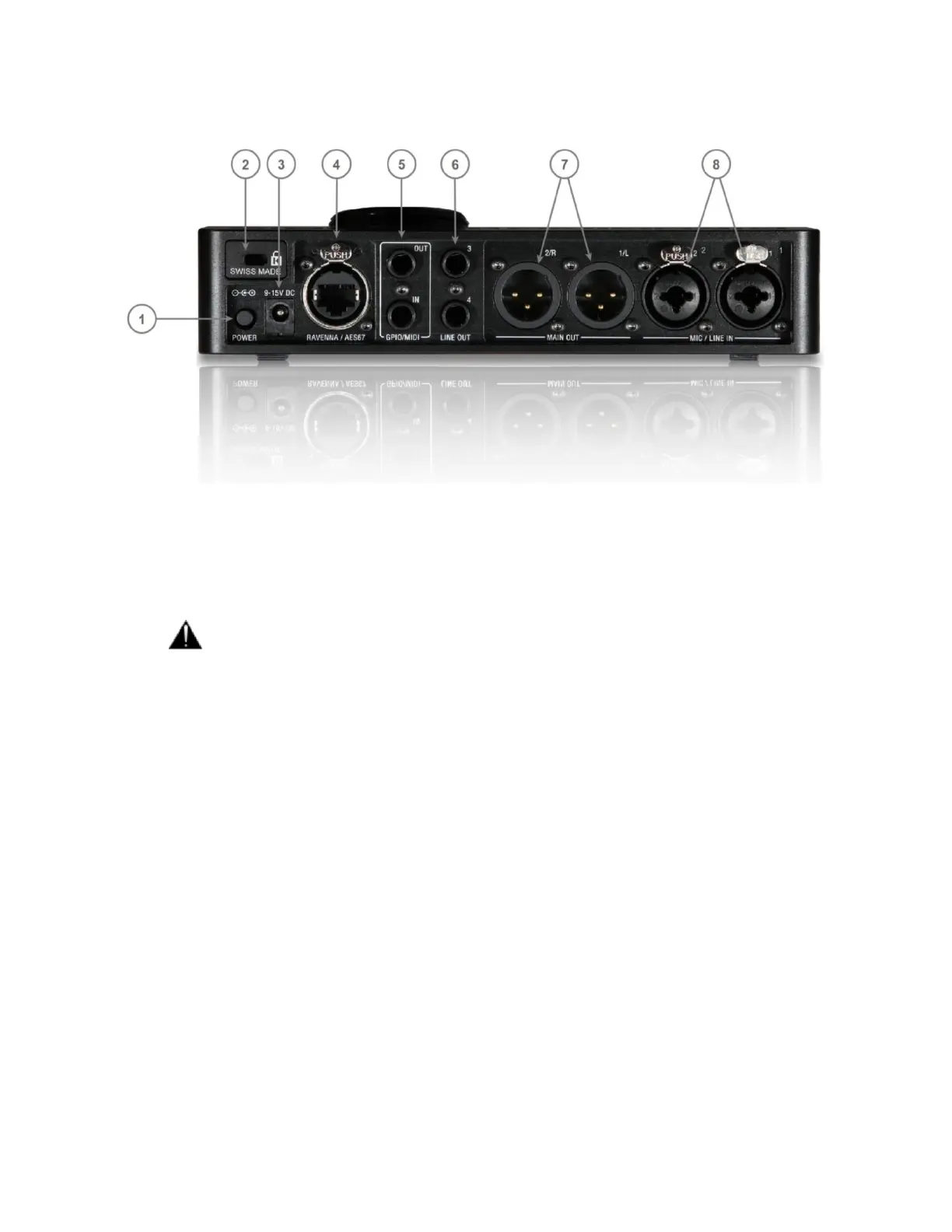
BACK PANEL
1. Power switch: Sets the power of the device to On (pressed) or Off (released).
2. Kensington Security Slot: Lock mechanisms for protection measure. Metal anchor not provided
3. Power Supply: DC Power Supply connector with lock, to prevent accidental disconnection. The DC
power input accepts a voltage from 9V to 15V, with a maximum power consumption of 18W.
Warning: Do not exceed the maximum DC input voltage or the unit may be damaged.
4. RAVENNA/AES67 interface: RJ45 female receptacle with a locking EtherCon connector. A
network interface adaptor might be required to connect to a USB-A, B, C or Thunderbolt port.
5. Dual functions interface: Switch between GPIO or MIDI (from General Settings)
▪ GPIO: General-purpose input/output
The GPO could for example be used to switch a LED Recording lamp on/off
The GPI. Can be used with a footswitch on/off to select an input or for hands-free punch-
in/out
▪ MIDI: Musical Instrument Digital Interface protocol that connect a wide variety of electronic
musical instruments, computers, and related audio devices.
6. Line Outputs 3-4 balanced: Assignable balanced stereo TRS ¼” jack outputs, that can be used for
auxiliary speaker set, sub-woofer or for additional cue mix.
Note: Can be used in balanced or unbalanced mode
7. Main Line Outputs 1-2: Two Neutrik sockets on XLR balanced, that can be connected to a set of
active studio monitors or power amp.
8. Inputs 1-2: Two Neutrik combo sockets Mic/Line inputs on XLR and 6.3 mm - 1/4" TRS connector
Note: Can be used in balanced or unbalanced mode



 To Next Page