92
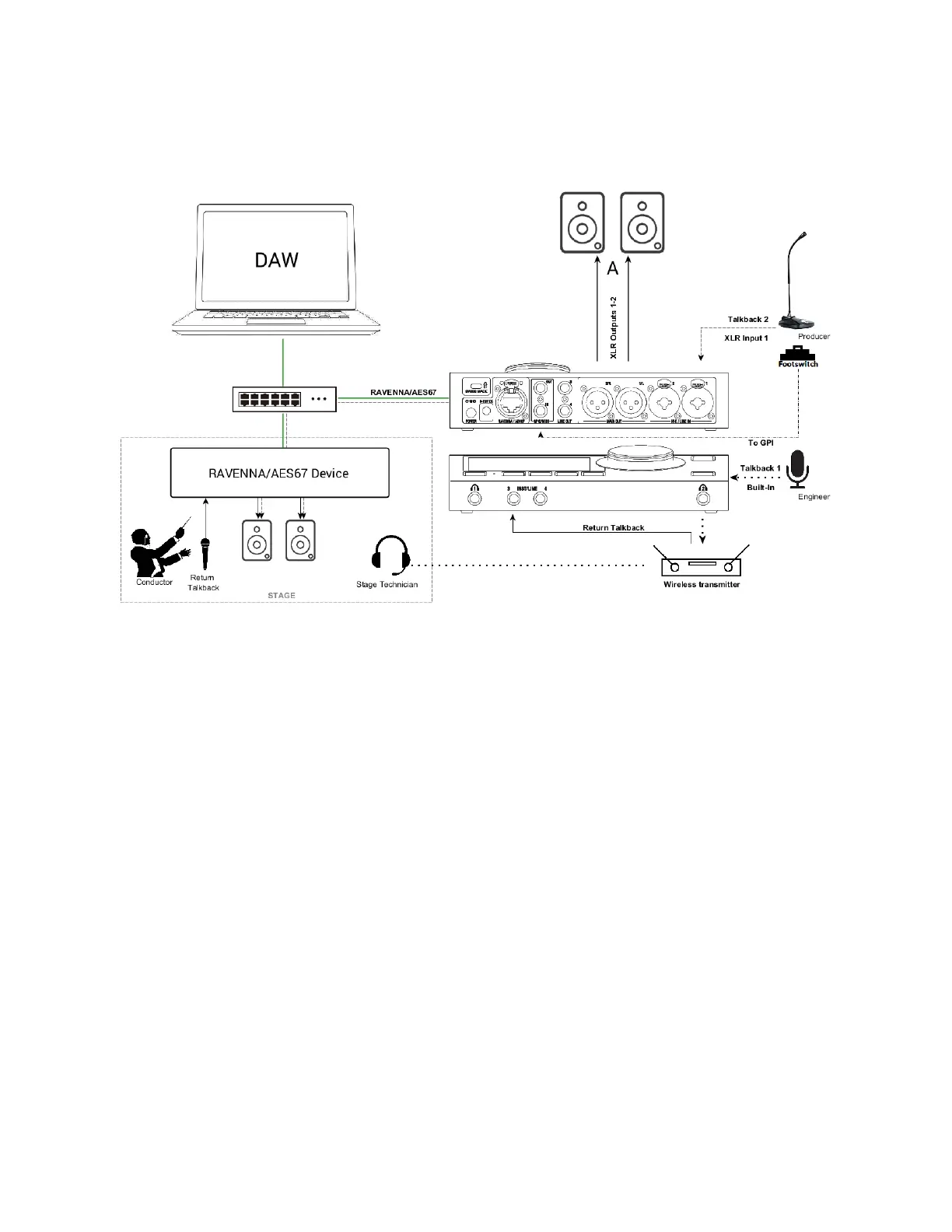
2 x TALKBACK NETWORK SETUP
Setup:
Two talkback configurations using a RAVENNA/AES67 device such as Horus or Hapi as a
stagebox. Anubis is used as the Monitoring control with integrated talkback.
Here the sound engineer uses the Anubis built-in Talkback #1 to communicate with a stage
technician. The producer communicates with the conductor using a second talkback #2 using an
external microphone connected to one of the Anubis input.
Prerequisites:
Make sure you have first followed the User Manual section on the Drivers Installation and have
correctly connected and powered up your Anubis. Follow as well the Recording use case to
connect Microphones.
Procedure:
1. Your Anubis should be configured with some Monitor sets (e.g. Speakers Set & Headphones).
Refer to previous use cases.
2. Configure the talkback that you will be using from the Settings>Talks page, a maximum of two
talkbacks is currently possible.



 To Next Page