30
ANUBIS HOME PAGE
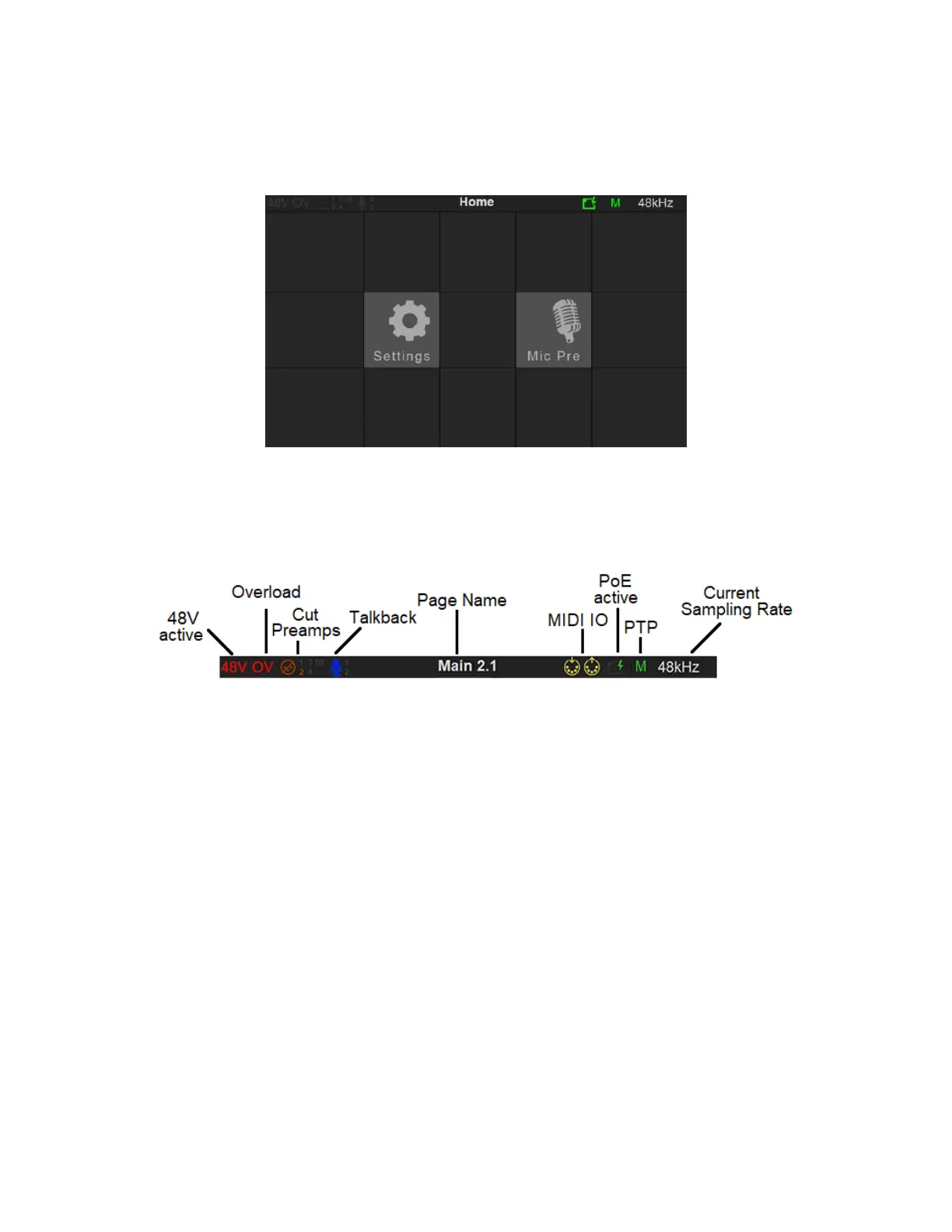
STATUS BAR
Displays information and notifications about the Anubis status
48V: Will light up red if 48 Phantom power is active on an input channel
OV: Overload peak detected, clear the overload by either tapping the meters section or use the
Peak clear option available in the Meters page (PK) or in the Monitor Control section (refer to the
Monitor Mission chapter)
Input Cut: When lit it will indicate that one or more Preamp channel is cut (muted) 1-2-3-4-TB
Talkback: Built-in and/or routed input to the Talk 1 or 2. Active talkback will light up if engaged.
Page title: Information related to the selected page.
Power Over Ethernet: (PoE) when active, the icon will be highlighted green
Synchronization status: M Master PTP or S Slave PTP clock.
Yellow color S indicate lock in progress
Red color S will indicate an improper synchronization.
PTP Clock: The Precision Time Protocol (PTP) is used to synchronize clocks throughout a computer
network. Also known as IEEE 1588, it is a protocol designed to synchronize real-time clocks in the



 To Next Page