86
RECORDING SETUP
Setup:
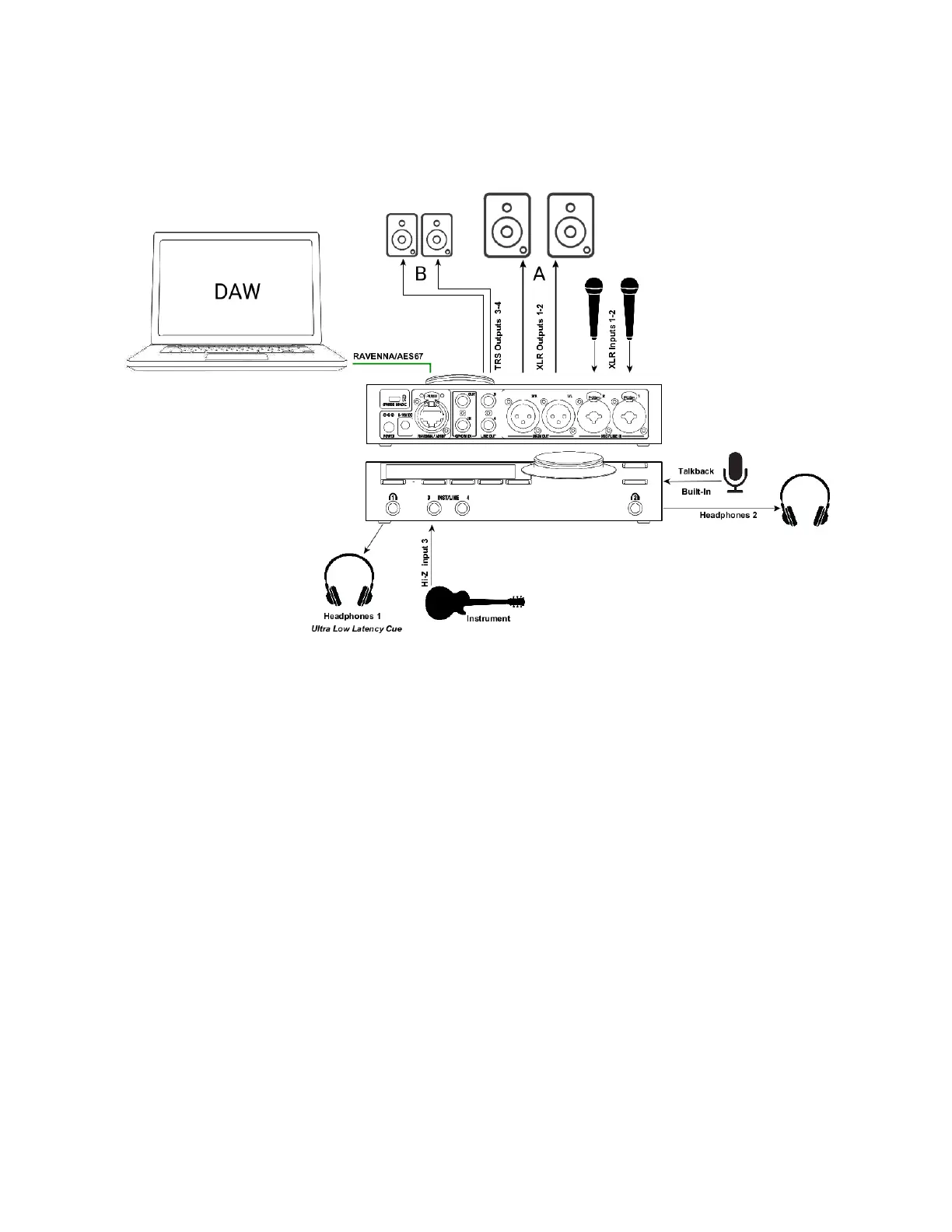
Adding Microphones and Instruments for recording while monitoring your DAW Main outputs
along with an ultra-low monitoring Cue routed to the Headphones 1.
Prerequisites:
Make sure you have first followed the User Manual section on the Drivers Installation and have
correctly connected and powered up your Anubis.
Connect your microphones to the XLR combo inputs 1-2 located at the back of the Anubis, your
Guitar or Bass can be directly connected to the Hi-Z instrument input at the front Input 3.
Stereo inputs 3-4 can be used, but in this case under Settings>Sources>Inst/Line the source
mode has to be changed to Stereo mode, and patched to Jack 3 and Jack 4.
Note: Using Input 4 will override the built-in Talkback microphone as both share the same circuitry.



 To Next Page