22
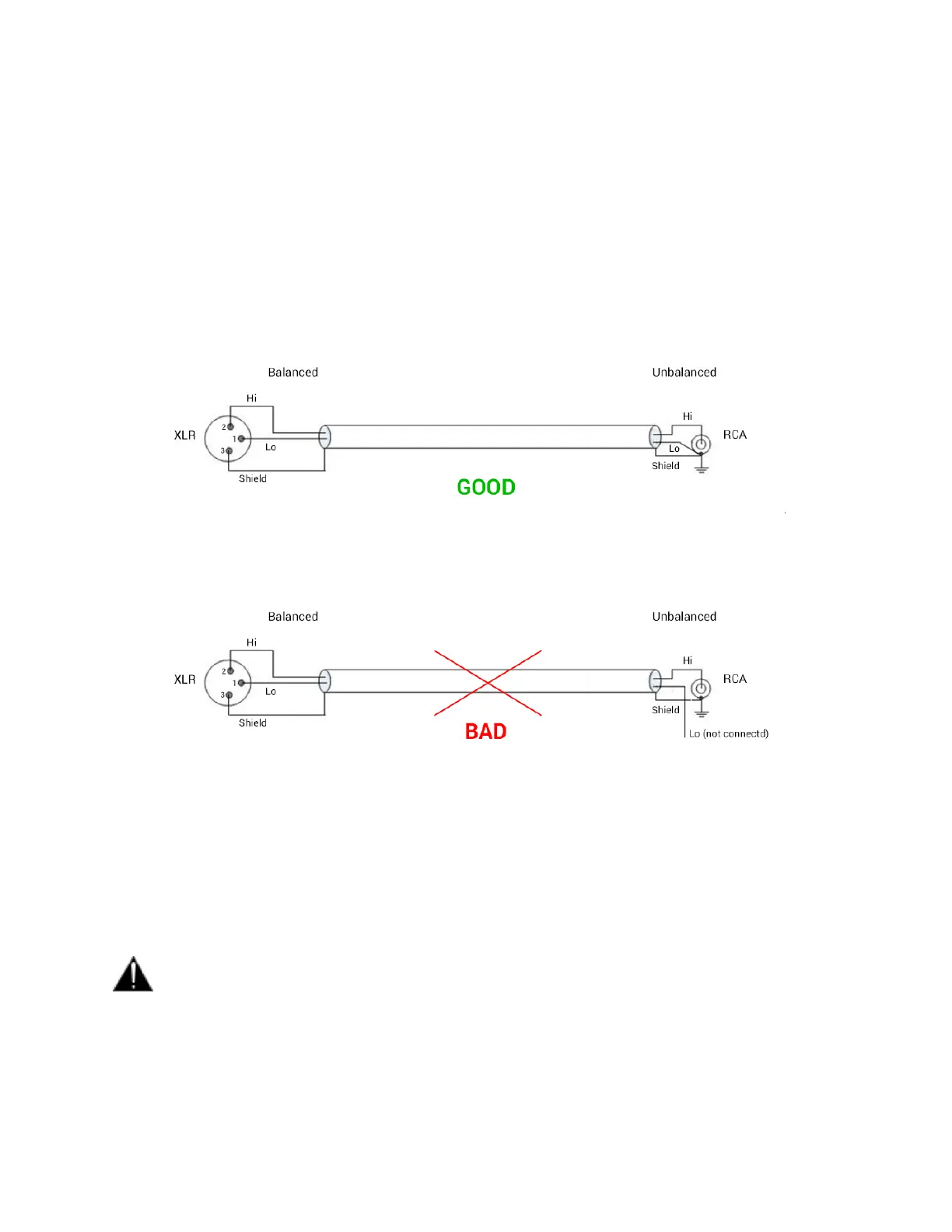
How to connect a balanced line output to an unbalanced input
Contrary to Horus and Hapi DA8/P Line outputs, the MERGING+ANUBIS outputs are
electronically floating (similar to transformer-based) and will therefore operate nominally with
either Hi or Lo shorted to ground as would be the case when connecting to an unbalanced input.
To connect the MERGING+ANUBIS to an unbalanced input using the balanced outputs, it is
recommended to do so as shown in Figure below.
Figure 2 Correct balanced output to unbalanced input connection method
Figure 3 Incorrect balanced output to unbalanced input connection method
Note: When driving an unbalanced input, make sure you set the line output level to the +18 dBu setting
as the +24 dBu setting is only achievable when driving balanced inputs. This could otherwise cause
distortion.
Warning: Before you Power Up Anubis, it is recommended to lower the Volume of your Monitor
Speakers (if those are connected) and to remove the headphones set from your ears.



 To Next Page