101
ANUBIS FIRMWARE UDPATE PROCEDURE
PREREQUISITES
- ANEMAN v1.1.7 and above. Download from https://www.merging.com/anubis/download
- An internet connection to download the latest Firmware or Maintenance Mode
- Connecting the ethernet interface of the Anubis to a Mac or PC system for the update procedure
PROCEDURE
1. Install ANEMAN
2. Download the latest Anubis Firmware from https://www.merging.com/anubis/download
Note: Some firmware will first require a Maintenance Mode update that is based on the same procedure
3. Connect your Anubis network port to the system where you have downloaded the latest firmware
4. Launching ANEMAN will discover your Anubis within seconds.
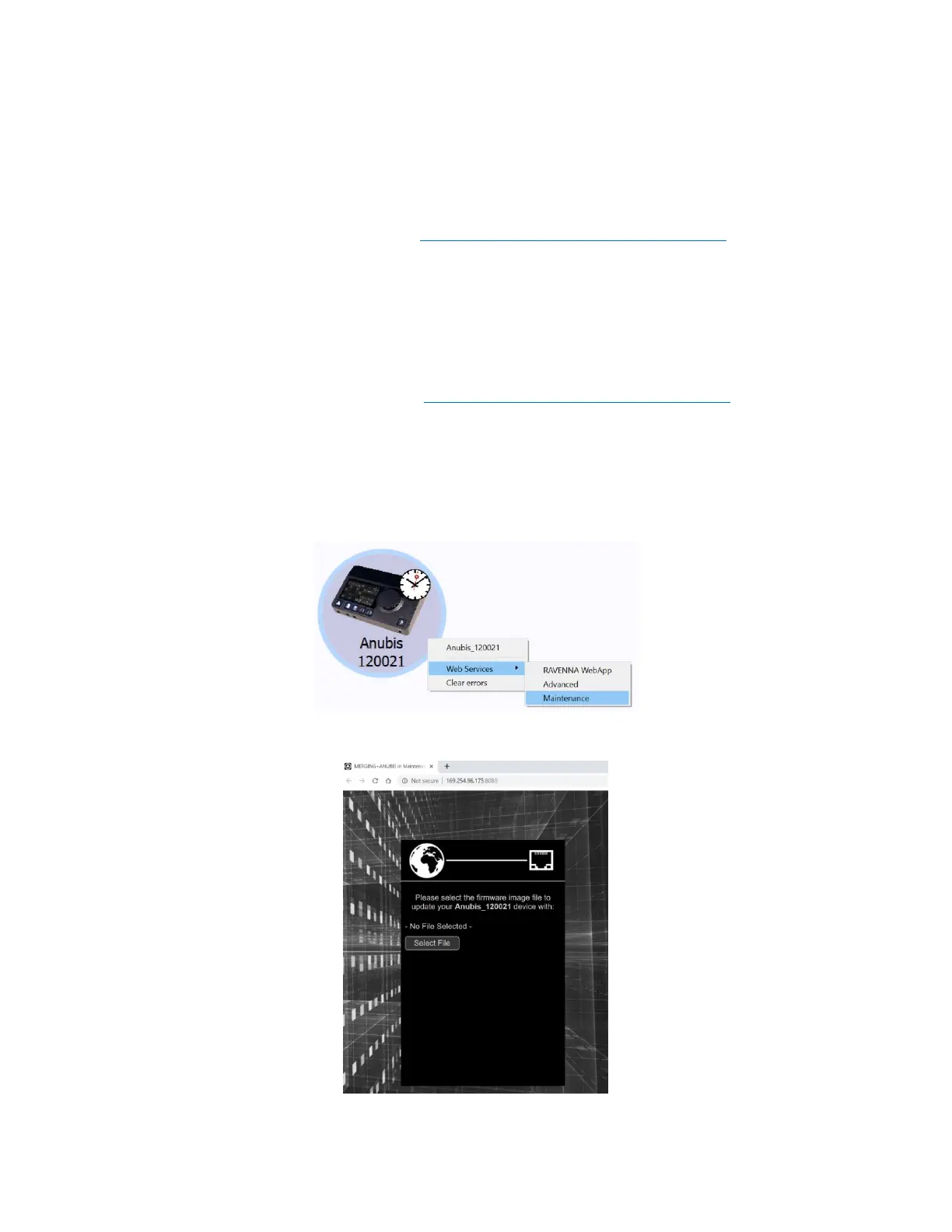
5. Once ANEMAN discovers Anubis, perform a Mouse + Right Click and select Web Services> Maintenance
6. This will open a browser page from which you will be able to select the firmware file



 To Next Page