32
PREAMPS CONTROL
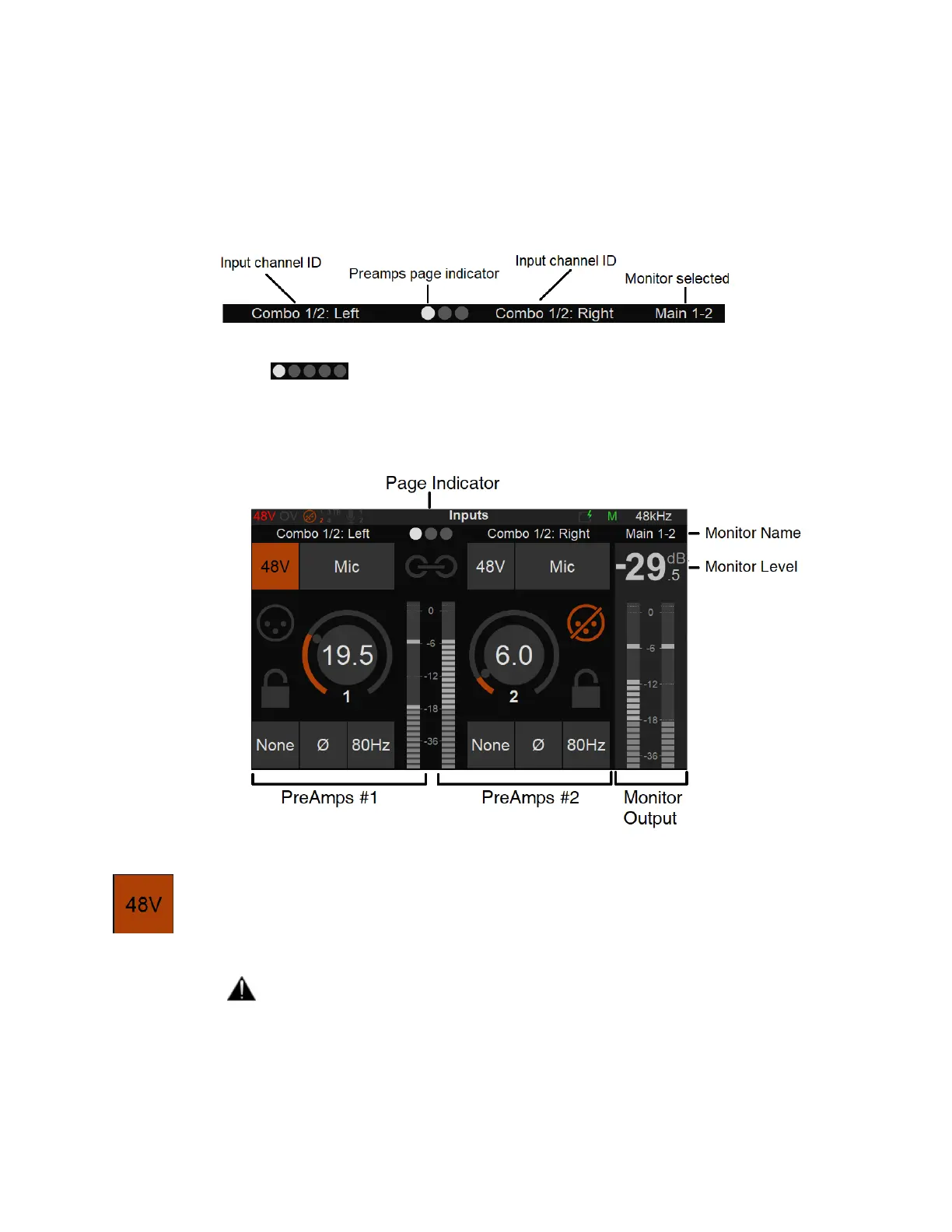
Selecting the Preamps icon will open the Anubis Inputs pages.
The Preamps Information bar on top of the controls displays: The Input Channel identification,
the page position and the name of the Output Monitor set selected.
Note: More than three Preamps pages will be available if the Split Channels are enabled under
Settings>Inputs>Split.
Combo 1/2: Control over the physical XLR/TRS Combo (6.3 mm / 1/4" connection) Mic/Line
inputs located on the back panel of the ANUBIS
INPUTS OPTIONS:
48V: When enabled it will turn on the 48V phantom power for the channel 1 or 2 of
the Anubis meaning that the Phantom power becomes active, typically needed for
condenser microphones.
Note: Only active on channels set to Mic (Anubis XLR/Combo Inputs 1-2).
Warning:
The 48V power MUST be turned off prior to changing the connection in certain
patch bays. Many such patch bays do short the Hot, Cold or both signals to
Ground during insertion or removal of the Jacks with the risk of deteriorating
permanently the protective resistors in the input of the Preamp circuitry. If an AD
module input circuitry is damaged, following such a short, it will end up



 To Next Page